> This is part 1 of 2 of the full documentation (pages 1–100 of 119).
> The content is paginated: fetch every part to see all of it.
> Next part: https://docs.brahma.fi/llms-full.txt/1
> Page index: https://docs.brahma.fi/llms.txt
# Migrate your Brahma Account
Brahma Products will sunset in 30 days, on **April 17th, 9 PM UTC.**\
All funds stay in your [Safe Wallet.](https://app.safe.global/welcome) During this period, you have full access to withdraw assets or export data. Afterwards, you have access to your funds through Safe’s UI.
#### Step-by-step Guide
A. How to migrate your Brahma Account to a Safe wallet?
1. Navigate to [app.safe.global](https://app.safe.global/)
2. Make sure you are connected with the same EOA as your Brahma Account
3. It will automatically show your main account, name your account and click add.
4. Now you can use your Brahma Account on Safe.
> Alternatively, follow the video tutorial: [Migrate your Brahma Account video guide](https://youtu.be/HUx-mj4Oh-M).
B. Sub-Account Recovery
Brahma's [Recovery tool](https://recovery.brahma.fi/) **let you regain independent access to your Sub-Accounts and Privy-generated wallets at any time. You always retain full control of your funds.**
Convert your Sub-Account or Automation Account into a standalone Safe controlled by your EOA wallet.
The tool generates a JSON transaction file that removes Brahma's guards and policies from your Sub-Account(s).
1. **Enter your Brahma Account address**
Go to [recovery.brahma.fi](https://recovery.brahma.fi). Select your network and enter your Main Account address. Your Sub-Accounts will be automatically mapped below.
**2. Generate and download the JSON file**
Select the Sub-Account(s) you want to detach and download the JSON file.
**3. Connect your EOA to Safe**
Open [app.safe.global](https://app.safe.global/) and connect the wallet (EOA) that owns your Main Account.
**4. Open the Transaction Builder**
Go to the **Apps** tab in Safe and launch **Transaction Builder**.
**5. Load the JSON file**
Upload the JSON file from Step 2.
Review the transactions displayed.
**6. Execute the transaction**
Confirm and execute. If your account is a multi-sig, collect the required signatures.
**7. Access your Sub-Account**
Your Sub-Account is now an independent Safe. Navigate back to [app.safe.global](https://app.safe.global/), connect your wallet (EOA)
> Alternatively, follow the video tutorial: [Convert Sub-Accounts to Safe Accounts](https://youtu.be/GLECu-9wt_E)\
> Also check, [Safe Transaction Builder docs](https://help.safe.global/en/articles/234052-transaction-builder)
C. Privy Wallet Export
If you created your Brahma Account with email or Google, a wallet was generated for you via Privy. Use this tool to export its private key so you can access your account through Safe directly.
**1. Sign in**
Go to [recovery.brahma.fi](https://recovery.brahma.fi/) and sign in with the same email or Google account you used to create your Brahma Account.
**2. Copy your private key**
Your wallet's private key will be displayed. Copy it.
> **Never share your private key with anyone.** Anyone with it has full control of your wallet and funds.
**3. Import into a wallet**
Open your preferred wallet (Phantom, Rabby, Metamask, etc.) and import using the private key.
**4. Connect to Safe**
Connect the imported wallet to [app.safe.global](https://app.safe.global/) to access your Brahma Account as a Safe.
# Brahma Overview
[**Brahma**](https://brahma.fi) is the programmable execution layer for onchain and real-world capital.
It powers two core products:
### 1. Brahma Account (for users)
A non-custodial, programmable crypto account that makes managing and executing onchain actions seamless. Users can interact across supported chains, perform actions like swapping, lending, and bridging, batch transactions in one go.
Beyond execution, Brahma Accounts are programmable. Users can automate recurring actions, rebalance positions, or delegate execution to agents, all while retaining full control of their assets.
### 2. ConsoleKit (for developers)
ConsoleKit is Brahma’s developer platform. It allows builders to launch programmable workflows, automations, and agents without deploying contracts or managing infrastructure.
**ConsoleKit powers:**
* Embedded automations within any app UI
* Programmable agents that act on behalf of users
* Full-stack apps that operate across chains, dApps, and power real world spending
* Programmable credit card tied to onchain positions
Key components include:
* Policy-bound accounts with execution and access control layers
* Time-and event-based automation triggers
* TypeScript SDK and API
ConsoleKit is used internally to power Brahma Accounts, and externally by developers to launch new products and agent-powered features.
{% hint style="info" %}
Whether you’re a user looking to simplify onchain activity or a developer building the next generation of automated apps, Brahma provides the stack to execute, automate, and scale.
{% endhint %}
Live on: Ethereum, Arbitrum, Base, Berachain, BNB, Optimism, Mode, Blast Swell, Scroll, Sei (limited support).
# Overview of Brahma products
> [**Brahma Console**](https://www.brahma.fi/) **is your universal multi-chain account to secure, navigate, and automate on-chain interactions, tailored for power users, teams and institutions.** Console focuses on improving your end-to-end on-chain journey in a fully non-custodial way, offering unmatched speed, reliability, and a CEX-level user experience.
Console is live on Ethereum Mainnet, Arbitrum, Scroll, Base, Blast, Mode, Sei, and soon expanding to newer chains.Next Up, Console Drop in our [Discord](https://discord.gg/FjMNAy7eb8) to say hi! We’re open to suggestions, contributions and queries.
# Getting Started
# Onboarding Brahma Console
Console is designed to make managing your on-chain assets simple and accessible for everyday crypto enthusiasts. With a fast, secure sign-up process, you can get started in under 30 seconds.
### Step-by-Step Guide to Onboarding
#### 1. **Sign Up with Your Email or Connect an Existing Wallet**
Getting started is easy! You have two options:
* **Existing Wallet**: Connect an existing wallet like MetaMask or Rabby. In this case, skip passkey setup in step 3.
* **Email Sign-Up**: Enter your email, and we’ll send a verification code to your inbox. Simply input the code, and Privy will create a wallet for you, tied to that email address.
* You will be able to export the private key of this newly created wallet from your Console if you wish to.
#### 2. **Select Console**
Once you’ve signed in, choose **Console** on the left-hand side of the screen to start your journey.
#### 3. **Add a Passkey for Easy and Secure Access**
To further secure your account, you’ll be prompted to set up a **passkey**. This allows you to sign in and approve transactions using your device’s biometric authentication (like fingerprint or faceID), making your experience both safe and convenient.
* You can add multiple passkeys across different devices for more flexibility.
* Manage your passkeys easily by clicking on your email in the top-right corner of the screen.
#### 4. **Name Your Console**
Personalise your Console by giving it a name. Once you're ready, click on "Create". Your Console will automatically be deployed on **Arbitrum** and **Base** chains without any extra steps, and you’ll be taken straight into your new account.
***
### What’s Next?
Once inside your newly created Console, you can:
* Buy tokens, and earn yield on them by exploring DeFi opportunities and manage your crypto assets effortlessly.
* Automate tasks, such as swapping tokens or allocating for optimal yield, all from a unified interface.
# Brahma Accounts
Brahma Accounts provide a secure and streamlined way to manage assets, execute transactions, and automate strategies across multiple chains. Whether you're an individual user or a team, Brahma offers intuitive account options for various needs.
#### Explore the Account Types:
* [**Brahma** ](/brahma-accounts/brahma)– The standard account for everyday users, with simple and fast onchain access.
* [**Brahma Pro**](/brahma-accounts/brahma-pro) – Advanced account designed for teams and power users, featuring multi-sig, sub-accounts, and custom policies.
* [**Brahma | Strategies**](/brahma-accounts/strategies-and-agents) – Discover built-in strategies to automate complex onchain actions and optimise yield on your account
Choose the account type that fits your needs and start executing more efficiently with Brahma.
# Key benefits
Brahma caters to a diverse range of use cases, empowering users to self-custody crypto securely, and access onchain opportunities across chains.
Brahma’s key benefits are:
1. **Access the best onchain opportunities from 1 Account** Manage and execute your crypto transactions across multiple chains from a single, non-custodial account.
2. **Seamless On-Chain Experience**
Execute various actions—swapping, lending, or bridging—directly within the Brahma account, without needing external tools or complicated workflows. Brahma integrates with multiple apps, streamlining your operations.
3. **Automation** Get access to automated management of your assets. Buy or sell a token overtime, lend your crypto automatically at the optimal rate on Morpho, and more.
4. **High Security for your account**
Benefit from integrated security features such as transaction simulation, in-app actions with integrated parties, and multi-signature and subaccounts (in Brahma Pro).
5. **Flexibility for All Users** Whether you're an individual user or part of a team, Brahma has a mode for you. **Brahma** offers simplicity for day-to-day users, while **Brahma Pro** provides advanced features like multi-signature approvals and access control for professionals.
# Which Account Version Is Right for You?
At Brahma, we offer two powerful versions of Brahma to suit different types of users: **Brahma** for everyday on-chain enthusiasts, and **Brahma Pro** for advanced users and teams who need more control and customisation. Whether you're just getting started with DeFi or you're managing a complex crypto operation, there's a version of Brahma that fits your needs.
Let’s help you decide which version is right for you. A Brahma account can always be switched to the Pro version, but the reverse isn’t possible.
## [Brahma: For Everyday On-Chain Users](/brahma-accounts/brahma)
If you’re an individual who wants to manage your crypto assets, interact with DeFi apps, **Brahma** is designed to be simple, intuitive, and fast. No complex setups, just a streamlined experience that gets you going in no time.
**Why choose Brahma?**
* **🔗 Quick Sign-Up**: Start using Brahma account in under 30 seconds—Simply sign in with your email to get started.
* **🔑 Passkey Security**: Say goodbye to passwords. Brahma account uses passkey security, offering seamless login and signatures to make managing your assets easier and safer.
* **🖥️ Streamlined Dashboard**: View and manage all your assets and positions from a single dashboard, giving you a clear picture of your portfolio.
* **🚨 Coming Soon: Mobile Access**: Stay in control of your crypto wherever you are with the upcoming mobile version, perfect for managing your assets on the go.
**Who is it for?**
* **Crypto Enthusiasts**: If you’re buying, holding, or interacting with DeFi apps, this version offers everything you need with minimal setup.
* **New Users**: Brahma account is perfect for those new to the crypto space, offering a simple interface that requires no technical expertise.
{% hint style="info" %}
You will be able to convert your Brahma account to a pro version at any time from the Settings page. [Converting your account to Pro](/brahma-accounts/brahma-pro/converting-your-account-to-pro) This is a one-time, irreversible upgrade.
{% endhint %}
## [Brahma Pro: For Advanced Users & Teams](/brahma-accounts/brahma-pro)
For teams, institutions, or power users managing multiple wallets and transactions, **Brahma Pro** delivers a range of advanced features that put you in full control. It’s designed for more complex setups where security, collaboration, and flexibility are key.
**Why choose Brahma Pro?**
* **👥 Multi-Sig Support**: Safeguard your assets with multi-signature wallets, allowing multiple team members to approve transactions before they are executed.
* **📬 Sub-Accounts**: Create sub-accounts and set specific permissions for each, allowing you to delegate tasks securely while maintaining control over key operations.
* **🔍 Advanced Transactions**: Execute complex batch transactions, saving time and optimising gas fees, especially useful for users who handle large volumes or need to optimise their strategy.
* **💼 Unified Management**: Manage multiple accounts and networks from a single, powerful interface, making it easier to handle cross-chain operations.
**Who is it for?**
* **Teams & Institutions**: Brahma Pro is ideal for DAOs, trading desks, and organisations that require collaboration across multiple wallets and need secure, structured control over who can do what.
* **Advanced Crypto Users**: If you’re managing complex DeFi operations, such as batch transactions, yield farming, or automated strategies, Brahma Pro gives you the tools you need to operate efficiently.
| **Feature** | **Brahma** | **Brahma Pro** |
| ------------------------------------- | ----------------------------- | ---------------------------- |
| Sign-Up | Email-based, 30-second setup | Advanced multi-wallet setup |
| Security | Wallet + Passkey | Multi-signature |
| Account Types | Single Account | Multi-Account (Sub-Accounts) |
| Batched Transactions | Yes | Yes |
| Best For | Crypto Enthusiasts, New Users | Team, DAOs, Power Users |
| Transaction Policies | No | Yes |
| Custom Transactions (JSON) | No | Yes |
| Strategies (Automation and Templates) | Yes | Yes |
{% hint style="info" %}
Did you Know? [A Brahma account can always be converted to the Pro version](/brahma-accounts/brahma-pro/converting-your-account-to-pro), but the reverse isn’t possible.
{% endhint %}
# Understanding the dashboard
#### **Menu Bar**
* Located on the **left-hand side**, the menu bar provides quick access to various in-app actions such as **Swapping**, **Lending**, and **Bridging**. These tools allow you to perform transactions directly within the Brahma account without needing to navigate away.
#### **Network and Wallet Information**
* At the **top right corner**, you can see the **network** you are currently connected to and the **extension** **wallet (Metamask/Rabby)** in use. This area allows you to switch networks or wallets, depending on your needs.
#### **Search and Connect to dApps**
* In the **center column at the top**, there is a feature to search for and connect to external applications (dApps). This feature facilitates easy access to broader DeFi ecosystems directly from your dashboard.
#### **Portfolio Overview**
* Below the dApp connectivity feature, the total value of your Brahma account is displayed, summarizing the worth of your on-chain positions such as lending, staking, or yield farming.
#### **Actions Button**
* The **"Actions"** button, situated near the portfolio value, acts as a shortcut to all key transactions you can perform within the Brahma account, enhancing user convenience for frequent operations.
#### **Chain Management**
* When creating your Brahma account, you can do so on one or more chains. As you require access to new chains, there's an option to **deploy Brahma account to your chosen chain** directly from the dashboard, as well as switching to that chain by clicking on it.
#### **Asset and DeFi Positions**
* In the **wallet section**, view your assets across all supported chains. You can use filters to narrow down to specific assets or chains. Below the asset list, your DeFi positions are displayed. This section can be manually refreshed and is synchronized with Debank to provide an accurate overview of how your crypto assets are allocated.
# Brahma
Welcome to Brahma!
**Brahma account** is tailored for crypto enthusiasts who want an easy, streamlined way to manage their assets and interact with DeFi apps. With a quick setup and intuitive dashboard, it’s perfect for users who are new to crypto or prefer a simple, efficient experience.
* **Quick Setup**: Get started in under 30 seconds using just your email.
* **Passkey Security**: Secure login and seamless signatures without the need for passwords.
* **Streamlined Portfolio Management**: View all your assets and DeFi positions in one place.
Whether you’re exploring DeFi or managing a few assets, **Brahma account** is designed to make your crypto experience smooth and hassle-free.
# Onboarding to Brahma
Brahma account is designed to make managing your on-chain assets simple and accessible for everyday crypto enthusiasts. With a fast, secure sign-up process, you can get started in under 30 seconds.
## Step-by-Step Guide to Onboarding
**Head to** [**https://console.brahma.fi/**](https://console.brahma.fi/) **to get started**
#### 1. **Sign Up with Your Email or Connect an Existing Wallet**
Getting started is easy! You have two options:
* **Existing Wallet**: Connect an existing wallet like MetaMask or Rabby. In this case, skip passkey setup in step 3.
* **Email Sign-Up**: Enter your email, and we’ll send a verification code to your inbox. Simply input the code, and Privy will create a wallet for you, tied to that email address.
* You will be able to export the private key of this newly created wallet from your account if you wish to.
#### 2. **Select Brahma account**
Once you’ve signed in, choose Brahma on the left-hand side of the screen to start your journey.
#### 3. **Add a Passkey for Easy and Secure Access**
To further secure your account, you’ll be prompted to set up a **passkey**. This allows you to sign in and approve transactions using your device’s biometric authentication (like fingerprint or faceID), making your experience both safe and convenient.
* You can add multiple passkeys across different devices for more flexibility.
* Manage your passkeys easily by clicking on your email in the top-right corner of the screen.
#### 4. **Name Your Account**
Personalise your Console by giving it a name. Once you're ready, click on "Create". Your account will automatically be deployed on **Arbitrum** and **Base** chains without any extra steps, and you’ll be taken straight into your new account.
***
### What’s Next?
Once inside your newly created account you can:
* Buy tokens, and earn yield on them by exploring DeFi opportunities and manage your crypto assets effortlessly.
* Automate tasks, such as swapping tokens or allocating for optimal yield, all from a unified interface.
# In-App Features
Brahma enhances user experience by integrating essential crypto transactions directly within the platform, in the most secure and efficient way. Here's how you can leverage Brahma account's in-app features:
* [**Swapping**](/brahma-accounts/brahma/in-app-features/swapping): Access multiple routes and providers for optimal trading conditions.
* [**Lending**](/brahma-accounts/brahma/in-app-features/lending): Engage with various protocols to earn interest on your crypto assets.
* [**Bridging**](/brahma-accounts/brahma/in-app-features/bridging): Seamlessly transfer assets across different blockchains.
* [**Strategies**](/brahma-accounts/strategies-and-agents): Set and manage advanced investment strategies directly within the app.
These integrated actions provide quick access to common features without the need to connect to external app frontends, increasing security and convenience.
Users can also select their preferred providers for swapping and bridging, further customizing their experience.
All these actions can be batched into a single transaction, allowing operations like multi-swapping or simultaneous lending and swapping to be executed efficiently and cost-effectively. This feature not only simplifies the transaction process but also reduces the associated gas costs.
# Swapping
Brahma makes swapping tokens across multiple chains simple and efficient. With built-in integration of multiple aggregators and routes, you can be sure you’re getting the best trading conditions for your swaps. No need to connect to external apps and compare quotes—Brahma does all the hard work for you.
#### How It Works
* **Multiple Aggregators**: Brahma account is integrated with leading services like **Uniswap**, **1inch**, **Matcha**, and **Odos**, ensuring that you always have access to the best swap routes.
* **Find the Best Route**: Simply input the tokens you want to swap, and Brahma account will automatically search for the most optimal swap path, providing you with the best available rate.
* **Multi-Swap Execution**: Want to swap more than one token at a time? Brahma account allows you to add multiple swaps and execute them all in a single transaction, saving time and reducing gas fees.
#### Execution Fee
Brahma charges a 0.25% fee for in-app swaps(0.20% on Berachain), which is already factored into the displayed quote. You can find a complete breakdown of all fees for each feature [here](/others/pricing-and-fees) .
# Bridging
**Bridging** in Brahma allows you to move your assets effortlessly between different blockchains. By integrating multiple bridge providers, Brahma ensures that your transfers are fast, secure, and cost-effective.
#### How It Works
* **Cross-Chain Transfers**: Brahma account enables you to transfer tokens across supported blockchains with just a few clicks, eliminating the need to use external bridges or interfaces.
* **Multiple Providers**: Choose from a selection of trusted bridge providers for optimal routes and fees. Brahma aggregates various options to find the most efficient path for your asset transfer.
* **Switch to Another Recipient**: If you wish to bridge assets to a different wallet on the destination chain, simply toggle the **"Another Recipient"** option , and input the desired address.
* **Secure and Simple**: All bridging actions take place within Brahma’s secure environment, keeping your assets safe without the need to navigate external apps.
Bridge transactions on Brahma incur a 0.1% fee. which is already factored into the displayed quote. You can find a complete breakdown of all fees for each feature [here](/others/pricing-and-fees). This competitive rate facilitates seamless cross-chain operations while maintaining high security standards.
#### Execution Fee
Brahma charges a 0.1% fee for in-app bridge transactions, which is already factored into the displayed quote. You can find a complete breakdown of all fees for each feature [here](/others/pricing-and-fees).
# Lending
The **In-App Lending** feature in Brahma allows you to seamlessly lend and borrow funds on Aave, without leaving the Brahma interface. You can manage your lending positions efficiently, performing multiple operations and signing them in a single transaction, all while tracking the changes to your position in real-time.
## How It Works
* **Lend and Borrow on Aave**: Open and manage Aave lending positions directly within Brahma account. You can supply assets to earn if you don’t have an existing position, or borrow against your collateral if you already do.
* **Multiple Actions in One Transaction**: Batch multiple actions—such as supplying, borrowing, repaying, and withdrawing—into a single transaction for greater efficiency. Brahma account integrates these actions seamlessly, allowing you to execute them with one signature.
* **Real-Time Position Updates**: As you adjust your lending and borrowing actions, Brahma account updates your position panel in real time, allowing you to simulate how each action will affect key metrics like your health factor, APY, and remaining borrow power.
{% hint style="info" %}
**Key Features**
* **Simulate Before Signing**: Before committing, you can simulate the outcome of your actions to see exactly how they will affect your position.
* **Direct Interaction with Aave**: All transactions are executed directly on Aave’s smart contracts, ensuring that your account remains the owner of your positions without any intermediaries.
* **Monitor Key Metrics**: Stay informed by tracking essential position metrics such as your **Health Factor**, **Borrow APY**, and **Supply APY**. These metrics are updated as soon as you make changes.
{% endhint %}
For lending operations, Brahma charges a 0.1% fee on batched actions, which is already factored into the displayed quote. You can find a complete breakdown of all fees for each feature[ here](/others/pricing-and-fees).
#### Execution Fee
Brahma charges a 0.1% fee for in-app lending transactions from the Lending tab. You can find a complete breakdown of all fees for each feature [here](/others/pricing-and-fees).
# Multichain
With Brahma account, managing assets across multiple chains becomes effortless. Whether you're interacting with Ethereum, Arbitrum, Base, or other chains, Brahma provides a unified platform to handle your entire portfolio, allowing you to deploy, bridge, and execute transactions on multiple networks—all from one place.
#### How Multichain Works in Brahma
* **Brahma Version**: When you create a **Brahma** account, it is automatically deployed on **Arbitrum** and **Base**. You can manually deploy your Brahma account on additional chains anytime by selecting them from the home page.
* **Brahma Pro**: For more advanced users, **Brahma Pro** offers the ability to deploy your Brahma account across multiple chains in a single transaction during onboarding. This saves time and streamlines your cross-chain operations.
{% hint style="info" %}
#### Key Features
* **Unified Portfolio Management**: View all your assets and DeFi positions across supported blockchains in a single dashboard. Brahma calculates the total worth of your account, so you can manage your entire portfolio without needing to switch between different apps.
* **Deploy to New Chains**: You can deploy your Brahma account to any additional chains by clicking on the respective chain icon from the home page. Deploying to multiple chains can be done in one transaction, using **gas**from the chain you are currently operating on.
* **Bridging to New Chains**: After deploying your Brahma to a new chain, easily bridge assets from one network to another through the **Bridging** feature, ensuring seamless transfer of funds across chains.
* **Chain-Specific Features**: Each feature (like lending, swapping, and bridging) has chain logos next to it, showing which chains are supported. To use any feature on a different chain, simply click the chain logo to switch networks.
* **Same Address on All Chains**: Your Brahma account has the same address across all deployed chains, making it simple to manage and interact with assets no matter the network.
* **Smart Execution**: By depositing some ETH on the chains you frequently use, Brahma will automatically optimise gas fees and execution speed. This **Smart Execution** feature ensures that every transaction you sign is processed with the best possible efficiency.
{% endhint %}
# Transacting in Brahma
Brahma simplifies the way you manage on-chain transactions, allowing you to build and execute complex operations with ease. Whether it's a single action or multiple actions bundled together, Brahma helps you handle it all through a powerful transaction builder and smart execution system.
#### Key Features
* **Batched Transactions**: In your account, you can bundle multiple actions into a single transaction. For example, you can approve a token, swap assets, and supply liquidity—all in one go. This not only saves you time but also optimises gas usage.
* **Transaction Builder**: Think of this as your **shopping cart** for transactions. As you add actions, each is explained clearly, so you know exactly what you're doing. Once you're ready, you can simulate the outcome of your transaction before signing, ensuring that you know what will happen before you commit.
* **Smart Execution**: Brahma's Smart Execution system optimises every transaction for cost and speed. It automatically handles gas payments and chooses the best RPC and route to process your transaction. You just need to maintain some ETH in your Brahma account on the chains you use, and Brahma will take care of the rest.
# Transaction Builder
The **Transaction Builder** in your account is a powerful tool that allows you to batch multiple actions into a single transaction, simplifying the way you interact with the blockchain. Think of it as your **shopping cart** for crypto transactions—you can add various actions, review them, simulate the outcome, and then sign and execute them all at once.
#### How It Works
* **Add Multiple Actions**: With the Transaction Builder, you can combine multiple actions like **sending**, **swapping**, or **supplying** into a single transaction. For example, you could approve a token, swap assets, and supply liquidity in one batch, saving you time and gas.
* **Clear Transaction Breakdown**: Each action you add is clearly explained within the builder. This way, you always know what you’re signing before committing to the transaction.
* **Simulate Transactions**: Before executing, your account allows you to simulate the entire batch. This simulation checks for gas costs, token changes, and verifies that everything is correct, ensuring you understand the potential outcomes before signing.
# Smart Execution
**Smart Execution** in your account is powered by Brahma's advanced relayer, which automatically handles the settlement of your transactions, ensuring they are executed in the most efficient and secure way possible.
#### How It Works
* **Optimised Gas Costs and Speed**: Once you sign a transaction, Brahma's relayer takes over, optimising gas costs and selecting the fastest route to complete the transaction. This ensures that your transactions are processed efficiently without manual adjustments, saving you both time and money.
* **Protection Against MEV and Frontrunning**: Brahma automatically safeguards your transactions from **Miner Extractable Value (MEV)** and potential frontrunning, particularly during swaps. It routes your transactions through specialised providers that offer protection against these risks, ensuring you receive the best possible outcome for your trades.
* **Automatic Adjustments for Stuck Transactions**: If a transaction gets stuck due to a sudden spike in gas fees or other on-chain conditions, Smart Execution will automatically adjust the settings (such as gas price) and retry the transaction several times. This ensures that your transaction is completed within a reasonable range, without requiring manual intervention.
# Connecting to Onchain Applications
With Brahma, you have in-app access to opportunities across multiple chains and decentralised applications (dApps). However, for those moments when you want to interact directly with external applications—whether to earn yield on a platform like Pendle or explore a new lending protocol—Brahma offers a secure way to connect and perform actions on these dApps.
{% hint style="info" %}
Key Features
* **Secure Discovery**: Your account allows you to search for popular dApps directly from the top search bar. This makes discovering new applications across chains both convenient and safe.
* **Direct URL Connection**: If the app you're searching for isn't listed, you can still connect to it by pasting the URL directly into Your account. For example, you can input `https://app.uniswap.org/` to connect to Uniswap.
* **Connection Options**: Once you click on a dApp from the search results, your account will show the available connection methods. If the dApp hasn’t been fully tested or the connection method isn't verified, your account will alert you.
{% endhint %}
#### Available Connection Methods
#### 1. [**Brahma Connect**](/brahma-accounts/brahma/connecting-to-onchain-applications/brahma-connect)
**Brahma Connect** is our proprietary connection method, offering an enhanced user experience with features tailored to save you time and gas costs. It requires a browser extension to run and allows you to load dApps directly within your account. Here’s how it benefits you:
* **Batch Multiple Actions**: You can queue multiple sequential actions across different protocols, such as approve > swap > approve > supply > approve > borrow, and execute them all in one transaction. This feature is especially valuable for complex DeFi strategies.
* **Gas & Time Savings**: Brahma Connect optimises transactions by batching them, reducing both the number of required signatures and the gas fees.
#### 2. [**Wallet Connect**](/brahma-accounts/brahma/connecting-to-onchain-applications/wallet-connect)
**Wallet Connect** is a universal and industry-standard connection option that supports a broader range of dApps. With Wallet Connect, the process is slightly different:
* **External Application Tab**: The dApp will open in a new tab. You'll receive a connection code that needs to be pasted into your account to complete the connection.
* **Action Triggers**: Once connected, any actions performed on the dApp will trigger transactions in your account for you to sign, one by one.
#### Why Two Connection Methods?
We offer **Brahma Connect** and **Wallet Connect** to ensure the best user experience and redundancy. While Brahma Connect optimises efficiency and batching, Wallet Connect offers broader compatibility with dApps.
FAQS
**What happens if Brahma Connect doesn’t work with a dApp?**
If you experience issues with Brahma Connect, try Wallet Connect as an alternative options. Also please reach out to us on **Discord** or through the support chat bubble in your account. We’ll work to resolve compatibility issues and update the status of that dApp.
**Can I use both connection methods with the same dApp?**
Yes! If both methods are supported, you can choose whichever best suits your needs at the time. You can easily switch between Brahma Connect and Wallet Connect as necessary.
**Can I use both methods at the same time in apps?**
No, **Brahma Connect** and **Wallet Connect** work separately. For example, you can’t add a swap using Wallet Connect from your account’s home page and then switch to Brahma Connect to add another action. To switch between methods, you’ll need to first sign and complete any transactions you’ve built with one method before using the other.
**But why are the methods separate?**
Brahma Connect operates in a simulated environment that allows you to queue sequential steps without needing to sign at each individual step, as you normally would in a wallet. This simulation environment is specific to the session within Brahma Connect, making it incompatible with actions performed using Wallet Connect in the same session.
For more detailed information on each connection method, check out the guides below.
# Brahma Connect
**Brahma Connect** enhances your onchain experience by simplifying how you interact with decentralised applications (dApps). With Brahma Connect, you can batch actions across multiple dApps and execute them all at once, saving time and gas, while staying fully in control of your assets.
***
### 🧭 **Getting Started with Brahma Connect**
1. **Install the Brahma Connect Extension** - Get started by downloading the browser extension (Chrome/Brave).
2. **Open Console and Search for dApps** - Use the search bar to find top dApps on your current network or paste any dApp URL directly.
3. **Connect to dApps** - Choose **Brahma Connect** as your wallet when prompted by the dApp.
4. **Add Actions to Transaction Builder** - As you interact with the dApp, actions like swaps or approvals will appear in your Transaction Builder.
5. **Sign Once, Execute Everything** - After reviewing, sign your transaction and let Brahma Connect execute it all in one go.
{% embed url="" %}
### ✅ **Why Use Brahma Connect?**
* **Streamlined Workflow**: Interact with multiple dApps directly within your Brahma Account.
* **Batch Actions**: Combine multiple actions from one or more dApps into a single transaction.
* **Secure & Efficient**: Brahma Connect operates fully within your account, keeping everything secure and optimised for gas costs.
* **Fully Self-Custodial**: You remain in control of your assets at all times.
***
# Wallet Connect
**Wallet Connect** is a widely accepted connection method for interacting with decentralised applications (dApps). It is a reliable backup option when using dApps that don’t support Brahma Connect.
#### Why Use Wallet Connect?
* **Broad Compatibility**: Wallet Connect supports a wider range of dApps, including those with specific signature requirements or off-chain dependencies. It’s ideal for users who need access to dApps that aren’t yet supported by Brahma Connect.
# Portfolio Management
Portfolio Management in your account is a comprehensive view of your crypto assets and DeFi positions across multiple chains. With account’s unified dashboard, you can easily track your holdings, manage your positions, and review your transaction history—all in one place.
{% hint style="info" %}
#### Key Features
* **Unified Asset Overview**: Brahma home page gives you a complete view of all the assets held in your account across multiple chains.
* **DeFi Position Tracking**: Your account also allows you to monitor your DeFi positions, providing a detailed breakdown of your token allocations, earned yield, and more. You can keep an eye on how your assets are performing within different protocols.
* **Filter by Chain**: If you want to view specific information by blockchain, Your account enables you to filter your assets and positions by chain. This helps you focus on the details relevant to each network.
* **Transaction History**: The **History** tab offers a clear and detailed overview of your past transactions. Each entry includes information about the actions taken and explains the transaction content.
{% endhint %}
# Unified History
The **History** feature in Brahma allows you to view and track all your past transactions in one central location. Whether you're managing multiple chains or executing complex multi-step transactions, **History** helps you stay on top of your on-chain activity with ease.
#### Key Features
* **Filter by Chain**: You can filter your transaction history by chain, allowing you to focus on specific activity on individual networks like Ethereum, Arbitrum, Base, and others.
* **Detailed Transaction Information**: Clicking on any transaction will open a detailed view in the sidebar, breaking down all the actions involved in the transaction. This includes token balance changes, gas fees, and timestamps.
* **Multi-Step Transaction Breakdown**: If you've performed multiple actions (like sending tokens, swapping, or approving) in a single transaction, you’ll see each action listed, providing a clear breakdown of how your transaction was processed.
# Positions
The Positions feature in Brahma provides a comprehensive view of all your DeFi positions across supported blockchains, with data supplied by Debank. This makes it easy to monitor your holdings and performance, all from a single interface.
{% hint style="info" %}
**Key Features**
* **Multi-Chain DeFi Overview**: View all your supported DeFi positions across multiple chains, including assets in lending, borrowing, liquidity pools, and more.
* **Refresh Positions**: you can click on **Refresh Positions** to pull the latest data, making sure that your dashboard reflects the current state of your DeFi investments.
{% endhint %}
# Brahma Pro
#### Brahma Pro: For Advanced Users & Teams
Welcome to Brahma Pro!
**Brahma Pro** offers advanced features for power users, teams, and institutions who need full control over complex transactions and multi-account management. With features like multi-signature wallets, sub-accounts, and advanced transaction batching, Brahma Pro is built for those who handle high-volume operations or need collaborative control.
* **Multi-Sig Support**: Secure transactions with team-based approval workflows.
* **Sub-Accounts**: Set permissions and delegate tasks across multiple wallets.
* **Advanced Management**: Handle batch transactions and cross-chain operations from a single interface.
**Brahma Pro account** is ideal for DAOs, trading desks, or experienced DeFi users who need more flexibility and control over their onchain activities.
# Converting your account to Pro
> Upgrading to Brahma pro unlocks advanced features tailored for power users, teams, and those looking for more control over their onchain activities. Before proceeding, here’s everything you need to know about the conversion process.
## Important Note: Permanent Upgrade
The upgrade to Brahma pro is a **one-time, irreversible change**. Once you convert, your account cannot revert to the standard version. Carefully consider whether Brahma pro’s features align with your needs before upgrading.
#### Why Upgrade to Brahma pro?
**Brahma pro** offers advanced functionality, ideal for users who need added flexibility, security, and control. Key features include:
* **Multi-Owner and Multi-Signature Support**: Add multiple owners and set signature thresholds for enhanced security. This is especially useful for shared accounts or users looking for extra security.
* **Sub-Accounts and Transaction Policies**: Organise and manage separate sub-accounts, allowing you to structure your operations into distinct “buckets.” Each sub-account can have specific permissions and transaction policies, perfect for teams or users managing multiple DeFi strategies.
* **Custom Transaction Builder**: Directly interact with any smart contract by creating custom transactions using contract ABIs. This feature is valuable for advanced DeFi operations, providing full control over contract interactions.
## Who Should Consider Upgrading?
* **Advanced Individual Users**: If you’re an individual seeking additional security (e.g., multi-signature support) or need to manage complex workflows (e.g., multiple sub-accounts), Brahma pro offers the tools for streamlined management.
* **Teams and Organisations**: Brahma pro is ideal for teams like protocol treasuries, asset managers, and other teams that need multi-user access and structured permissions.
## Can I Use Both Brahma and Brahma pro?
Yes! You can create multipleaccount. This allows you to maintain both a standard account for simpler transactions and a **Brahma pro** for more advanced use cases. You can switch between them as needed, giving you flexibility in how you manage different types of operations.
How to Upgrade
1. Go to the **Settings** page in your account.
2. Under **Brahma pro**, click on **Convert to Brahma pro**.
3. Confirm the conversion when prompted. Remember, this is a permanent upgrade.
***
#### **Learn More About Brahma Pro**
Before making the switch, review the full list of Console Pro features and considerations:
{% content-ref url="/pages/vYCcbaobcGc5JvEJ5tJI" %}
[Which Account Version Is Right for You?](/brahma-accounts/which-account-version-is-right-for-you)
{% endcontent-ref %}
***
# Onboarding to Brahma Pro
## Step-by-Step Guide to Onboarding on Brahma Pro
**Head to** [**https://console.brahma.fi/**](https://console.brahma.fi/) **to get started**
### 1. . **Connect or Create a Wallet**
To begin, you need to connect an existing wallet, such as MetaMask or Rabby. If you don't have a wallet set up, no problem! You can create one simply by connecting your email and add a passkey to it for extra security.
#### 2. **Select Your Brahma Version**
After connecting your wallet, choose which version of Brahma you'd like to use. In this case, select **Brahma Pro**. This will unlock enhanced controls for managing multiple accounts, advanced transactions, and team collaboration.
#### 3. **Name Your account and Choose Networks**
Next, name your new account and select the networks you'd like to deploy it on. You’ll be able to set up your account across multiple networks (such as Ethereum, Arbitrum, or Base) by signing just one transaction, and you’ll only need to pay gas fees on the chain you're currently on. At this stage, if you prefer, you can also choose to import an existing **Safe**wallet instead of creating a new one.
#### 4. **Set Ownership and Signature Threshold**
Brahma Pro is designed for collaborative teams and advanced security. Here, you can add the wallets that will act as owners of your new account. Then, configure the **signature threshold**—the number of signatures required to approve a transaction. For example, if you set a threshold of 2/3, every transaction will need two out of three owners to approve it before it can proceed.
#### 5. **Review and Proceed**
Before finalising your setup, review all the details of your account configuration. Make sure that your wallet has enough ETH to cover the deployment gas fees, which will be shown on the right side of the screen.
### 6. **Sign and Deploy**
Once you’re satisfied with the setup, sign the creation transaction using your connected wallet. This will deploy your account account across the networks you've chosen. After signing, you’ll be taken straight into your newly created account, ready to manage and automate your on-chain assets and activities.
***
#### 6. **Sign and Deploy**
Once you’re satisfied with the setup, sign the creation transaction using your connected wallet. This will deploy your account account across the networks you've chosen. After signing, you’ll be taken straight into your newly created account, ready to manage and automate your on-chain assets and activities.
***
### What’s Next?
Once your Brahma Pro account is deployed, you can immediately start:
* Setting up **Sub-Accounts** to manage permissions and streamline operations.
* Batch processing transactions to optimise gas fees and time.
* Automating routine tasks like yield farming or rebalancing.
Brahma Pro offers you the flexibility and security to handle all your crypto transactions, from individual actions to complex team operations.
# In-App Features
Brahma enhances user experience by integrating essential crypto transactions directly within the platform, in the most secure and efficient way. Here's how you can leverage Brahma account's in-app features:
* **Swapping**: Access multiple routes and providers for optimal trading conditions.
* **Lending**: Engage with various protocols to earn interest on your crypto assets.
* **Bridging**: Seamlessly transfer assets across different blockchains.
* **Strategies**: Set and manage advanced investment strategies directly within the app.
These integrated actions provide quick access to common features without the need to connect to external app frontends, increasing security and convenience.
Users can also select their preferred providers for swapping and bridging, further customizing their experience.
All these actions can be batched into a single transaction, allowing operations like multi-swapping or simultaneous lending and swapping to be executed efficiently and cost-effectively. This feature not only simplifies the transaction process but also reduces the associated gas costs.
# Swapping
Brahma makes swapping tokens across multiple chains simple and efficient. With built-in integration of multiple aggregators and routes, you can be sure you’re getting the best trading conditions for your swaps. No need to connect to external apps and compare quotes—Brahma does all the hard work for you.
#### How It Works
* **Multiple Aggregators**: Brahma account is integrated with leading services like **Uniswap**, **1inch**, **Matcha**, and **Odos**, ensuring that you always have access to the best swap routes.
* **Find the Best Route**: Simply input the tokens you want to swap, and Brahma account will automatically search for the most optimal swap path, providing you with the best available rate.
* **Multi-Swap Execution**: Want to swap more than one token at a time? Brahma account allows you to add multiple swaps and execute them all in a single transaction, saving time and reducing gas fees.
#### Swap Operations
Brahma charges a **0.25% fee** for in-app swaps (**0.20% on Berachain**) , which is already factored into the displayed quote. You can find a complete breakdown of all fees for each feature [here](/others/pricing-and-fees) .
# Bridging
**Bridging** in Brahma allows you to move your assets effortlessly between different blockchains. By integrating multiple bridge providers, Brahma ensures that your transfers are fast, secure, and cost-effective.
#### How It Works
* **Cross-Chain Transfers**: Brahma account enables you to transfer tokens across supported blockchains with just a few clicks, eliminating the need to use external bridges or interfaces.
* **Multiple Providers**: Choose from a selection of trusted bridge providers for optimal routes and fees. Brahma aggregates various options to find the most efficient path for your asset transfer.
* **Switch to Another Recipient**: If you wish to bridge assets to a different wallet on the destination chain, simply toggle the **"Another Recipient"** option , and input the desired address.
* **Secure and Simple**: All bridging actions take place within Brahma’s secure environment, keeping your assets safe without the need to navigate external apps.
### Bridge Transactions
Bridge transactions on Brahma incur a 0.1% fee. which is already factored into the displayed quote. You can find a complete breakdown of all fees for each feature [here](/others/pricing-and-fees). This competitive rate facilitates seamless cross-chain operations while maintaining high security standards.
#### Execution Fee
Brahma charges a 0.1% fee for in-app bridge transactions, which is already factored into the displayed quote. You can find a complete breakdown of all fees for each feature [here](/others/pricing-and-fees).
# Lending
The **In-App Lending** feature in Brahma allows you to seamlessly lend and borrow funds on Aave, without leaving the Brahma interface. You can manage your lending positions efficiently, performing multiple operations and signing them in a single transaction, all while tracking the changes to your position in real-time.
#### How It Works
* **Lend and Borrow on Aave**: Open and manage Aave lending positions directly within Brahma account. You can supply assets to earn if you don’t have an existing position, or borrow against your collateral if you already do.
* **Multiple Actions in One Transaction**: Batch multiple actions—such as supplying, borrowing, repaying, and withdrawing—into a single transaction for greater efficiency. Brahma account integrates these actions seamlessly, allowing you to execute them with one signature.
* **Real-Time Position Updates**: As you adjust your lending and borrowing actions, Brahma account updates your position panel in real time, allowing you to simulate how each action will affect key metrics like your health factor, APY, and remaining borrow power.
#### Key Features
* **Simulate Before Signing**: Before committing, you can simulate the outcome of your actions to see exactly how they will affect your position.
* **Direct Interaction with Aave**: All transactions are executed directly on Aave’s smart contracts, ensuring that your Brahma account remains the owner of your positions without any intermediaries.
* **Monitor Key Metrics**: Stay informed by tracking essential position metrics such as your **Health Factor**, **Borrow APY**, and **Supply APY**. These metrics are updated as soon as you make changes.
### Lending Actions
For lending operations, Brahma charges a 0.1% fee on batched actions, which is already factored into the displayed quote. You can find a complete breakdown of all fees for each feature[ here](/others/pricing-and-fees).
#### Execution Fee
Brahma charges a 0.1% fee for in-app lending transactions from the Lending tab. You can find a complete breakdown of all fees for each feature [here](/others/pricing-and-fees).
# Multichain
With **Brahma account**, managing assets across multiple chains becomes effortless. Whether you're interacting with Ethereum, Arbitrum, Base, or other chains, Brahma provides a unified platform to handle your entire portfolio, allowing you to deploy, bridge, and execute transactions on multiple networks—all from one place.
#### How Multichain Works in Brahma
* **Brahma Version**: When you create a **Brahma** account, it is automatically deployed on **Arbitrum** and **Base**. You can manually deploy your Brahma account on additional chains anytime by selecting them from the home page.
* **Brahma Pro**: For more advanced users, **Brahma Pro** offers the ability to deploy your Brahma account across multiple chains in a single transaction during onboarding. This saves time and streamlines your cross-chain operations.
#### Key Features
* **Unified Portfolio Management**: View all your assets and DeFi positions across supported blockchains in a single dashboard. Brahma calculates the total worth of your account, so you can manage your entire portfolio without needing to switch between different apps.
* **Deploy to New Chains**: You can deploy your Brahma account to any additional chains by clicking on the respective chain icon from the home page. Deploying to multiple chains can be done in one transaction, using **gas**from the chain you are currently operating on.
* **Bridging to New Chains**: After deploying your Brahma to a new chain, easily bridge assets from one network to another through the **Bridging** feature, ensuring seamless transfer of funds across chains.
* **Chain-Specific Features**: Each feature (like lending, swapping, and bridging) has chain logos next to it, showing which chains are supported. To use any feature on a different chain, simply click the chain logo to switch networks.
* **Same Address on All Chains**: Your Brahma account has the same address across all deployed chains, making it simple to manage and interact with assets no matter the network.
* **Smart Execution**: By depositing some ETH on the chains you frequently use, Brahma will automatically optimise gas fees and execution speed. This **Smart Execution** feature ensures that every transaction you sign is processed with the best possible efficiency.
# Transacting in Brahma pro
Brahma simplifies the way you manage on-chain transactions, allowing you to build and execute complex operations with ease. Whether it's a single action or multiple actions bundled together, Brahma helps you handle it all through a powerful transaction builder and smart execution system
* **Batched Transactions**: In your account, you can bundle multiple actions into a single transaction. For example, you can approve a token, swap assets, and supply liquidity—all in one go. This not only saves you time but also optimises gas usage.
* **Transaction Builder**: Think of this as your **shopping cart** for transactions. As you add actions, each is explained clearly, so you know exactly what you're doing. Once you're ready, you can simulate the outcome of your transaction before signing, ensuring that you know what will happen before you commit.
* **Smart Execution**: Brahma's Smart Execution system optimises every transaction for cost and speed. It automatically handles gas payments and chooses the best RPC and route to process your transaction. You just need to maintain some ETH in your Brahma account on the chains you use, and Brahma will take care of the rest.
# Transaction Builder
The **Transaction Builder** in your account is a powerful tool that allows you to batch multiple actions into a single transaction, simplifying the way you interact with the blockchain. Think of it as your **shopping cart** for crypto transactions—you can add various actions, review them, simulate the outcome, and then sign and execute them all at once.
#### How It Works
* **Add Multiple Actions**: With the Transaction Builder, you can combine multiple actions like **sending**, **swapping**, or **supplying** into a single transaction. For example, you could approve a token, swap assets, and supply liquidity in one batch, saving you time and gas.
* **Clear Transaction Breakdown**: Each action you add is clearly explained within the builder. This way, you always know what you’re signing before committing to the transaction.
* **Simulate Transactions**: Before executing, your account allows you to simulate the entire batch. This simulation checks for gas costs, token changes, and verifies that everything is correct, ensuring you understand the potential outcomes before signing.
# Smart Execution
**Smart Execution** in your account is powered by Brahma's advanced relayer, which automatically handles the settlement of your transactions, ensuring they are executed in the most efficient and secure way possible.
#### How It Works
* **Optimised Gas Costs and Speed**: Once you sign a transaction, Brahma's relayer takes over, optimising gas costs and selecting the fastest route to complete the transaction. This ensures that your transactions are processed efficiently without manual adjustments, saving you both time and money.
* **Protection Against MEV and Frontrunning**: Brahma automatically safeguards your transactions from **Miner Extractable Value (MEV)** and potential frontrunning, particularly during swaps. It routes your transactions through specialised providers that offer protection against these risks, ensuring you receive the best possible outcome for your trades.
* **Automatic Adjustments for Stuck Transactions**: If a transaction gets stuck due to a sudden spike in gas fees or other on-chain conditions, Smart Execution will automatically adjust the settings (such as gas price) and retry the transaction several times. This ensures that your transaction is completed within a reasonable range, without requiring manual intervention.
# Connecting to Onchain Applications
With Brahma, you have in-app access to opportunities across multiple chains and decentralised applications (dApps). However, for those moments when you want to interact directly with external applications—whether to earn yield on a platform like Pendle or explore a new lending protocol—Brahma offers a secure way to connect and perform actions on these dApps.
{% hint style="info" %}
#### Key Features
* **Secure Discovery**: Your account allows you to search for popular dApps directly from the top search bar. This makes discovering new applications across chains both convenient and safe.
* **Direct URL Connection**: If the app you're searching for isn't listed, you can still connect to it by pasting the URL directly into Your account. For example, you can input `https://app.uniswap.org/` to connect to Uniswap.
* **Connection Options**: Once you click on a dApp from the search results, your account will show the available connection methods. If the dApp hasn’t been fully tested or the connection method isn't verified, your account will alert you.
{% endhint %}
#### Available Connection Methods
#### 1. [**Brahma Connect**](/brahma-accounts/brahma-pro/connecting-to-onchain-applications/brahma-connect)
**Brahma Connect** is our proprietary connection method, offering an enhanced user experience with features tailored to save you time and gas costs. It requires a browser extension to run and allows you to load dApps directly within your account. Here’s how it benefits you:
* **Batch Multiple Actions**: You can queue multiple sequential actions across different protocols, such as approve > swap > approve > supply > approve > borrow, and execute them all in one transaction. This feature is especially valuable for complex DeFi strategies.
* **Gas & Time Savings**: Brahma Connect optimises transactions by batching them, reducing both the number of required signatures and the gas fees.
**Brahma Pro Time-Saving Example**: In a multi-signature setup using Brahma Pro, Brahma Connect allows for significantly fewer signatures. For example, what would normally require 10+ individual signatures can be approved with just one signature, streamlining the process.
#### 2. [**Wallet Connect**](/brahma-accounts/brahma-pro/connecting-to-onchain-applications/wallet-connect)
**Wallet Connect** is a universal and industry-standard connection option that supports a broader range of dApps. With Wallet Connect, the process is slightly different:
* **External Application Tab**: The dApp will open in a new tab. You'll receive a connection code that needs to be pasted into your account to complete the connection.
* **Action Triggers**: Once connected, any actions performed on the dApp will trigger transactions in your account for you to sign, one by one.
#### Why Two Connection Methods?
We offer **Brahma Connect** and **Wallet Connect** to ensure the best user experience and redundancy. While Brahma Connect optimises efficiency and batching, Wallet Connect offers broader compatibility with dApps.
FAQ's
**What happens if Brahma Connect doesn’t work with a dApp?**
* If you experience issues with Brahma Connect, try Wallet Connect as an alternative options. Also please reach out to us on **Discord** or through the support chat bubble in your account. We’ll work to resolve compatibility issues and update the status of that dApp.
**Can I use both connection methods with the same dApp?**
* Yes! If both methods are supported, you can choose whichever best suits your needs at the time. You can easily switch between Brahma Connect and Wallet Connect as necessary.
**Can I use both methods at the same time in apps?**
* No, **Brahma Connect** and **Wallet Connect** work separately. For example, you can’t add a swap using Wallet Connect from your account’s home page and then switch to Brahma Connect to add another action. To switch between methods, you’ll need to first sign and complete any transactions you’ve built with one method before using the other.
**But why are the methods separate?**
* Brahma Connect operates in a simulated environment that allows you to queue sequential steps without needing to sign at each individual step, as you normally would in a wallet. This simulation environment is specific to the session within Brahma Connect, making it incompatible with actions performed using Wallet Connect in the same session.Brahma Connect operates in a simulated environment that allows you to queue sequential steps without needing to sign at each individual step, as you normally would in a wallet. This simulation environment is specific to the session within Brahma Connect, making it incompatible with actions performed using Wallet Connect in the same session.
# Brahma Connect
**Brahma Connect** enhances your onchain experience by simplifying how you interact with decentralised applications (dApps). With Brahma Connect, you can batch actions across multiple dApps and execute them all at once, saving time and gas, while staying fully in control of your assets.
***
### 🧭 **Getting Started with Brahma Connect**
1. **Install the Brahma Connect Extension** - Get started by downloading the browser extension (Chrome/Brave).
2. **Open Console and Search for dApps** - Use the search bar to find top dApps on your current network or paste any dApp URL directly.
3. **Connect to dApps** - Choose **Brahma Connect** as your wallet when prompted by the dApp.
4. **Add Actions to Transaction Builder** - As you interact with the dApp, actions like swaps or approvals will appear in your Transaction Builder.
5. **Sign Once, Execute Everything** - After reviewing, sign your transaction and let Brahma Connect execute it all in one go.
{% embed url="" %}
### ✅ **Why Use Brahma Connect?**
* **Streamlined Workflow**: Interact with multiple dApps directly within your Brahma Account.
* **Batch Actions**: Combine multiple actions from one or more dApps into a single transaction.
* **Secure & Efficient**: Brahma Connect operates fully within your account, keeping everything secure and optimised for gas costs.
* **Fully Self-Custodial**: You remain in control of your assets at all times.
***
# Wallet Connect
**Wallet Connect** is a widely accepted connection method for interacting with decentralised applications (dApps). It is a reliable backup option when using dApps that don’t support Brahma Connect.
#### Why Use Wallet Connect?
* **Broad Compatibility**: Wallet Connect supports a wider range of dApps, including those with specific signature requirements or off-chain dependencies. It’s ideal for users who need access to dApps that aren’t yet supported by Brahma Connect.
# Portfolio Management
Portfolio Management in your account is a comprehensive view of your crypto assets and DeFi positions across multiple chains. With account’s unified dashboard, you can easily track your holdings, manage your positions, and review your transaction history—all in one place.
{% hint style="info" %}
#### Key Features
* **Unified Asset Overview**: Brahma home page gives you a complete view of all the assets held in your account across multiple chains.
* **DeFi Position Tracking**: Your account also allows you to monitor your DeFi positions, providing a detailed breakdown of your token allocations, earned yield, and more. You can keep an eye on how your assets are performing within different protocols.
* **Filter by Chain**: If you want to view specific information by blockchain, Your account enables you to filter your assets and positions by chain. This helps you focus on the details relevant to each network.
* **Transaction History**: The **History** tab offers a clear and detailed overview of your past transactions. Each entry includes information about the actions taken and explains the transaction content.
{% endhint %}
# Unified History
The **History** feature in Brahma allows you to view and track all your past transactions in one central location. Whether you're managing multiple chains or executing complex multi-step transactions, **History** helps you stay on top of your on-chain activity with ease.
#### Key Features
* **Filter by Chain**: You can filter your transaction history by chain, allowing you to focus on specific activity on individual networks like Ethereum, Arbitrum, Base, and others.
* **Detailed Transaction Information**: Clicking on any transaction will open a detailed view in the sidebar, breaking down all the actions involved in the transaction. This includes token balance changes, gas fees, and timestamps.
* **Multi-Step Transaction Breakdown**: If you've performed multiple actions (like sending tokens, swapping, or approving) in a single transaction, you’ll see each action listed, providing a clear breakdown of how your transaction was processed.
# Positions
The Positions feature in Brahma provides a comprehensive view of all your DeFi positions across supported blockchains, with data supplied by Debank. This makes it easy to monitor your holdings and performance, all from a single interface.
{% hint style="info" %}
**Key Features**
* **Multi-Chain DeFi Overview**: View all your supported DeFi positions across multiple chains, including assets in lending, borrowing, liquidity pools, and more.
* **Refresh Positions**: you can click on **Refresh Positions** to pull the latest data, making sure that your dashboard reflects the current state of your DeFi investments.
{% endhint %}
# Team Management & Access Control
Manage your team’s access and permissions in Brahma Pro with these guides:
Invite team members and assign roles with specific permissions:
[**Inviting Operator & Role Management**](/brahma-accounts/brahma-pro/team-management-and-access-control/inviting-operator-and-role-management)
Organise tasks by creating and managing separate sub-accounts:
[**Sub-Accounts**](/brahma-accounts/brahma-pro/team-management-and-access-control/sub-accounts)
Set transaction policies to control and monitor team actions:
[**Policies**](/brahma-accounts/brahma-pro/team-management-and-access-control/policies)
\
# Inviting Operator & Role Management
#### Here’s a deep dive into the difference between owner vs operator
To invite an operator, admins can directly add their operator address to extend access to your account. Joining **operators will only be able to view Sub-Accounts assigned to them** and will not be able to make any global-level changes to the main account.
Only your account Admins can set upper limits on Sub-Account transactions and pre-fund the Sub-Account before transferring it to any operators for specific actions and automations, making operations ready to execute as soon as control is exercised.
Role-based policies enable users to tailor access control to automation-specific needs, ensuring that only authorised operators can interact with your assets and execute transactions.
**Here’s a deep dive into the difference between owner vs operator access:**
To make changes to set-up policies, users can select specific rules they wish to edit and proceed to customise. This step requires a signature to confirm the changes and can only be accessed by Admins.
***
*Note: You can also add various addresses and tag them by names/use cases and directly access them via the account’s Address Book. The Address book extends the functionality of additional security and error handling during send transactions with your account. Furthermore, it makes recurring transactions convenient and traceable within the historical view.*
# Sub-Accounts
## Overview
Brahma's key functionality lies in its ability to create Sub-Accounts, apply granular transaction and role policies, and manage them in a single environment, effectively segregating capital and mitigating smart contract risk. Users can create Sub-Safes using Brahma's interface and devise custom access control policies to suit their needs.
Taking advantage of [Safe Modules](https://docs.safe.global/safe-core-protocol/plugins), Your account enables the Main Safe to manage Sub-Safes, delegating execution rights to external operators. This flexible structure caters to various scenarios, such as a fund setup where the Main Safe owners can grant certain Sub-Safe execution rights to an internal trader, limiting their operational scope. Restrictions might confine activities to specific protocols and functions, like enabling operations only on Uniswap and restricting permissions to swap functions and specified tokens.
Sub-Accounts are deployed through the Safe Factory Deployer. The Brahma Guard (hook) is added during the deployment transaction. This on-chain guard enforces the hierarchical relationship between the Main Account and Sub-Accounts on-chain.
Only account Owners can initiate the creation or modification of Sub-Account configurations, which include setting Operators, signature threshold, and Transaction Policies (which authorise operational scope), all requiring on-chain Owner signatures for authentication.
This design guarantees that Sub-Account Operators are always bound by the Transaction Policies established by the account Owners. Each Account is an independent Safe, of which account Owners retain full on-chain ownership. This ensures Owners can access and manage their Safes directly from [Safe’s independent UI](https://safe.global/) or via contract calls at any time, reducing reliance on Brahma in any scenario.
## Functionalities of a Sub-Account
Brahma allows users to segregate their risk through the creation of Sub–accounts, designed with specific permissions according to their use case.
Sub-Accounts enable users to segregate their assets into separate siloed compartments, each dedicated to specific purposes, risk profiles, or use cases. This compartmentalisation promotes organised and transparent portfolio management while also mitigating the overall risk exposure of their main account.
By doing so, Sub-Accounts extend account’s functionalities by enhancing:
* Segregated Risk Management: by allocating assets across multiple Sub-Accounts, users can isolate potential risks associated with specific DeFi protocols or strategies. This compartmentalisation prevents a single compromised Sub-Account from jeopardising the entire portfolio.
* Granular Transparency: Sub-Accounts provide a clear breakdown of asset allocation, enabling users to track the performance of different strategies and make informed investment decisions. This transparency fosters accountability and facilitates better risk management practices.
* Advanced Access Controls: through Sub-Accounts users can define granular access permissions, granting specific entities or individuals control over specific Sub-Accounts. This advanced access control set-up ensures that only authorised operators can manage and execute transactions within designated Sub-Accounts with dedicated admin vs. operator controls pre-defined.
* Expanded DeFi Functionality: the integration of Sub-Accounts expands Console’s functionalities, allowing users to explore a broader range of DeFi strategies and protocols, tailored to their risk tolerance and financial goals.
## Diverse Use Cases of Sub-Accounts
Sub-Accounts can be used to manage different investment portfolios within the single overarching Main Account, allowing owners and operators in teams or individually to segregate and track the performance of automations and strategies including:
1. Trading Strategies: users can leverage Sub-Accounts to implement different trading strategies, including position management, LPing across assets or reward harvesting. Trading teams can isolate funds for distinct strategies, minimising their risk and optimising portfolio management.
2. Automated Transactions: Sub-Accounts can be deployed to automate specific transactions, such as setting up recurring asset purchases (DCA) and triggered auto-exits (TWAP or limit orders). More on upcoming Brahma Automation possibilities here.
3. Risk Management: Sub-Accounts are designated to cater for different risk profiles and purposes within asset management teams, based on the client’s risk and reward appetite. This aids in risk management and prevents unintended financial exposure while managing funds through your account.
4. Customised Access: Sub-Accounts can have different levels of access and permissions within teams. In fact, different users and teams might need different degrees of control or visibility.. For instance, a primary account owner could delegate fund management responsibilities to specific Sub-Account operators with restricted access to managing positions.
Account Owners maintain uninterrupted access to their Safe Wallet and can deploy Sub-Accounts or Safe via [https://safe.global](https://safe.global/) or by interacting directly with Safe contracts. Operator roles only retain access to assigned Sub-Accounts and do not have access to Main account as per granular policy parameters. At any time Brahma does not have direct access to deployed accounts
# Sub-Account Detachment (Recovery)
Brahma has developed a [decentralised recovery tool](https://recovery.brahma.fi/), hosted on IPFS, to streamline and standardize the process of managing SubAccounts. This tool facilitates the creation of a single batched transaction that executes all necessary actions to detach selected SubAccounts.
Users wishing to access their Sub-Account Safes via alternative frontends must first disable the [Transaction Guard](https://help.safe.global/en/articles/40809-what-is-a-transaction-guard) on their Safe. Additionally, it's crucial to ensure that the operators of the Sub-Account are either removed or altered, and replaced with the Main Safe owners when necessary, to maintain proper fund governance.
It's important to note that Console [Broken mention](broken://pages/P2mB9BBaxHGq3ZdVhEeM) Safes come with a custom [Transaction Guard](https://help.safe.global/en/articles/40809-what-is-a-transaction-guard) installed by Brahma, which is necessary for enabling complex logic within Policies. These Policies can automatically screen transactions, blocking them if they don't meet specific criteria, thus providing an additional layer of security. However, this means that Sub-Account Safes are incompatible with alternative frontends that do not support the Policy Validation provided by the Console.
{% embed url="" %}
Brahma Recovery tool hosted on IPFS
{% endembed %}
### What is the Console Sub-Account Safe Detachment Tool?
This tool offers a simplified and efficient way to generate the necessary transaction file in json format for removing guards and policies from your Sub-Account Safes in a single batched transaction.
* The transaction data prepared by the tool is fully compatible with the official Safe Transaction Builder for maximum accessibility.
* Detaching Subaccounts allows you to independently manage and transact on them via the Safe.global interface.
* This tool is not a custom software or unique process; rather, it is a practical solution for easily detaching multiple Sub-Accounts from your Main Console Safe by preparing the transaction call-data automatically. While it's possible for users to manually create and execute such a transaction on Safe.global, this tool streamlines and simplifies the process.
* Brahma never has any ownership or signature rights on your Console Safes. Only the Main Safe owner can execute any transaction on their Console Main Safe, including this module transaction for detaching Sub-Accounts
* This tool is hosted on IPFS and fully decentralised Please review the usage guide below and the overall Brahma docs.
### Usage Guide: How to detach Console Subaccounts using this tool
**Input Main Console Safe Address**: Start by entering your main Console Safe address. This is the primary address associated with your Brahma Console account.
* **Automatic Sub-Account Detection**: The tool will automatically detect all Sub-Accounts owned by your main Console Safe.
* **Select Sub-Accounts for Detachment**: Choose the Sub-Accounts you wish to detach from Console. These are the accounts you intend to manage independently. The process will simultaneously:
* Remove the Transaction Guard with Console Policy
* Replace the Sub-Account operators with the Main Console Safe Owners. This makes the Main Console Safe Owners the Sub-Account direct owners, and removes the Console guard and Policy so any transaction can be executed by the owners.
* Please note the recovery/detachment transaction does not instruct any action related to assets on the Sub-Accounts. Open positions, and assets are completely untouched.
* **Download the JSON File**: After selection, download the JSON file generated by the tool. This file contains the necessary transaction call-data for detaching the selected Sub-Accounts.
* **Visit Safe.global**: Navigate to and select the “Transaction Builder” option. - **Upload the JSON File**: Drag and drop the downloaded JSON file into the Transaction Builder. This will prepare the transaction for detaching your Sub-Accounts.
* **Simulate the Transaction**: Before executing, simulate the transaction to ensure it processes correctly and thoroughly read and understand its effects. The Safe UI and Re-Define report will outline the steps taken.
* **Execute the Transaction**: Confirm and execute the transaction. This step detaches the selected Sub-Accounts from Console.
* **Completion**: After execution, the Sub-Accounts are no longer accessible from the Console UI. The Console Safeguard with Policy is removed, operators are cleared, and replaced with the Main Console Safe owners, who become the sole owners of the Sub-Account Safe. They can now freely perform transactions on the Sub-Account Safe from [https://app.safe.global/.](https://app.safe.global/)
### ⚠️ Important Considerations
* The detached Sub-Accounts will no longer have Console Policies applied to them (this means any transaction can be executed by the Safe Owners!)
* The detached Sub-Account will not be accessible on the Console UI anymore.
* A detached Sub-Account cannot be re-attached to the Console as Sub-Accounts cannot be imported back.
**Proceed with caution. Ensure you have a complete understanding of the process and implications of detaching a Sub-Account.**
# Policies
> Policies stand as one of the most powerful and functional features, screening every transaction conducted via Brahma Sub-Accounts with extensive granularity, thus serving as the core policy layer within your account. As an account owner, you control end-to-end asset policies, thresholds, and functions, both before and post-transaction initiation.
Policies act as the guiding mechanism for managing the flow of transactions initiated on your Brahma Sub-Accounts. It's a customisable framework that empowers users to define the conditions under which operators can execute transactions, allowing you to specify these conditions based on a multitude of parameters, such as the asset type, timing, utilised protocols, and the intended operators.
An on-chain [Safe Transaction Guard](https://help.safe.global/en/articles/40809-what-is-a-transaction-guard) called [Safe Moderator](https://etherscan.io/address/0x36aaca9fcfadecc309fd0c82d247c374ab83d9b5#code) by Brahma is added to Sub-Accounts in their creation transaction. This Guard, Brahma Guard complies with Safe's transaction validation specs, and can be removed at any time by the user with a module transaction . The Brahma Guard instates pre-and-post transaction checks to every transaction that is built/sent in that SubAccount. The checks are performed off-chain by the Brahma Policy Manager to be able to decode and simulate complex transaction states, as well as ensuring privacy of the Policy parameters set by the users. The policy parameters set by the account owners with the policy creation transaction are stored off-chain, and its commit hash is posted on-chain for auditability.
{% hint style="info" %}
Brahma Policies can only perform checks against the owner-set parameters and act as a semaphore, but don't have any permission or key to be able to sign transactions on users' behalf.
{% endhint %}
Sub-Accounts introduce varying levels of policy depth during creation:
* **Global Policy**, the highest grade of policy overlooking all sub-policies restricts contract interactions, creating a controlled "Walled Garden" limiting asset transfers to a specific set of recipients and assets with timeframes.
* **Protocol Policy** regulates contract interactions by whitelisting approved protocols and contracts, with specific input tokens and amounts to be used on each contract.
Initially, each Sub-Account is set to an open state, allowing transactions freely. To implement a policy, owners must activate the `Global Policy`, which limits transactions to pre-approved recipients/contracts, effectively sealing the account from any outside transfers. This happens by enforcing the `*Brahma Guard*` on the deployment of every Sub-Account that ensures on-chain checks With this in place, users can then proceed to fine-tune transactional and protocol-specific rules within the Policy Authenticator.
Once a policy is signed on a Sub-Account, it starts being enforced on each transaction, irrespective of its origin — be it directly through the Brahma UI or executed through the Brahma API. When an operator initiates a transaction, the Policy Manager in your Access Control simulates and verifies if the transaction output complies with the owner-set policy.
While adding a transaction to be signed, the Policy Manager verifies the transaction against the policy rules defined by the owners, and appends an attestation unique to the transaction hash with the nonce, policy commit, and time stamp. This process establishes unalterable on-chain assurances by the Safe guard that verifies the attestation reducing potential for any malicious actions should the Policy Manager's integrity be breached.
{% hint style="info" %}
Some practical use cases illustrating the versatility of this system:
1. A DAO can empower an external trader to oversee their native token within an AMM pool, enabling market-making on decentralised exchanges. They can limit the trader's operations to pool tokens and prohibit transfers to external owned accounts (EOAs).
2. An experienced user may grant an operator permission to conduct transactions on GMX, but only with select pairs. They can also impose a daily trading volume cap and restrict withdrawals.
3. A DAO can add an external accountant or internal finance team member as an operator to a Sub-Account, and make it a 'walled garden' by setting a whitelist of recipient wallets, and setting monthly payment budgets, eliminating the need for manual oversight and allowing quick operations with lower signature thresholds in the Sub-Account.
4. An investment fund can utilise Policies in combination with the Brahma API to pre-set allowed protocols, amounts, and operations to be conducted. They can then integrate the Brahma API with their existing backend systems to trigger automated execution within the boundaries defined in the policy (e.g. triggering the withdrawal from a protocol).
5. Developers can curate applications designed to optimise yield farming across various protocols, with users authorising a list of protocols, contracts, tokens, and amounts that can be used directly from their your account.
{% endhint %}
# Types of Policies
Through the smart contracts, access permissions are programmatically managed and enforced, ensuring that only authorised operators can engage in specific transactions or operations. Brahma enables various Access Control parameters through Policies to ensure optimal transparency and delegation outlets.
Our Policies employ a quantitative approach to assess user’s eligibility, taking into consideration factors such as assigned actions within your account, transaction history, and adherence to protocol governance rules.
### **A. Global Policy**
The Brahma Global Policy is a series of policies restricting contract interactions, creating a controlled *"Walled Garden"*where transactions can only have a specific set of recipients.
Account admins can activate Global Policy to allow precise protocol interactions, and set overarching asset policies and granular transfer policies, ensuring compliance. This approach mitigates numerous risks and fosters a secure environment for authorised transactions, reinforcing transparency within all overlapping policy frameworks.
1. Asset Policy
2. Transfer Recipients
Asset policies within Sub-Accounts create a resilient framework that not only protects assets from contract vulnerabilities but also ensures a strategic and controlled approach to fund management, thereby enhancing the overall operational integrity of the Sub-Account.
Admin can assign transaction limits on selected assets with a maximal outgoing limit in a given time frame. This ensures that assigned operators are in a controlled transaction environment.
To limit transactions on specific assets, the admin can also place restrictions by barring the asset from the whitelist.
## B. Protocol Policy
The Interaction Policy regulates system interactions by whitelisting approved protocols and custom contracts. External protocol interactions are restricted by default to enhance security and prevent unauthorised third-party access. The policy acts as a contract gatekeeper, ensuring adherence to predefined parameters and safeguarding overall system integrity.
Admins can pre-verify and whitelist certain protocols and define contract functions for operation within the Sub-Account.
## C. Granular Transfer Policies
Granular Transfer policies upkeep transfer limits within the Sub-Account
As an admin, transfer funds, monitor ownership transactions, and employ kill-switches with a streamlined emergency protocol.
# Custom Transaction Builder
The **Custom Transaction Builder** in your account allows users to interact directly with any smart contract by crafting and executing custom transactions. This tool is ideal for advanced users who need granular control over smart contract interactions or wish to bundle multiple actions in a single transaction across supported networks.
### What is the Custom Transaction Builder?
The Custom Transaction Builder provides a flexible interface for creating and sending transactions to any smart contract address. It enables users to:
* Interact with specific functions of a smart contract using custom data.
* Batch multiple actions into a single transaction, saving time and optimising gas fees.
### Steps to Use the Custom Transaction Builder
Follow these steps to create and send a custom transaction using Brahma’s Custom Transaction Builder:
1. **Select Network**:
Choose the network you wish to interact with by selecting one of the supported chains at the top. Ensure the chosen network corresponds to the contract you intend to interact with.
2. **Enter Contract Address**:
In the **Contract address** field, input the contract address or an ENS name if available. This field identifies the contract you wish to interact with.
3. **Provide the ABI (Application Binary Interface)**:
* Paste the **ABI** of the smart contract in the provided field. The ABI is essential for decoding the contract’s functions and generating the correct transaction data. Common ABIs like erc20 tokens, nfts and safe ABI are available for selection. ABI auto fetching from etherscan is supported on limited networks.
* If you frequently interact with the same contracts, you can save ABIs for future use, or use the **ABI Templates** section for pre-configured templates (if available).
4. **Select Function and Input Parameters**:
Once the ABI is loaded, you’ll see a list of functions that the contract supports (if the auto loaded abi does not contain your expected method, paste your own abi). Choose the desired function, and input any necessary parameters directly within the interface. Each parameter corresponds to the data required by that specific function.
5. **Add Transaction to the Queue**:
Click **Add** to queue the transaction. You can add multiple transactions if you want to execute a series of actions in one go. Each added transaction will appear in the **Transactions** panel on the right.
6. **Review and Download Transactions** (Optional):
Before sending, review each transaction in the **Transactions** list. You can download the transaction data for record-keeping or offline review by clicking **Download**.
7. **Send to Builder**:
Once your transactions are configured, click **Send to Builder**. This action moves the selected transactions into the main transaction builder, where they’re queued for final execution.
8. **Sign and Execute**:
In the main transaction builder, review all queued transactions. When ready, sign and execute them as a single batched transaction. Brahma will handle the relaying and optimise gas costs for the transaction.
### Tips and Best Practices
* **Verify Contract Data**: Always double-check the contract address and ABI to ensure you’re interacting with the correct smart contract.
* **Use Saved ABIs**: If you regularly interact with specific contracts, save the ABIs to streamline future interactions.
* **Batch Wisely**: While batching saves on gas fees, ensure that each transaction in the batch is correct. Errors in any transaction may affect the entire batch.
### Example Use Cases
* **Multi-Step Protocol Interaction**: For DeFi protocols where you need to approve, swap, and deposit funds, the Custom Transaction Builder allows you to execute all steps in a single transaction, saving time and fees.
* **DAO Operations**: Execute governance-related transactions that require interaction with multiple smart contracts, or batch several operations into a single transaction.
* **Repeated Actions**: Execute large, fixed operations like executing payroll, or any transactions that need to be repeated often and execute them all in a single go.
# Strategies & Agents
**Strategies** in Brahma enable users to perform multi-step actions in a single transaction or even automate future executions directly within their Brahma account, and without needing to sign each transaction manually. With **Strategies**, users can streamline their onchain interactions and maximise efficiency across various DeFi protocols.
Key Features
* **One-Click Access**: All available Strategies can be easily accessed from the menu bar, where users can explore both **Automations** and **Templates**.
* **Self-Custodial Execution**: When using Strategies, your funds are never deposited in an external contract. Instead, they remain within your Brahma account, and actions are executed directly through the smart contracts of the involved apps.
#### Templates
**Templates** are designed to let you access on-chain opportunities quickly and efficiently by batching multiple steps into a single transaction. These are pre-configured workflows that can be easily customised directly from the Brahma’s UI. For example, you can adjust parameters like which tokens or amounts to use when entering a specific DeFi position.
* **Customisable**: Adjust token amounts and assets directly from the UI.
* **Effortless Entry**: You can reuse templates anytime you want to add to the same position.
* **Ongoing Position Management**: Once you've used a template to allocate funds, you can manage or adjust your position by connecting to the apps the template supports.
#### Automations
**Automations** take Templates to the next level by automating both multi-step execution and future transactions. Automations allow your Brahma account to carry out pre-set actions automatically, without needing your signature each time.
* **Automated Execution**: For example, the **DCA Automation** (Dollar-Cost Averaging) allows you to automatically buy a token on a regular schedule, like every week.
* **Delegated Monitoring**: With Automations, you delegate the monitoring and triggering of specific transactions to trusted third parties. These third parties can only execute the predefined actions—they don’t have access to your entire Brahma account.
#### Why Use Strategies?
* **Efficiency**: Execute complex multi-step actions in one go or set up automatic actions without needing to monitor or sign each step.
* **Flexibility**: Whether you prefer using Templates for instant access to opportunities or Automations for ongoing strategies, Brahma offers you full control of your on-chain interactions.
* **Security**: Your funds remain self-custodial. You aren't depositing into external contracts but executing directly through trusted apps and contracts via your Brahma.
# Automation & Agents
> Automations are tailored workflows with transactions programmed to execute when certain triggers (conditions) are met. Main Brahma account users authorise these automations to manage and execute designated actions on selected protocols, using the assets provided.
Brahma Automations allow users to automate future execution from their Brahma account with a single signature, significantly reducing time and overhead for position management and coordination. For example, users can set up DCA or TWAP automations to schedule regular purchases or sales of their assets within the Brahma account dashboard.
Examples include:
1. Automated exit
2. a. Trigger variable: asset price, pool liquidity, etc.
b. Bundle: withdraw from position (close position), swap to x token
3. Capital efficient (Buy the dip while farming) Withdraw USDC from a farming position and submit swap order to buy $ETH
4. Trigger variable: $ETHUSD Price
5. Bundle: Withdraw (or unstake + withdraw) + swap
To access Brahma Automations, users have to enable the Brahma Executor Module.
# TWAP | DCA Automation
The TWAP Automation is tailored for users aiming to optimise their token trading strategies execution. This feature is suitable for those who wish to mitigate the impact of large trades on market price, offering a strategic, automated approach based on predefined intervals, with privacy of automation parameters as well as added randomisation of timing and sizing.
Brahma Automations are fully self custodial. The user retains the assets on their Safe during the whole automation process, with no deposits in any contract by Brahma. The user grants permission to an automation SubAccount owned by their Safe to trigger the execution of the automated orders with the selected input token and amount on the preselected swap routes. Brahma automations execute batched automated transactions able to complete multiple steps in a single transaction.
### **Automation Overview**
TWAP, or Time-Weighted Average Price Automation, is a trading strategy that divides a large order into smaller orders, which are then executed at regular intervals over a specified period. Its primary goal is to minimise the trade's market impact on liquidity pools, selling or buying an asset over the span of a predefined time, getting a more homogeneous price.
* Supported Chains: Ethereum and Arbitrum
* Balance Requirements: Users must ensure they have sufficient balance of the chosen input token within their Brahma wallet to cover the total trade amount for the duration of the TWAP automation.
* Supported Tokens: ETH is not supported as an input token due to restrictions in the multi-call process. Any ERC20 is supported, as long as a swap route between the two selected tokens can be found. Users can search for token name or paste contract addresses to add a token.
* Automation Size Threshold: The automation will alert the user in case the predicted execution gas cost is larger than 30% of the total input token size
### **How It Works?**
#### **Automation Initiation**
TWAP Initiation requires the signature of a single multicall transaction, which performs the following actions:
1. **Sub-Account Configuration:**
* For new users implementing their first automation, the transaction creates their Brahma Automation Sub-Account, a segregated Safe owned by their Main Brahma Safe—and introduces a Custom Policy that restricts its operations to the user-specified automation parameters.
* For users with previous automations, the existing Automation SubAccount is assigned to the new task.
*The Automation Sub-Account is capable of managing multiple automations and benefits from a one-time gas cost incurred at the initial creation. This segregates protocol interaction risks for swapping to the Automation Sub-Account, with multisig approval thresholds required for policy and automation changes, offering strong security.*
2. **Token Approval and Transaction Authorisation:**
* On-chain approval is provided to the Automation Sub-Account, allowing it to handle the specific token amount necessary for the automation. This enables the SubAccount to seamlessly pull the input token, execute the swap, and return the output token to the Main Brahma Safe within a single transaction.
3. **Automation Parameters Registration:**
* Automation settings, including the minimum price threshold, randomization settings, and maximum slippage, are detailed and registered. These parameters play a pivotal role in monitoring and triggering the automated order execution, managed privately off-chain.
*Dynamic Order Management*\*:\*\* The automation evenly spaces out the orders over the chosen time frame, maintaining adherence to the user's strategy while managing market conditions.\*
#### **Features:**
* Randomised Execution: Adjusts order execution timing and size variably to prevent pattern detection.
* Multi-swap route. Swaps are automatically routed through 7 swap venues and aggregators including: Matcha, Uniswap, 1inch, Odos.
* Minimum Price: Set a floor price, below which the orders won’t execute
* Automatic Slippage: Slippage is fine-tuned automatically for optimal execution, increased incrementally after sequential retries, handled by the Brahma relayer.
### **Risks**
Automation comes with risks that should be acknowledged:
* Swap Execution Fulfillment: There's a potential risk that not all orders can be fulfilled if market liquidity becomes insufficient during the automation period or swap routes are unavailable at time of order. Multiple swap venues and integrations for redundancy minimise this risk.
* Gas Cost Fluctuation: Gas cost can fluctuate during the TWAP execution period. While this isn’t a concern on L2, it can be on L1 for smaller order sizes.
### **Execution Fee**
* Automation Setup Fee: Setting up TWAP automation may incur a one-time gas fee for the creation of a new Automation SubAccount on the Ethereum mainnet (this is gas cost for the deployment of the Sub-Account Safe wallet, no fee is levied by Brahma).
* Execution Fee: A **0.30% fee** is charged for successful TWAP orders **(0.25% on Berachain)**. This fee is strictly associated with successful order completions.
### **In Summary**
The TWAP Automation feature from Brahma is an advanced, user-friendly tool designed for traders who prefer a systematic approach to executing orders over time. While striving for efficiency and security, it's important for users to comprehend the potential risks and costs involved. Our team is dedicated to offering support and ensuring optimal user experience.
For more detailed information, additional inquiries, or support regarding LRT Automation, please refer to our comprehensive documentation, consult the [FAQs section](https://docs.brahma.fi/other/other/faqs), or contact our support team through the chat bubble in your Brahma.
# Morpho Agent
The Morpho Agent helps you maximise yield by continuously reallocating your assets across Morpho vaults. It runs autonomously on an Automation Subaccount within your Brahma Account on Ethereum and Base, following a policy that ensures safe, optimised execution without manual intervention.
### Supported Networks and Assets
* **Networks**: Ethereum, Base
* **Base**: USDC, WETH, cbBTC
* **Ethereum Mainnet**: USDC, WETH, USDT, WBTC
### Suggested Minimum Deposit
These thresholds are designed to cover automation gas costs under both optimal and volatile conditions:
* Base: $100+ in selected asset
* Ethereum:
* $10,000 minimum for weekly rebalances
* $5,000 minimum for bi-weekly rebalances
### How It Works
1. Select Asset and Amount
Choose your preferred supported asset and enter the amount you’d like to deposit.
2. Set Rebalance Frequency
Choose how frequently the agent should rebalance your position:
3. Vault Selection Logic
The agent automatically selects the best vault based on:
* Highest APY
* Sufficient liquidity (≥ 5× your deposit)
* Optional filters (curator, min APY, min liquidity).
*Only vaults for the selected asset are considered (e.g. USDC → USDC vaults only). No swaps are performed.*
4. Agent Executes & Claims Rewards
* Rebalances happen automatically based on your frequency
* [Any rewards earned are auto-claimed by the agent](#user-content-fn-1)[^1]
* Claimed rewards tokens appear in your Brahma Account balance on the Home dashboard
{% hint style="info" %}
**Key Features**
* Autonomous Yield Optimisation: Agent tracks and reallocates to the highest APY vaults based on filters or defaults.
* Optional Custom Filters: Set curator preferences, minimum yield, and liquidity thresholds.
* Automatic Reward Claiming: No manual claiming required—rewards go straight to your account.
* Self-Custodial & Secure: Agent operates within your Sub-Account with pre-set policy boundaries. You maintain ownership of all assets.
{% endhint %}
### Fees
The Morpho Yield Optimizer includes two types of fees:
* #### Execution Fee
Applied on deposits and each rebalance to cover sponsored gas costs. Calculated based on current network gas estimates.
#### Performance Fee
10% of yield earned (only applied during rebalancing). Not charged on deposits.
### Security & Control
The Morpho Agent runs inside a dedicated Sub-Account under your Brahma Account, with:
* A pre-set policy restricting what actions it can take
* Full transparency and auditability of all agent actions
* No custody risks—assets remain in your account at all times
You can pause, upgrade, or remove the agent anytime with a single transaction.
[^1]:
# Infrared iBGT Automation
The Infrared iBGT Automation simplifies staking by automatically claiming and re-staking iBGT rewards at set intervals. Instead of manually managing claims and staking cycles, Brahma Accounts ensure continuous staked iBGT compounding without extra effort.
This automation is designed for users staking LP tokens on **Infrared**, which aggregates liquidity from platforms like **BEX, Kodiak, Dolomite, and more**.
🔗 [Infrared Vaults](https://infrared.finance/vaults) | [Infrared iBGT Staking](https://infrared.finance/ibgt) | [Infrared Docs](https://infrared.finance/docs)
## **What Does the Automation Do?**
• **Auto-claim iBGT rewards** from your staked LP tokens.
• **Auto-stake iBGT** on Infrared at scheduled intervals (by default every 1 hour).
• **Auto-harvest all additional token rewards** (HONEY, WBERA) earned on your automation staked iBGT position, as well as auto-harvest from any existing staked IBGT "siBGT" you have on your **Brahma Account**.
• You can **Manually deposit iBGT** from your Brahma Account **into the automation** and it will **stake and compound** them.
• **Run securely via a segregated Automation Account** owned by your Brahma Account.
This ensures **optimal APY compounding** while maintaining full self-custody over your funds.
### **Supported Assets**
• **Any LP token staked in an Infrared Vault** (e.g., BEX, Kodiak, Dolomite, etc.).
• Users can manually select which **vault positions** they want to automate.
• The Infrared position must be held in a **Brahma Account** to enable automation.
## **Important Notes**
• The automation now allows manual iBGT deposits, letting users add iBGT from their Brahma Account to an active automation for compounding. Just press `Compound iBGT` button to add iBGT to a running vault automation.
• The automation now auto-claims rewards for siBGT staked in your Brahma Account, ensuring all your earned rewards are included.
• You can withdraw iBGT from specific automated vaults without stopping the automation.
• The automation operates through an **Automation Account** owned by your **Brahma Account**, ensuring segregated risks and limited approvals.
* Your **main LP position remains in your Brahma Account**.
* The **automation claims iBGT and stakes it in the Automation Account**.
• You can view the Automation Account address on the right panel `Your Automation Accounts`
## **Upcoming Upgrades**
• **v1.2**: New migration flow to migrate Infrared positions from external wallets.
• **v2**: Full integration to open and automate Infrared positions from scratch from any input token (e.g., USDC).
• **v3**: Automated rebalancing of Infrared Vault LP positions to optimize APY.
• **v3**: Auto-compound iBGT into Vault LP or auto-compound other reward tokens into staked iBGT.
***
## How to Get Started
### **If You Have an Existing Infrared Position**
If Your Infrared Position Is in an External Wallet
You must **unstake your position from Infrared**, transfer the LP tokens to your **Brahma Account**, and re-stake them to enable automation.
**Step-by-Step Guide**
**1. Unstake LP Tokens from Infrared**
• Connect your wallet to **Infrared**.
• Go to **Portfolio** and select your **Vault Name**.
• Click **Unstake**, enter the amount, and sign the transaction.
• This will return the underlying LP tokens to your wallet.
**2. Transfer LP Tokens to Your Brahma Account**
• Copy your **Brahma Account Address** from [**console.brahma.fi**](http://console.brahma.fi).
• Send the LP tokens (e.g., Berahub-BEX, Kodiak, Dolomite) from your wallet to this address.
**3. Stake LP Tokens on Infrared**
• Go to **Infrared** and select **Stake**.
• Choose your LP tokens and **connect to Infrared using WalletConnect**.
• Stake the tokens again to start earning iBGT rewards.
**4. Activate iBGT Automation**
• In **Brahma Console**, go to **Strategies > iBGT Automation**.
• Your Infrared position should now appear in the **Vaults** tab.
• Click **Activate**, sign the transaction, and let the automation start.
**5. Sit Back & Earn**
• The automation will **claim and stake iBGT** at regular intervals.
• Additional token rewards (HONEY, WBERA) will be automatically harvested.
• If you deposit more LP into the vault, the automation **automatically updates** to claim for the full balance.
• You can **stop the automation anytime**, which will unstake all compounded iBGT.
If Your Infrared Position Is Already in Your Brahma Account
Since your position is already in **Brahma**, you can skip unstaking and transferring and directly activate the automation.
**Step-by-Step Guide**
**1. Activate iBGT Automation**
• In **Brahma Console**, go to **Strategies > iBGT Automation**.
• Your **Infrared vault position** will appear under the **Vaults** tab.
• Click **Activate**, sign the transaction, and automation will begin.
**2. Sit Back & Earn**
• The automation will **claim and stake iBGT** at regular intervals.
• Additional token rewards (HONEY, WBERA) will be automatically harvested.
• If you deposit more LP into the vault, the automation **automatically updates** to claim for the full balance.
• You can **stop the automation anytime**, which will unstake all compounded iBGT.
### If You Don’t Have an Existing Infrared Position
{% embed url="" %}
{% hint style="info" %}
TLDR:
* **Create a Brahma Account** ([console.brahma.fi](https://console.brahma.fi/))
* **Deposit liquidity & stake LP tokens** on Infrared.
* **Activate the automation** in your Brahma Account.
{% endhint %}
#### **Step-by-Step Guide**
**1. Deposit into a Vault**
• Visit [Infrared Vaults](https://infrared.finance/vaults) and select a vault.
• Click **Mint** or follow the **protocol link** to the vault’s dApp.
• Connect your wallet via **WalletConnect**, copy the pairing code, and return to Brahma.
• Paste the code in the **Search Apps bar** and **deposit liquidity** into the vault.
**2. Stake LP Tokens on Infrared (Same process as above.)**
• Go to **Infrared** and select **Stake**.
• Choose your LP tokens and **connect to Infrared using WalletConnect**.
• Stake the tokens again to start earning iBGT rewards.
**3. Activate iBGT Automation**
• In **Brahma Console**, go to **Strategies > iBGT Automation**.
• Your Infrared vault position/s should now appear.
• Click **Activate**, sign the transaction, and the automation will begin managing rewards.
**4. Manage & Earn**
• **Automation claims & stakes iBGT** at your chosen frequency (default is 1 hour).
• **Manually deposit iBGT** from your Brahma Account for extra compounding.
• **Withdraw iBGT from individual automated vaults** anytime without stopping automation.
• **Stop anytime** to unstake all compounded iBGT.
## **Risks**
• The automation **only interacts with public claim/stake functions** on Infrared.
• Your **LP position remains in your self-custodial Brahma Account**.
• The automation **cannot move funds elsewhere**—it only executes claim and stake functions, and sends funds back to your Brahma Account.
• The **Automation Account is isolated from your main account**, limiting exposure.
• You can stop **or modify the automation anytime**.
## **Fees**
• **0.1% fee (10bps) applies to iBGT rewards auto-claimed**. No fees on other reward tokens.
• **Brahma covers all gas fees**, ensuring cost-free execution for users.
**Example:** If **30 iBGT** is claimed, the fee is **0.03 iBGT**, leaving **29.97 iBGT** in your balance.
## FAQ – Infrared iBGT Automation
{% hint style="info" %}
* **Can I use the automation for my Infrared position in Metamask or a similar wallet?**
No, the automation only works when the position is in a **Brahma Account** (smart contract wallet). Brahma’s infrastructure enables **delegated onchain execution** using agents or bots that trigger transactions directly from your account. This level of automation isn’t possible with standard EOA wallets like Metamask.
* **Can I transfer an existing Infrared-staked position from my wallet to my Brahma Account?**
No, **Infrared positions don’t issue a receipt token**, meaning they cannot be transferred directly. However, you can:
1. **Unstake your position** on Infrared from your existing wallet.
2. **Transfer the underlying LP tokens** (Berahub-BEX Vault, Kodiak, Dolomite, etc.) to your Brahma Account.
3. **Re-stake** the LP tokens on Infrared using your Brahma Account.
4. **Activate the automation** to start compounding iBGT rewards.
* **Why isn’t the automation claiming all my iBGT rewards?**
* The automation **only claims iBGT earned after activation**. If you have iBGT in your Account already, you can also add them to the automation once started :arrow\_down:
* Once you start the automation, you can manually deposit iBGT from your Account to the Automation to compound them. Click on `Compound iBGT`
* If you have staked iBGT (siBGT) in your Brahma Account, the automation will automatically claim rewards for it to your Account too.
* **Why don’t I see the staked iBGT from automation in my Brahma Account?**
Automations run through your **Brahma Automation Account**, a segregated SubAccount owned by your Brahma Account. This ensures:
• Your **main Infrared LP position** remains in your **Brahma Account**.
• Your **Brahma Automation Account** (SubAccount) executes:
• **iBGT claims** from your LP position.
• **iBGT staking** within the Automation Account.
• **Transfers back other harvested rewards** (e.g., HONEY, WBERA) to your Brahma Account.
This setup improves **security and risk isolation**, ensuring only **limited actions and tokens** have automation permission.
* **How can I verify that my iBGT rewards are being claimed?**
1. In **Brahma Console**, scroll to the **Automations** section on the home screen.
2. Click **Refresh Positions** if your position isn’t displaying.
3. The top right will show your **Automation Account address**—click it.
4. Use **Etherscan or Debank** to check the staked iBGT balance in your Automation Account.
5. Additionally, in the history tab on Home you can see all the automation transactions which run
* **Does the automation compound iBGT rewards in real-time?**
No, the automation **runs at scheduled intervals** based on your chosen frequency (default: every **1 hour**). This reduces gas costs and prevents unnecessary transactions.
* **Do I need to manually claim Infrared rewards after enabling automation?**
No, automation **claims all rewards** for the Infrared Vault LP position it’s active on.
However, if you:
• **Had previously earned iBGT before activating automation**, it won’t be auto-compounded.
• **Have another vault position that isn’t automated**, you will still need to manually claim rewards for that position.
* **What happens to my staked iBGT when I stop the automation?**
When you **cancel the automation**, it will:
1. **Harvest all remaining rewards**.
2. **Unstake the staked iBGT** in your Automation Account.
3. **Send everything back to your Brahma Account**.
Your **Automation Account will be emptied**, making it ready for when you decide to restart automation.\
**Note: You can also withdraw iBGT from specific vaults if you need them, without stopping automation.**
* **Can I modify or stop the automation at any time?**
Yes, you can start/stop automation per vault, manually deposit iBGT, or withdraw iBGT from specific vaults anytime with a single signature.
* **Why do I still have to manually open the position for automation to run?**
This first version of the automation **only handles claim and stake operations**. However, we are working on future updates to:
✅ Allow **direct migration of existing positions from external wallets**.
✅ Enable **full deposit automation**—you select an input token, and Brahma automatically handles LP staking and iBGT compounding.
For now, users must **manually deposit and stake their LP tokens** before activating automation.
* **How often does the automation claim and stake iBGT?**
The automation **runs based on the frequency you select** (default: **every 1 hour**). You can choose a different interval (e.g., **every 2 hours, 6 hours, etc.**) to optimize gas efficiency.
* **Is my LP position safe?**
Yes. Your LP position **always remains in your Brahma Account**, which is a **self-custodial smart contract wallet controlled by you**.
* The automation **only has permission to execute claim and stake functions** on Infrared.
* It **cannot move funds anywhere else**—only **back to your Brahma Account**.
This ensures **maximum security** while allowing automated compounding.
* **What happens if I deposit more LP into an active vault?**
The automation **automatically adjusts** to manage your **updated LP balance**.
✅ It will **continue claiming and compounding rewards** for the full position without requiring manual restarts.
* **What is the cost of using the automation?**
* A **0.1% fee (10bps) is applied** on the **iBGT amount auto-claimed**.
* The fee isn’t applied to other reward tokens claimed like HONEY, WBERA etc, only to iBGT
* **Brahma covers all gas fees**, ensuring **no additional transaction costs** for users.
💡 **Example:**
*If the automation **claims 30 iBGT**, the fee is **0.03 iBGT**, leaving **29.97 iBGT** in your balance.*
* **How can I get help if I have an issue?**
If you need support, you can:
🗨️ [**Join our Discord**](https://discord.com/invite/khXHEnvS6N) to ask questions and get real-time assistance.
💬 **Use the Support chat bubble** in your **Brahma Account (bottom left corner)** to chat with our team directly.
{% endhint %}
FAQ
# BGT Automation
The BGT Automation allows you to earn, compound, and boost your BGT staking rewards in Berachain LP pools, all without lifting a finger after setup.
With just one or multiple deposits, Brahma automates the entire BGT lifecycle:
• Earned BGT is automatically claimed every 1.5 hours.
• Claimed BGT is boosted to your selected validators.
• Validator boosts are confirmed on-chain.
• You remain in full control of your assets and validator choices.
Brahma handles the complexity behind validator reward boosts so you can focus on optimising your earnings with zero manual maintenance.
🔗 [Berahub Validators](https://hub.berachain.com/validators/) | [Berachain BGT Docs](https://docs.berachain.com/learn/pol/rewardvaults)
{% hint style="info" %}
Get Started guide - [#how-to-get-started](#how-to-get-started "mention")
{% endhint %}
## **🧠 How Does the Automation Work?**
Once you deposit into a pool and activate automation, your LP tokens are moved into an Automation Account. This allows secure, delegated execution while keeping funds in your control.
* Earned BGT is auto-claimed and used to boost your chosen validators
* You can choose from preset boost modes or customise your own validator weights
* The validator boost selection can be changed at any time, with a cooldown to ensure unboosting and reboosting are confirmed properly
* Depositing into new pools will auto-extend the automation without needing a second signature
### **LP Position Handling**
* When deposited from the “Pools” tab, LP tokens are automatically added to the automation (after the automation has been started manually on at least one pool)
* If LP tokens are transferred from another wallet, use the “Automate” or “Add” button under the Positions section
* You can withdraw LP tokens from specific vaults using the “Withdraw” button or end the full automation using “Cancel All”
### **Validator Boosts**
* BGT is auto-boosted to selected validators every 1.5 hours
* Up to 10 validators can be boosted
* Boost selection is editable at any time with a 3-hour cooldown between changes
## **🧪 Fees**
* Brahma covers all gas fees, ensuring automation runs without additional costs to you
## **⚠️ Risks**
* Your LP and BGT tokens remain in self-custodial Brahma Accounts at all times, owned by your wallet/s of choice
* No proxy contracts or external custody is involved
* The Automation Account only has permission to perform the automation actions (boost, queue, claim)
* You can cancel automation and withdraw at any time (you will receive the pool LP tokens back and can unwrap them manually)
## **🛠️ Upcoming Upgrades**
* Auto-validator rebalancing agent. The upcoming agent will always keep you boosted to the top yielding validator/s.
* BGT Management Panel for full boost control, batch boosting, and more advanced options
* Auto-compounding of validator rewards: The agent will auto-swap and compound validator rewards at each automation cycle.
* Streamlined first automation setup (1-step LP deposit and automation)
* Support for pools beyond Berahub, including Kodiak and other AMMs
***
## **🚀 How to Get Started**
1. **Deposit into a Pool / Transfer in LP tokens**
1. **Deposit into a Pool**
1. Select any Berahub pool from the “Pools” tab
1. Choose one or more pools and deposit in one go
2. Use tokens from either of the pool’s base assets (i.e depositing HONEY into HONEY/wBERA pool)
3. Your LP position will appear in the Positions tab
2. **Transfer in LP tokens**\
If you have existing Berahub LP positions:
1. Copy your Brahma Account and send the LP tokens you want to automate to it
1. Once received, your LP tokens should now show in your Account token balances. If they don't, add the custom token address on Home > Tokens > + Token\

2. Head to Strategies -> BGT Automation and the LP token should now show under the Positions tab
2. **Activate Automation**
* For the first automation: click “Automate” on your LP position
* Sign the transaction to transfer the LP to your Automation Account and begin automation
* For any new pool afterwards: once you deposit, it will be auto-included in the active automation
3. **Set Validator Boosts**
* Choose a boost mode or customise validator weights
* You can adjust your validator setup at any time
* Your validator setup of choice will apply across all pools in your automation
4. **Manage Your Position**
* Withdraw LP tokens from individual vaults using the **Withdraw** button
* To exit all active automations, use **Cancel All**, this withdraws your LP tokens to your main Brahma Account. Your LP is withdrawn, but BGT remains boosted to your selected validators
**Note:** When withdrawing, you receive LP tokens. To unwrap them back to base assets, connect to the original app (e.g. Berahub, Kodiak) via Home → Search Apps using WalletConnect. You can also send LP tokens to another wallet.
*Note: The **BGT Management Panel** is coming soon. It will let you easily manage your BGT, including boosting/unboosting validators, delegating, or converting to BERA.*
## FAQ – BGT Automation
{% hint style="info" %}
* **Can I use the automation for the BGT position I hold in Metamask or a similar wallet?**
No, the automation only works when the position is in a **Brahma Account** (smart contract wallet). Brahma’s infrastructure enables **delegated onchain execution** using agents or bots that trigger transactions directly from your account. This level of automation isn’t possible with standard EOA wallets like Metamask. You need to transfer the position to your Brahma Account first.
* **Can I transfer an existing Berahub LP position to my Brahma Account?**
Yes. Simply transfer your LP tokens from your external wallet to your Brahma Account:
Once transferred, you can:
* Click **Automate** if that pool is not yet active in your automation.
* If an automation is already running for that pool, click **Add** and choose how many LP tokens to add to the running automation.
* **Why do I need to click “Automate” for some vaults, but not others?**
* The first time you automate a vault, it requires a two-step setup: deposit + automate.
* Once an automation is active, any future deposits made via Brahma will automatically join the automation, no extra action required.
* If you transfer LP tokens from an external wallet, you’ll still need to manually click **Add / Automate** to include them.
* **Can I deposit into multiple pools at once?**
Yes. The deposit panel at the bottom of the automation lets you select and deposit into multiple pools in one transaction. These LP tokens will be automatically added to the automation if one is already running.
* **How can I verify that my BGT rewards are being claimed?**
* BGT rewards are auto-claimed every 1.5 hours
* BGT is automatically boosted to your selected validators
* You can customise your validator list anytime (up to 10 validators)
* Changing validators includes a 3-hour cooldown between boosts to ensure a safe unboost + reboost cycle
* **Can I update my validator boost setup after automation starts?**
Yes, you can update your validator selection or weightings at any time. Once a change is made, there’s a 9-hour cooldown before your new boost setup is active.
* **What happens to my LP and BGT if I stop the automation?**
When you click `Cancel All`, the automation will:
* Withdraw all LP tokens to your main Brahma Account
* The earned BGT stay inside the Automation Account
* Your BGT validator boosts will stay active. Edit your chosen validator boost setup before cancelling if needed.
BGT remains fully usable and will be manageable from the upcoming ***BGT management panel,** which will include validator boost/unboost actions, as well as conversion of BGT to BERA or iBGT*.
* **Can I withdraw from individual vaults without cancelling everything?**
Yes. Use the `Withdraw` button next to any active vault to remove just that LP position without affecting the rest of your automation.
* **Why don’t I see my LP or BGT in my main Brahma Account?**
Once automated, your LP tokens and BGT are moved to your **Automation Account,** a dedicated SubAccount with isolated permissions. You can see its address on the right column in the automation.
This ensures security while enabling automation.
Your main Brahma Account remains untouched for all other funds.
* **How often does the automation claim and boost BGT?**
BGT rewards are claimed and boosts are executed every 1.5 hours.
This interval is fixed for optimal performance and minimal gas usage, as BGT boost confirmations run in \~1.5h cycle and performing it more frequently resets the boost timer.
* **Is my position safe?**
Yes. The automation only has permission to:
* Claim BGT rewards from your LP
* Queue/confirm boosts to your selected validators
* Withdraw LP back to your main Brahma Account
* Manage rewards earned from validators
It cannot transfer funds elsewhere. All positions and BGT stay within your self-custodial Brahma environment.
* **What is the cost of using this automation?**
* Brahma covers all gas fees, you don’t pay for transaction costs.
* Future updates may introduce fee structures.
* **How can I get help if I have an issue?**
If you need support, you can:
🗨️ [**Join our Discord**](https://discord.com/invite/khXHEnvS6N) to ask questions and get real-time assistance.
💬 **Use the Support chat bubble** in your **Brahma Account (bottom left corner)** to chat with our team directly.
{% endhint %}
FAQ
# Berabaddies AutoBGT
The Berabaddies BGT Automation lets you earn and boost BGT to the Berabaddies validator, fully automated. Deposit into Berahub pools or transfer existing LP tokens into your Brahma Account, and let the automation handle reward claiming and boosting.
With just one or multiple deposits, Brahma automates the entire BGT lifecycle:
• Claims BGT rewards from your staked LP positions every 1.5 hours
• Automatically boosts the **Berabaddies validator** with earned BGT
• Claims validator rewards to your Brahma Account every 1.5 hours.
• You remain in full control of your assets at all times. It runs through a dedicated Automation Account owned by your Brahma Account.
Brahma handles the complexity behind validator reward boosts so you can focus on optimising your earnings with zero manual maintenance.
🔗 [Berahub Validators](https://hub.berachain.com/validators/) | [Berachain BGT Docs](https://docs.berachain.com/learn/pol/rewardvaults)
{% hint style="info" %}
Get Started guide - [#how-to-get-started](#how-to-get-started "mention")
{% endhint %}
## **🧠 How Does the Automation Work?**
Once you deposit into a pool and activate automation, your LP tokens are moved into an Automation Account. This allows secure, delegated execution while keeping funds in your control.
* Earned BGT is auto-claimed and used to boost your chosen validators
* You can choose from preset boost modes or customise your own validator weights
* The validator boost selection can be changed at any time, with a cooldown to ensure unboosting and reboosting are confirmed properly
* Depositing into new pools will auto-extend the automation without needing a second signature
### **LP Position Handling**
* When deposited from the “Pools” tab, LP tokens are automatically added to the automation (after the automation has been started manually on at least one pool)
* If LP tokens are transferred from another wallet, use the “Automate” or “Add” button under the Positions section
* You can withdraw LP tokens from specific vaults using the “Withdraw” button or end the full automation using “Cancel All”
### **Validator Boosts**
This automation automatically boosts the Berabaddies validator with earned BGT.
## **🧪 Fees**
* Brahma covers all gas fees, ensuring automation runs without additional costs to you
## **⚠️ Risks**
* Your LP and BGT tokens remain in self-custodial Brahma Accounts at all times, owned by your wallet/s of choice
* No proxy contracts or external custody is involved
* The Automation Account only has permission to perform the automation actions (boost, queue, claim)
* You can cancel automation and withdraw at any time (you will receive the pool LP tokens back and can unwrap them manually)
## **🛠️ Upcoming Upgrades**
* Public page to directly access the Berabaddies AutoBGT in 1 go without having to separately create a Brahma Account.
* BGT Management Panel for full boost control, batch boosting, and more advanced options
* Auto-compounding of validator rewards: The agent will auto-swap and compound validator rewards at each automation cycle.
* Streamlined first automation setup (1-step LP deposit and automation)
* Support for pools beyond Berahub, including Kodiak and other AMMs
***
## **🚀 How to Get Started**
1. **Deposit into a Pool / Transfer in LP tokens**
1. **Deposit into a Pool**
1. Select any Berahub pool from the “Pools” tab
1. Choose one or more pools and deposit in one go
2. Use tokens from either of the pool’s base assets (i.e depositing HONEY into HONEY/wBERA pool)
3. Your LP position will appear in the Positions tab
2. **Transfer in LP tokens**\
If you have existing Berahub LP positions:
1. Copy your Brahma Account and send the LP tokens you want to automate to it
1. Once received, your LP tokens should now show in your Account token balances. If they don't, add the custom token address on Home > Tokens > + Token\

2. Head to Strategies -> BGT Automation and the LP token should now show under the Positions tab
2. **Activate Automation**
* For the first automation: click “Automate” on your LP position
* Sign the transaction to transfer the LP to your Automation Account and begin automation
* For any new pool afterwards: once you deposit, it will be auto-included in the active automation
* This automation will automatically boost the **Berabaddies validator**, no setup needed
3. **Manage Your Position**
* Withdraw LP tokens from individual vaults using the **Withdraw** button
* To exit all active automations, use **Cancel All**, this withdraws your LP tokens to your main Brahma Account. Your LP is withdrawn, but BGT remains boosted to your selected validators
**Note:** When withdrawing, you receive LP tokens. To unwrap them back to base assets, connect to the original app (e.g. Berahub, Kodiak) via Home → Search Apps using WalletConnect. You can also send LP tokens to another wallet.
***Notes:***
*The **BGT Management Panel** is coming soon. It will let you easily manage your BGT, including boosting/unboosting validators, delegating, or converting to BERA.*
This automation is preset to boost only the Berabaddies validator. Use the main BGT Automation if you’d like to customise your validator selection.
## FAQ – BGT Automation
{% hint style="info" %}
* **Can I use the automation for the BGT position I hold in Metamask or a similar wallet?**
No, the automation only works when the position is in a **Brahma Account** (smart contract wallet). Brahma’s infrastructure enables **delegated onchain execution** using agents or bots that trigger transactions directly from your account. This level of automation isn’t possible with standard EOA wallets like Metamask. You need to transfer the position to your Brahma Account first.
* **Can I transfer an existing Berahub LP position to my Brahma Account?**
Yes. Simply transfer your LP tokens from your external wallet to your Brahma Account:
Once transferred, you can:
* Click **Automate** if that pool is not yet active in your automation.
* If an automation is already running for that pool, click **Add** and choose how many LP tokens to add to the running automation.
* **Why do I need to click “Automate” for some vaults, but not others?**
* The first time you automate a vault, it requires a two-step setup: deposit + automate.
* Once an automation is active, any future deposits made via Brahma will automatically join the automation, no extra action required.
* If you transfer LP tokens from an external wallet, you’ll still need to manually click **Add / Automate** to include them.
* **Can I deposit into multiple pools at once?**
Yes. The deposit panel at the bottom of the automation lets you select and deposit into multiple pools in one transaction. These LP tokens will be automatically added to the automation if one is already running.
* **How can I verify that my BGT rewards are being claimed?**
* BGT rewards are auto-claimed every 1.5 hours
* BGT is automatically boosted to your selected validators
* You can customise your validator list anytime (up to 10 validators)
* Changing validators includes a 3-hour cooldown between boosts to ensure a safe unboost + reboost cycle
* **Can I boost other validators in this automation?**
* No, this automation is preset to boost the Berabaddies validator only. For custom validator boosting, use the general BGT Automation strategy.
***
* **Can I run both Berabaddies and the general BGT Automation?**
* Yes. You can activate both automations separately. Just note that changing validator setup on the general BGT Automation will affect all positions if both are active.
***
What if I already have an active BGT Automation running?
If it’s not boosting Berabaddies, starting this automation will change your current setup to boost Berabaddies instead. You can manage your setup from the BGT Automation page.
* **What happens to my LP and BGT if I stop the automation?**
When you click `Cancel All`, the automation will:
* Withdraw all LP tokens to your main Brahma Account
* The earned BGT stay inside the Automation Account
* Your BGT validator boosts will stay active. Edit your chosen validator boost setup before cancelling if needed.
BGT remains fully usable and will be manageable from the upcoming ***BGT management panel,** which will include validator boost/unboost actions, as well as conversion of BGT to BERA or iBGT*.
* **Can I withdraw from individual vaults without cancelling everything?**
Yes. Use the `Withdraw` button next to any active vault to remove just that LP position without affecting the rest of your automation.
* **Why don’t I see my LP or BGT in my main Brahma Account?**
Once automated, your LP tokens and BGT are moved to your **Automation Account,** a dedicated SubAccount with isolated permissions. You can see its address on the right column in the automation.
This ensures security while enabling automation.
Your main Brahma Account remains untouched for all other funds.
* **How often does the automation claim and boost BGT?**
BGT rewards are claimed and boosts are executed every 1.5 hours.
This interval is fixed for optimal performance and minimal gas usage, as BGT boost confirmations run in \~1.5h cycle and performing it more frequently resets the boost timer.
* **Is my position safe?**
Yes. The automation only has permission to:
* Claim BGT rewards from your LP
* Queue/confirm boosts to your selected validators
* Withdraw LP back to your main Brahma Account
* Manage rewards earned from validators
It cannot transfer funds elsewhere. All positions and BGT stay within your self-custodial Brahma environment.
* **What is the cost of using this automation?**
* Brahma covers all gas fees, you don’t pay for transaction costs.
* Future updates may introduce fee structures.
* **How can I get help if I have an issue?**
If you need support, you can:
🗨️ [**Join our Discord**](https://discord.com/invite/khXHEnvS6N) to ask questions and get real-time assistance.
💬 **Use the Support chat bubble** in your **Brahma Account (bottom left corner)** to chat with our team directly.
{% endhint %}
FAQ
# LRST Automation
Capitalise on market price movements with Brahma.
LRST Automations are designed for users seeking to optimize their trading strategies for Liquid Restaking Tokens (LRST) such as ezETH and eETH. This automation is ideal for those looking to capitalize on market price movements, providing a hands-off approach to trading based on user-defined parameters.
{% hint style="info" %}
Brahma Automations are fully self custodial. The user retains the assets on their Safe during the whole automation process, with no deposits in any contract by Brahma. The user grants permission to an automation SubAccount owned by their Safe to trigger the execution of the automated orders with the selected input token and amount on the preselected swap routes. Brahma automations execute batched automated transactions able to complete multiple steps in a single transaction.
{% endhint %}
## **Automation Overview**
The LRST Automation function lets users set specific price thresholds that, when reached, trigger the atomic buying or selling of LRST through Balancer pools. This is achieved through live monitoring of the LRST's market price on the Balancer liquidity pools and the token issuing contract. By setting a deviation percentage, users can dictate the exact conditions under which the automation should execute orders, with a smart logic that performs the swap at the lowest possible slippage.
* **Balance Requirements**: To engage with the Automation, users are required to maintain a balance of the automation token within their Brahma wallet (wETH for discount buying , ezETH or weETH for deviation selling).
* **Automation Threshold**: Due to high mainnet gas fees, the minimum size for automation is set at 10ETH, to ensure that the operations are economical for users.
## **How It Works?**
The operational flow of the automation process is detailed and user-centric:
* **Policy and Account Configuration**: At the onset, the automation framework establishes a dedicated SubAccount for the user. Alongside this, a transaction policy is created and assigned to this SubAccount, which dictates the permissible actions and safeguards the automated process.
* **Automation Triggers**: When the market price aligns with the user's pre-set price deviation trigger, the automation initiates a series of steps in a single transaction:
* Transfer of the specified amount of tokens from the main account to the SubAccount.
* Execution of the trade at the best available rate across multiple aggregator platforms like 1inch, 0x Matcha, or LiFi.
* Re-deposit the swapped tokens back into the main account.
**Dynamic Slippage Management**: The automation intelligently manages slippage to secure the best possible transaction conditions. It begins with a tight max slippage of 0.1%, incrementally increasing through successive simulations and retries if needed. This process continues until it reaches the predefined max slippage limit of 5%, ensuring multiple attempts are made to execute the order at the most favorable rate.
## **Risks**
While automation offers convenience and efficiency, it also comes with inherent risks that users must be aware of:
* **Price Reversion**: There's a chance that after a price dip, the market quickly corrects itself, leading to a less than optimal swap rate. The automation has a delay time to monitor price before triggering an execution to confirm the mispricing isn’t erroneous.
* **Rapid Price Drops**: If the price of LRST falls more rapidly than the automation's set parameters, the system may not execute the swap in time, leaving the position unchanged.
* **Availability of Swap Routes**: Although having three aggregator routes greatly reduces this risk, there is still a possibility that suitable swap routes might not be available at the required moment.
## **Fees**
The automation service is designed with cost-efficiency in mind:
* **Automation Setup Fee**: Users should note that setting up the automation on the Ethereum mainnet entails a gas fee due to the deployment of a new Safe. These fees can vary and may be significant, but are only a reflection of the network charges. Brahma does not levy any additional fees for this service.
* **Execution Fee**: Upon the execution of a trade, a modest fee 0.5% fee, inclusive of gas costs for the trade is applied. This fee is transparent and only applicable when the automation successfully completes a trade.
## **In Summary**
Brahma's LRST Automation feature offers a sophisticated yet user-friendly solution for those looking to engage in automated trading based on specific market conditions. While the system is designed to be as efficient and secure as possible, users are encouraged to understand the associated risks and fees. As always, our team is committed to providing support and ensuring the best possible experience for our users.
For more detailed information, additional inquiries, or support regarding LRT Automation, please refer to our comprehensive documentation, consult the [FAQs section](broken://pages/m6aX0HG3N88yBbKrV0a8), or contact our support team through the chat bubble in your account.
#### Execution Fee
Brahma charges a 0.15% fee for the LRST automation from the Lending tab. You can find a complete breakdown of all fees for each feature [here](/others/pricing-and-fees).
# Templates
Templates in Brahma allow you to perform complex multi-step actions in a single transaction, saving time, signatures, and gas fees. These pre-built strategies are designed to streamline your onchain interactions, offering a quick and secure way to access various DeFi opportunities.
#### How Templates Work
Templates are designed to let you execute multiple steps within a single transaction, whether you’re entering a position, lending assets, or interacting with protocols. Instead of manually approving each step, you can customise certain parameters—like token amounts and assets—directly from the Brahma UI and execute the entire sequence in one go.
* **Time-Saving**: Templates eliminate the need to interact with multiple app frontends or sign separate transactions for each step. You complete the process in a single, efficient action.
* **Security**: All actions performed through templates interact directly with the smart contracts of the underlying protocols, bypassing the need to rely on external app frontends. This ensures a higher level of security and reduces the chances of frontend vulnerabilities or risks.
#### Cross-Chain Expansion
Currently, templates are **chain-specific**, meaning they only work on a single specific chain. However, **cross-chain templates** are coming soon. These will allow you to not only execute actions across different chains but also seamlessly bridge assets between them within the same transaction. This will further enhance the flexibility of your DeFi strategies and streamline multi-chain interactions.
#### Built by Brahma, Expandable by Developers
Templates have been carefully crafted by the **Brahma team**, with the goal of simplifying access to DeFi opportunities. Now, we’re expanding that capability: protocols and developers can directly integrate with Brahma through the **Brahma Builder Kit**. This allows external protocols to create their own templates, bringing more onchain opportunities directly to users and reducing friction when interacting with multiple apps.
#### Why Use Templates?
* **One-Click Access to DeFi Opportunities**: Instantly allocate funds or manage positions in a single transaction. No need to manually navigate between apps or sign multiple steps.
* **Customisation**: While templates come pre-configured, you have the flexibility to adjust parameters like the assets you want to use, how much you want to allocate, and more.
* **Seamless Integration**: Templates connect directly to protocol contracts, ensuring your transactions are executed efficiently and securely without relying on frontend interfaces.
#### Template Usage
Template operations are subject to a 0.15% fee. This fee structure supports the advanced automation and security features provided by Brahma's template system. The fee is applied to the total transaction value executed through the template.
# Morpho Earn
The Morpho Earn Strategy allows users to seamlessly deposit and withdraw from multiple Morpho Vaults across Ethereum and Base in a single transaction. This strategy integrates directly with Morpho’s protocol, eliminating the need to manually manage vault interactions through Morpho’s interface. Users can enter any vault with any asset, and your account automatically handles the swaps needed to deposit into the required vault asset, ensuring optimal execution through its meta-aggregator.
**Key Features:**
* One-Transaction Deposits/Withdrawals: Deposit into or withdraw from multiple Morpho Vaults in one transaction, making capital management more efficient.
* Multi-Chain Support: Available across Ethereum and Base, giving users flexibility in asset and chain selection.
* Native Integration: Manage your entire position from your account without needing to connect directly to Morpho.
* Auto-Swapping: your account’s meta-aggregator ensures that any input asset is automatically swapped to the appropriate vault asset for optimal performance.
* Multiple Deposits: Execute multiple deposits with different tokens and strategies in a single transaction, streamlining your capital allocation.
**How it Works?**
Once a position is opened, users can view and manage it from the home or withdraw tab. Additionally, a future update will introduce a one-transaction rebalance feature to make portfolio adjustments even more efficient.
Step by step
1. Select Vaults: Choose one or multiple Morpho Vaults on Ethereum or Base that you wish to deposit into or withdraw from.
2. Choose Input Assets: Select the tokens you want to deposit. your account will automatically swap the assets to the required vault tokens using its meta-aggregator to ensure best execution.
3. Execute Deposits: Enter multiple vaults with different tokens, all in one streamlined transaction.
4. Manage Positions: Once positions are opened, view them on the home or withdraw tab, where you can track or adjust them easily.
**Position Management**
To rebalance a position between vaults, users need to first withdraw their funds from the current vaults and then execute a new deposit into the desired vaults. A single-transaction rebalance feature is planned for future updates, simplifying this process further.
After deploying the strategy, you have the flexibility to also manage your position directly using [Brahma Connect](https://docs.brahma.fi/features-and-functionalities/execution/dapp-connection-and-execution/brahma-connect) or Wallet Connect.
#### Risks
**Morpho Protocol Risks**
Engaging with Morpho contracts involves risks inherent to any DeFi protocol, such as potential vulnerabilities in the underlying smart contracts. Users should carefully assess the risks before interacting with vaults.
**Direct Vault Interaction**
All vault positions are opened directly from your account Safe to Morpho, without any intermediary contracts from Brahma. This reduces intermediary risks but still maintains exposure to the underlying risks of interacting with Morpho.
#### Contracts Used
• Morpho Contracts: Interactions are done directly with the vault contracts on Morpho for maximum security and transparency.
• Brahma Meta-Aggregator: This component ensures that users’ input tokens are optimally swapped to the required vault tokens in the same transaction.
#### Resources
• Morpho Docs: [Visit Morpho Documentation](https://docs.morpho.org/morpho/overview)
• Brahma [Explore Brahma Console](https://console.brahma.fi)
**Additional Resources**
• Usual Money Docs: [Visit Usual’s Documentation](https://docs.usual.money/)
# Brahma Agents | Built with Console kit
Brahma Agents are autonomous, onchain agents built using the **Console Kit** to simplify and optimize interactions with DeFi protocols. These agents automate complex tasks, reduce manual effort, and unlock new efficiency in onchain execution.
#### Explore the Agents:
* 🦋 [**Morpho Agent** ](/brahma-agents-or-built-with-console-kit/morpho-agent)– An agent designed to optimize yields across Morpho's lending markets by automatically reallocating funds to the highest-yielding opportunities.
* [Surge & Purge Agent](/brahma-agents-or-built-with-console-kit/surge-and-purge-agent) - The Surge & Purge Agent outperforms traditional DCA by adjusting order sizes dynamically for optimal execution based on liquidity, price action, and slippage. Surge accumulates assets by buying more when prices drop, while Purge liquidates by selling more when prices rise—all without requiring your constant attention.
Stay tuned as we expand the agent suite with more integrations and capabilities!
# Surge & Purge Agent
## What happens to my funds after I deposit?
The Agent creates a dedicated sub-account in a Brahma Account , analyzes user inputs and market conditions, then executes trades based on trend momentum, liquidity depth, and volume impact — either accumulating or offloading the asset for optimal execution.
## How does rebalancing frequency work?
Unlike traditional DCA, which follows a fixed execution pattern, the Surge & Purge Agent dynamically adjusts order sizes based on liquidity, price action, and slippage. This ensures a more optimized average buy/sell price in real-time market conditions. For example, if you've set up a Surge (Buy) automation and the asset's price drops significantly, the Agent will increase the order size; if the price spikes, it will reduce the order size to enhance efficiency.
## **Can I withdraw anytime?**
Yes, you can cancel the Agent at any time. Once canceled, it will automatically transfer your assets back to your wallet.\
# Morpho Agent
Introducing the Morpho Agent: Automated Yield Optimization, Built on ConsoleKit
Autonomous execution is here. Meet the **Morpho Agent**— an onchain agent, powered by ConsoleKit, actively seeking the highest Morpho APYs, rebalancing automatically, and keeping your funds under your control with strict policy guardrails.
### **What is the Morpho Agent?**
The Morpho Agent is an **autonomous yield optimizer** that monitors and adjusts your **Morpho positions in real-time.**
Built on Base and powered by ConsoleKit, this agent executes transactions from your dedicated smart account (Safe wallet), ensuring full autonomy while preserving ownership and transparency.
Now accessible on [earn.brahma.fi](http://earn.brahma.fi/) and
### Onchain Agents Have Arrived
Built on ConsoleKit , the Morpho Agent is, the first implementation that allows AI agents to execute onchain, bridging the gap between autonomous decision-making and real-time financial execution.
* **Personalized Execution** – Your agent **executes yield strategies** 24/7 based on the preferences you define via chat interaction with the agent on or by setting filters on .
* **Comprehensive Controls** – Select **trusted vault curators**, set **minimum TVL requirements**, minimum APY % and rebalancing frequency.
* **Fully Onchain Autonomy** – Transactions are executed permissionlessly via **your Safe wallet**—**no intermediaries**.
* **Integrated Rebalancing Logic** – The agent dynamically moves funds based on yield conditions, optimizing allocation across Morpho vaults.
### **How It Works**
1. **Deploy your agent** – Connect your wallet and select a deposit asset (USDC/wETH).
2. **Configure strategy parameters** – Adjust curator selection, TVL minimums, and rebalancing frequency.
3. **Activate autonomous execution** – Sign two transactions to initialize the Safe and start the agent.
4. **Continuous optimization** – The agent monitors, rebalances, and adjusts positions per policy constraints.
### **ConsoleKit: The New Standard for Onchain Automation**
ConsoleKit unlocks a new paradigm in execution:
* **For AI-driven agents** – Provides a **direct bridge to onchain execution**, enabling autonomous strategies beyond simple data analysis.
* **For builders** – Offers **pre-built execution agents** or fully customizable deployment models.
* **For users** – Delivers **seamless control** over autonomous agents through an intuitive chat interface or secure dashboard.
Imagine an AI agent not only analyzing market data but executing yield strategies, reallocating positions, and managing complex financial tasks—all in real-time, without manual intervention.
### **Key Features**
* **Dedicated Safe smart account** – Autonomous execution with full custody retained by the user.
* **Custom rebalancing logic** – Adjustable frequency (weekly, bi-weekly, monthly).
* **Security-first execution** – Strict guardrails ensuring funds move only within designated vaults.
* **Real-time monitoring & execution** – Yield shifts trigger rebalancing with minimal latency.
### **How the Morpho Agent Manages Your Deposits**
Upon deposit (50 $ min), the agent operates through a dedicated Safe wallet, ensuring that funds remain under your control. The system actively manages positions within Morpho vaults, reallocating assets only when predefined conditions align with your preferences.
Rebalancing is executed at your chosen frequency, searching for optimal yields while adhering to security parameters. More frequent rebalancing allows for faster response to yield fluctuations but incurs Base network gas fees. The agent takes **10% of earned yield in performance fees.**
if using withdrawals are seamless—simply connect your wallet at [console.brahma.fi/account](https://console.brahma.fi/account) to access and retrieve funds anytime. Since each agent is deployed as an independent smart contract, changes to strategy settings require a fresh deployment.
### What’s new in V2:
\- Auto-claims rewards during rebalances and exits
\- Filter vaults by APY, liquidity, and curator.
\- Auto-selects the best vaults based on filters and more!
# Brahma Cards | Legal
The following documents outline the applicable terms associated to products offered by brahma.fi
# Terms and Conditions
Welcome to the Brahma.fi website (the "Site"). The Site gives access to Console, a sophisticated, non-custodial technology for experienced DeFi users ("Console" or "Console Infrastructure"). Console offers enhanced tools for on-chain connectivity to decentralised applications (dApps) and streamlines execution.
These terms and conditions (these "Terms") constitute a binding legal agreement between each individual, entity, group or association who views, interacts, links to or otherwise uses or derives any benefit from the Site (as defined below) ("Users") and the applicable service providers as defined below.
### **Service Providers**
**Reverb Inc.**, with principal office in the Republic of Panama, operates and maintains the Interface (frontend) for the Site ("Reverb" or "Site Operator").
**BrahmaFi LTD**, incorporated in the British Virgin Islands, provides the underlying Console Infrastructure, Brahma Smart Accounts, DeFi Agents, Automations, ConsoleKit SDK, and other protocol-related services ("BrahmaFi" or "Protocol Provider").
**Brahma Cards**: Brahma Cards are provided separately and are **NOT ASSOCIATED** with BrahmaFi protocol, Console Infrastructure, or any DeFi protocol. Brahma Cards are traditional financial products that operate independently of decentralized finance protocols.
Please contact us at for any questions or issues.
### **Eligibility**
In order to use the Site, you must satisfy the following eligibility requirements:
* You are of legal age in the jurisdiction in which you reside and you have the legal capacity to enter into the Terms and be bound by them;
* If you accept the Terms on behalf of a legal entity, you must have the legal authority to accept the Terms on that entity's behalf, in which case "you" (except as used in this paragraph) will mean that entity;
* You are not a resident, national or agent of Antigua and Barbuda, Algeria, Bangladesh, Bolivia, Belarus, Burundi, China, Myanmar (Burma), Cote D'Ivoire (Ivory Coast), Crimea and Sevastopol, Cuba, Democratic Republic of Congo, Ecuador, Iran, Iraq, Libya, Mali, Morocco, Magnitsky, Liberia, Nepal, North Korea, Somalia, Sudan, Syria, Taiwan, Venezuela, Zimbabwe or any other country to which the United States, the United Kingdom or the European Union embargoes goods or imposes similar sanctions (collectively, "Restricted Territories"); (ii) you are a member of any sanctions list or equivalent maintained by the United States government, the United Kingdom government, by the European Union or the United Nations (collectively, "Sanctions Lists Persons"); or (iii) you intend to transact with any Restricted Territories or Sanctions List Persons;
* You are not a Restricted Person;
* Your use of the Site is not prohibited by and does not otherwise violate, assist you in the violation of any applicable laws or regulations, or contribute to or facilitate any illegal activity.
### **1. Service Overview**
#### **1.1 About Console Infrastructure**
Console is a sophisticated non-custodial technology designed for experienced DeFi users and provided by BrahmaFi LTD. Console provides advanced tools for on-chain connectivity to decentralised applications ("dApps") and allows users to streamline the execution of on-chain transactions. Console is built on top of open source smart contracts on Ethereum Mainnet, Arbitrum, Blast, Mode and other blockchains on which Console will be implemented ("Blockchains").
#### **1.2 About the Interface**
Reverb Inc. operates and maintains a specialized interface ("Interface") for operating in DeFi, which includes the following functionalities:
* Deploying Safe smart contract wallets
* Managing team and operator access to these wallets
* Connecting to dApps
* Preparing, simulating and performing transactions
Please note that some actions are served directly in the application for extra security and convenience.
#### **1.3 About Brahma Cards**
**IMPORTANT NOTICE**: Brahma Cards are traditional financial products that are **NOT ASSOCIATED** with:
* BrahmaFi protocol or Console Infrastructure
* Any decentralized finance (DeFi) protocols
* Any blockchain-based services or smart contracts
* Any cryptocurrency or digital asset services
**Brahma Cards operate as conventional financial products subject to traditional financial regulations and are completely separate from all DeFi-related services.**\
\
**1.3.1 Morpho, Euler, and Aave**\
\
Morpho, Euler, and Aave are decentralized finance platforms that operate on blockchain networks and extend credit to you based on criteria established solely by the DeFi Protocols and set forth in the DeFi Protocols' terms and conditions. The Card Issuer does not originate or extend credit to you in connection with DeFi Protocol services but instead issues a Card that you may use to access credit extended through the DeFi Protocols. The DeFi Protocols are solely responsible for their credit services, including evaluation, approval, and denial of your credit application. The Card Issuer has no responsibility for, and does not in any way participate in, the DeFi Protocol credit transactions.\
You understand that by using the Card you are agreeing that the Card Issuer does not have any affiliation or liability related to any interactions between you and the DeFi Protocols. The DeFi Protocol services, and your access and use of those services, are governed by your separate terms of service for Brahma or the DeFi Protocols and you acknowledge the Card Issuer is not a party to either of those Agreements.
\
By using Brahma, you understand that you are not buying or selling digital assets from either the Card Issuer or BrahmaFi LTD. You understand that the Card Issuer is not affiliated with and has no relationship to the DeFi Protocols or any assets linked to the DeFi Protocols. Any fees associated with the DeFi Protocols accrue to providers in the DeFi Protocols and neither the Card Issuer nor BrahmaFi LTD have control over those fees. You also agree and understand that the Card Issuer does not have custody or control over the contents of your wallet and has no ability to retrieve or transfer its contents.
\
You acknowledge and agree that you will access and use the Services of the App, including, without limitation, the DeFi Protocols at your own risk and will not hold the Card Issuer or its affiliates responsible for any interaction with the DeFi Protocols. Should you have any issues with a transaction that is not a Card purchase, you should refer to your terms of service with either Brahma or the DeFi Protocols. Should you have any issue with a transaction completed with your Card, please contact the Card Issuer through the customer service channels listed in your cardholder agreement.
#### **1.4 Technology Characteristics**
Due to its technological characteristics, Console does not provide any services related to the transfer or custody of crypto-assets. Ultimate control of the crypto-assets rests solely with the User, who determines if and when to trigger the on-chain transaction through their cryptographic keys. Console is therefore only an additional technology that helps Users improve their user experience when executing transactions on the Blockchains.
Console depends on blockchain technology and is intended to access on-chain software protocols that are provided and operate in a decentralised and permissionless manner, meaning that neither Reverb nor BrahmaFi has any ability to control, modify, prevent, stop, amend, or adjust interactions or transactions after they are submitted to each relevant blockchain network's nodes or validators.
#### **1.5 Relayer and Automation Services**
BrahmaFi has developed a relayer that abstracts the gas estimation and payment process for users. Users sign transactions, and when all required signatures have been collected, the relayer chooses the best gas settings and monitors the transaction until completion. The relayer can only process signed transactions and has no execution rights on its own.
Users can also utilize specific automation providers to execute automated actions on specific subaccounts. The automation routines are surfaced in Console and require subscriptions by Users with blockchain transactions signed with Users' wallets. When trigger events are integrated, BrahmaFi's technology, through smart contract operation, autonomously performs the execution. BrahmaFi does not have the capacity to influence predetermined execution policies selected by the User.
#### **1.6 Service Modifications**
The functionality of both the Interface and Console Infrastructure is subject to blockchain technology dynamics and internal systems. Reverb and BrahmaFi reserve the right to modify, suspend, or discontinue services at any time without notice. We encourage Users to thoroughly review our documentation to understand Console's capabilities and associated risks, including digital asset volatility and market fluctuations.
#### **1.7 Relationship to Blockchain Protocols**
Neither Reverb nor BrahmaFi owns, operates, or controls the Blockchains or smart contract systems. Using the Blockchains or smart contract systems does not require use of the Site. The Site aggregates and publishes publicly available information about the Blockchains and smart contract systems in a user-friendly format. Such information is independently available from other sources.
### **2. Site Operator Discretion; Certain Risks**
#### **2.1 Content**
The Site Operator makes no representations or warranties as to the quality, origin, or ownership of any content found on or available through the Site. The Site Operator shall not be liable for any errors, misrepresentations, or omissions in content, nor for content availability or any losses, injuries, or damages from content purchase, inability to purchase, display, or use.
#### **2.2 Token Lists and Token Identification**
In providing token information, the Site associates token names, symbols, or logos with specific smart contracts deployed to blockchain systems. The Site relies upon third-party resources which may not be accurate or conform to User expectations. Multiple smart contracts can utilize the same token name or symbol, meaning that token names or symbols do not guarantee the desired token. Users must examine specific smart contracts associated with names, symbols, or branding and confirm tokens accord with their expectations.
#### **2.3 User Responsibility for Accounts & Security**
Users are solely responsible for all matters relating to their accounts, addresses, and tokens, and for ensuring all uses comply with these Terms. Users are solely responsible for protecting data integrity and confidentiality of login information, passwords, or private keys for the Site or any wallet applications or devices used in connection with the Site.
#### **2.4 Fees; Third-Party Fees**
Smart contract systems imply transaction volume-based fees on each transaction executed through Console infrastructure. Fees paid to validate transactions on Blockchains and fees charged by third-party dApps are independent of Console infrastructure. All fees are irreversible.
#### **2.5 Service Availability**
The Site is a web application operated and maintained at the sole discretion of Reverb and BrahmaFi. Neither entity assumes duties, liabilities, obligations, or undertakings to continue operating or maintaining service availability and may terminate or change services at any time. Neither entity has guaranteed revenue models or long-term business plans for the Site.
#### **2.6 Access Limitations**
The Site Operator reserves the right to terminate or limit any person's User status or access at any time, without notice, at sole discretion. Such terminations may be based on identity, blockchain address, IP address, internet service provider, virtual provider network, metadata, browser software, device type, wallet application, wallet device, region of citizenship, residence, current location, or suspicion of Prohibited Use.
#### **2.7 Cooperation with Investigations**
The Site Operator reserves the right to cooperate with governmental or law enforcement investigations or to disclose any information deemed necessary to satisfy applicable law, regulation, legal process, or governmental request, or to edit, refuse to post, or remove any information or materials, based on applicable law, regulation, legal process, or governmental request.
#### **2.8 No Regulatory Supervision**
The Site Operator and Site are not registered, qualified, licensed, or under active supervision of any government agency or financial regulatory authority. No government or regulator has approved or consulted regarding information accuracy or completeness available on the Site.
### **3. Intellectual Property Matters**
#### **3.1 License to Use Site**
Each User, subject to eligibility and acceptance of these Terms, is granted a personal, revocable, non-exclusive, non-transferable, non-sub-licensable license to view, access, and use the Site for Permitted Uses in accordance with these Terms.
#### **3.2 Marks, Logos and Branding**
All Console-related marks, logos, and branding used on the Interface are trademarks owned by applicable licensors. Users must not copy, imitate, or use them without consent of applicable licensors, and these Terms do not grant rights in that intellectual property. Users must not remove, obscure, or alter any legal notices displayed in or along with the Interface.
#### **3.3 Privacy Policy**
The Site may directly or indirectly collect and temporarily store personally identifiable information for operational purposes, including for identifying blockchain addresses or IP addresses that may indicate use from prohibited jurisdictions or by sanctioned persons or other Prohibited Uses. Except as required by applicable law, the Site Operator will have no obligation of confidentiality with respect to any information collected by the Site.
#### **3.4 More Information**
For more information on Brahma's Console visit:
### **4. Permitted & Prohibited Uses**
#### **4.1 Permitted Uses**
The Site is available exclusively for use by technologically and financially sophisticated persons who wish to use the Site for informational purposes only as an aid to their own research, due diligence, and financial decision making. Before utilizing information from the Site (including draft transaction messages) to engage in transactions, each User must independently verify information accuracy and consistency of draft transaction messages with User intentions. The foregoing are the "Permitted Uses".
#### **4.2 Prohibited Uses**
Each User must not, directly or indirectly, in connection with their use of the Site:
* Utilize the Site other than for Permitted Uses
* Utilize the Site when any User representation in Section 5 is untrue or inaccurate
* Rely on the Site as a basis for or source of advice concerning any financial decision making or transactions
* Employ any device, scheme, or artifice to defraud or otherwise materially mislead any person
* Engage in any act, practice or course of business that operates or would operate as fraud or deceit upon the Site Operator or any other person
* Violate, breach, or fail to comply with any applicable provision of these Terms or other applicable policies or contracts
* Engage or attempt to engage in or assist any hack of or attack on the Site or any wallet application or device
* Commit any violation of applicable laws, rules, or regulations
* Use VPN or any other privacy or anonymization tools to circumvent restrictions that apply to the Interface
* Engage in or knowingly facilitate "front-running," "wash trading," "pump and dump trading," "ramping," "cornering," or fraudulent, deceptive, or manipulative trading activities
* Engage in any act, practice, or course of business that operates to circumvent any sanctions or export controls targeting the User or the country or territory where User is located
The foregoing matters are referred to as "Prohibited Uses".
### **5. Representations and Warranties of Users**
Each User represents and warrants that the following statements are accurate and complete at all relevant times. If any statement becomes untrue, User shall immediately cease accessing and using the Site.
#### **5.1 Adult Status; Capacity; Residence**
If User is an individual, User is of legal age in the jurisdiction in which User resides (and in any event is older than eighteen years of age) and is of sound mind. If User is a business entity, User is duly organized, validly existing, and in good standing under applicable laws, with all requisite power and authority to carry on business as conducted.
#### **5.2 Power and Authority**
User has all requisite capacity, power, and authority to accept these Terms and carry out obligations under these Terms. These Terms constitute a legal, valid, and binding obligation of User enforceable against User in accordance with its terms.
#### **5.3 No Conflict; Compliance with Law**
User's agreement to these Terms and use of the Site does not constitute, and would not reasonably be expected to result in, a breach, default, contravention, or violation of any law applicable to User, or contract or agreement to which User is a party or by which User is bound. Tokens or other funds User accesses through Console Infrastructure are not derived from, and do not represent proceeds of, any activities done in violation of any law.
#### **5.4 Absence of Sanctions**
User is not (and, if User is an entity, User is not owned or controlled by any other person who is), and is not acting on behalf of any other person who is: (a) located or ordinarily resident in prohibited jurisdictions; (b) listed by any nation or international organization as a prohibited party; or (c) subject to any other national or international sanctions or export controls.
#### **5.5 Non-Reliance**
User is knowledgeable, experienced, and sophisticated in using and evaluating blockchain and related technologies and assets, including tokens, yield-generating smart contract systems, automated market making smart contract systems, bonding curve systems, and "smart contracts". User has conducted thorough independent investigation and analysis of Console's technology and other matters contemplated by these Terms, and has not relied upon any information, statement, omission, representation, or warranty made by or on behalf of Site Operator, except as expressly set forth in these Terms.
### **6. Risks, Disclaimers and Limitations of Liability**
Each User acknowledges, agrees, consents to, and assumes the risks of the matters described in this Section 6.
#### **6.1 No Consequential, Incidental or Punitive Damages**
Site Operator shall not be liable to any person for any economic or other damages, including any special, incidental, consequential, indirect, punitive, or exemplary damages (including lost data, lost profits or savings, loss of business, or other economic loss) arising out of or related to these Terms, regardless of whether Site Operator has been advised of the possibility of such damages.
#### **6.2 Disclaimer of Representations**
The Site is provided on an "AS IS" and "AS AVAILABLE" basis. To the fullest extent permitted by law, Site Operator disclaims all information, statements, omissions, representations, and warranties, express or implied, in connection with the Site and matters contemplated by these Terms. User acknowledges and agrees that use of the Site is at User's own risk.
#### **6.3 No Professional Advice or Liability**
All information provided by or on behalf of Site Operator is for informational purposes only and should not be construed as professional, accounting, or legal advice. Users should seek independent professional advice before making any financial, legal, or other decisions involving the Site.
#### **6.4 Limited Survival Period for Claims**
Any claim or cause of action a User may have in connection with the Site shall survive for the shorter of: (a) the expiration of the statute of limitations applicable thereto; and (b) six months after the date on which the facts and circumstances giving rise to such claim first arose.
#### **6.5 Third-Party Offerings and Content**
References, links, referrals, or connections to third-party dApps, resources, products, services, or content may be provided in connection with the Site. Site Operator does not endorse or assume responsibility for any activities or resources owned, controlled, operated, or sponsored by third parties. Users access such resources at their own risk.
#### **6.6 Blockchain Technology Risks**
**Use of Blockchain Technology**: Site Operator or third parties may utilize experimental cryptographic technologies and blockchain technologies in connection with the Site. User acknowledges that such technologies are novel, experimental, and speculative, with significant uncertainty regarding operation, effects, risks, and application of existing law.
**Blockchain Technology Risks**: Technologies relevant to the Site depend on public peer-to-peer networks not under Site Operator control and subject to many risks and uncertainties. Site Operator has no ability to change such technologies. Users are solely responsible for safekeeping private keys associated with blockchain addresses used in connection with Console.
**Smart Contract Technology Risks**: Crypto-assets relevant to the Site depend on Console Infrastructure or other smart contracts deployed to Blockchains. Once deployed, smart contract code cannot be modified. If Console Infrastructure or other smart contracts are adversely affected by malfunctions, bugs, defects, hacking, theft, attacks, negligent coding, design choices, or protocol rule changes, Users may be exposed to risk of total loss and forfeiture of all relevant digital assets.
**Crypto-asset Prices**: Fiat-denominated prices and value of crypto-assets have historically been subject to dramatic fluctuations and may be highly volatile. Market value of any token may decline below acquisition price.
**Regulatory Uncertainty**: Blockchain technologies and crypto-assets are subject to legal and regulatory uncertainties. Console Infrastructure or any tokens could be adversely impacted by regulatory or legal inquiries, actions, suits, investigations, claims, fines, or judgments.
**Cryptography Risks**: Advances in code cracking or technical advances such as quantum computers may present risks to Blockchains, Console Infrastructure, or tokens.
**Fork Handling**: Blockchains, Console Infrastructure, and all tokens may be subject to "forks." Site Operator may not be able to anticipate, control, or influence fork occurrence or outcome and assumes no risk, liability, or obligation in connection therewith.
**Essential Third-Party Software Dependencies**: Interacting with dApps and tokens through Console Infrastructure requires essential third-party or user dependencies without which Console Infrastructure cannot be utilized.
#### **6.7 Tax Issues**
Tax consequences of purchasing, selling, holding, transferring, or locking tokens or otherwise utilizing Console Infrastructure are uncertain, may vary by jurisdiction, and may be adverse to User. Site Operator assumes no obligation or liability to optimize tax consequences and is not providing tax advice.
#### **6.8 Indemnification**
Each User shall defend, indemnify, compensate, reimburse, and hold harmless Site Operator (and each of its officers, directors, members, employees, agents, and affiliates) from any claim, demand, action, damage, loss, cost, or expense, including reasonable attorneys' fees, arising out of or relating to: (a) User's use of or conduct in connection with the Site; (b) User's violation of these Terms or any applicable policy or contract; or (c) User's violation of any rights of any other person or entity.
### **7. Governing Law; Dispute Resolution**
#### **7.1 Settlement Negotiations**
If a User has a potential legal dispute against Site Operator, User shall first contact Site Operator by sending an email to describing the nature of the potential dispute and providing all relevant documentation. If elected by Site Operator, User shall use commercially reasonable efforts to negotiate a settlement within 60 days of email delivery.
#### **7.2 Agreement to Binding, Exclusive Arbitration**
**Mandatory Binding Arbitration**: All claims, disputes, and controversies directly or indirectly arising out of or relating to these Terms (collectively, "Disputes") shall be resolved by confidential, binding arbitration seated in London and conducted in English by a single arbitrator pursuant to UNCITRAL International Arbitration Rules. The arbitrator's award shall be final and binding, with parties expressly waiving any right to appeal or challenge the award.
**Waiver of Jury Trial**: Parties irrevocably waive any right to trial by jury in any action, suit, or legal proceeding arising out of or related to these Terms.
**Confidentiality of Arbitration**: Parties undertake to maintain confidentiality as to the existence and events of arbitration proceedings and all related submissions, correspondence, and evidence.
#### **7.3 Court Jurisdiction**
To the extent any court is required to weigh on enforceability of Section 7.2 or to enforce any arbitrator judgment, User hereby irrevocably and unconditionally submits to the jurisdiction of the courts of the Republic of Panama for such purposes.
#### **7.4 Class Action Waiver**
**No Class Actions Permitted**: All Users agree that any arbitration or other permitted action regarding any Dispute shall be conducted in individual capacities only and not as a class action or other representative action. Users expressly waive their right to file a class action or seek relief on a class basis.
### **8. Miscellaneous**
#### **8.1 Amendments and Modifications**
These Terms may only be amended with written consent of Site Operator. Site Operator reserves the right to amend these Terms from time to time. The most current version will be posted on the Site. Changes will be effective immediately upon posting. Users are responsible for reviewing modifications. Use of the Site after any modification constitutes acceptance of modified terms.
#### **8.2 Successors and Assigns**
These Terms shall inure to the benefit of Site Operator, Users, and their respective permitted successors and assigns. A User shall not assign any rights or delegate any liabilities under these Terms without Site Operator's advance written consent. Site Operator may freely assign, transfer, or delegate its rights, obligations, and liabilities under these Terms.
#### **8.3 Severability**
If any provision of these Terms is determined to be invalid, unlawful, void, or unenforceable, the remainder of these Terms shall continue to be valid and enforceable to the fullest extent permitted by law.
#### **8.4 Force Majeure**
Site Operator shall not incur liability for not performing any act by reason of any occurrence not within its control, including any provision of present or future law, governmental authority acts, acts of God, war, terrorism, epidemics, pandemics, or unavailability, disruption, or malfunction of the Internet, World Wide Web, electronic networks, Blockchain, Console Infrastructure, or any consensus attack, hack, or denial-of-service attack.
#### **8.5 Contact Information**
For questions about these Terms, please contact:
* **Email**:
* **Mailing Address**:
* **Reverb Inc.**: Principal office in the Republic of Panama
* **BrahmaFi LTD**: Road Town, Tortola, British Virgin Islands
#### **8.6 Entire Agreement**
These Terms constitute the entire agreement between the parties relating to the subject matter hereof and supersede all prior or contemporaneous agreements and understandings between the parties.
***
**Effective Date**: These Terms are effective as of the date of posting and last modification. Continued use of the Site after any modification constitutes acceptance of the modified Terms.
# Privacy Policy
This Privacy Policy explains how BrahmaFi LTD ("Brahma," "we," "our," or "us") collects, uses, and shares information about you, as well as your rights and choices regarding such information. BrahmaFi LTD is incorporated in the British Virgin Islands (BVI), and we adhere to the BVI Data Protection Act, 2021, along with other applicable data protection laws (such as the EU General Data Protection Regulation (GDPR), the California Consumer Privacy Act (CCPA), and Brazil's Lei Geral de Proteção de Dados (LGPD)) in all jurisdictions where we operate.
**Reverb Inc.**, with principal office in the Republic of Panama, maintains the Interface that is the Frontend. For privacy-related inquiries regarding the Interface, you may contact .
"You" or "your" refers to the natural person interacting with our websites, services, or products.
By accessing our website, using our services, or interacting with our products (including Brahma Smart Accounts, DeFi Agents, Automations, ConsoleKit SDK, and Brahma Cards), you agree to be bound by this Privacy Policy and consent to our collection, use, and sharing of personal information as described below. If you do not agree, please notify us in writing, cease all use of the services, and delete any cookies from your devices.
### 1. Information We Collect
We collect various types of information from and about users of our services.
#### A. Information You Provide
We collect personal information that you provide to us when you interact with Brahma, including:
* **Contact Information:** First and last name, email address, phone number.
* **Identity Verification Data:** Date of birth; identification documents (such as driver's license or passport) for KYC verification purposes.
* **Business Information:** If you represent a company or institution, we may collect company name, address, incorporation documents, tax IDs, beneficial owners, and associated wallet addresses.
**Limited KYC Scope:** We only require identity documents for certain regulated products (such as the Brahma crypto card) to fulfill Know-Your-Customer (KYC) obligations. These verifications are performed through our third-party KYC provider (e.g., Sumsub) and are not required for using Brahma's open protocol infrastructure beyond such compliance needs.
#### B. Information Collected Automatically
When you use our websites or services, we automatically collect certain information about your device and usage:
* **Technical Data:** Browser type, operating system, device identifiers, and device information.
* **IP Address and Geolocation:** Your Internet Protocol (IP) address and an approximate geolocation (which may infer your country or region).
* **Usage Patterns:** Interaction data about how you use our websites and developer tools -- for example, events and logs relating to your use of the ConsoleKit SDK, Brahma Smart Accounts, and automated DeFi Agents on our platform. This helps us understand feature utilization and improve user experience.
* **Cryptocurrency Wallet Addresses:** We may collect wallet addresses when you connect your wallet or perform blockchain-based transactions.
#### C. Transactional and Financial Information
If you utilize Brahma's financial features, we collect information about the transactions you make through our services:
* **Transaction Details:** Transaction amounts, types, asset or token details, and other metadata related to each transaction.
* **Timestamp and Context:** Dates and times of transactions and the contexts (e.g., whether it was an automated action by an Agent).
* **Card Activity:** For Brahma Card users, information about card transactions such as merchant names and locations, and any associated transaction metadata.
* **Smart Account Activity:** Financial activity occurring via Brahma Smart Accounts and Agents, including deposits, withdrawals, and any automated DeFi actions carried out on your behalf.
#### D. Information from Third Parties
We may receive additional information about you from third-party sources and combine it with the data you provide. For example, we could obtain data from: credit bureaus or identity verification services (for fraud prevention and KYC), compliance partners, analytics providers, or public databases. This supplemental information helps us verify identities, prevent fraud, and understand our user base better.
### 2. Purposes and Legal Basis of Processing Personal Information
```
```
*In some jurisdictions, we may not be able to rely on the above lawful bases. If this is the case, we will seek your consent, and we will rely on that consent as the lawful basis of processing. You can withdraw consent at any time.*
### 3. How We Use Information
We use the information collected about you for various business and operational purposes, including:
* **Providing and Maintaining Services:** To present our website and its contents, provide services, and fulfill transactions.
* **Identity Verification:** To verify user identities and conduct KYC/AML checks as required by law.
* **Product Improvements:** For testing, research, analysis, product development, and machine learning to improve user experience and develop new services.
* **Communication:** To provide customer support, send service-related communications, and notify you about changes to our services.
* **Legal Compliance:** To satisfy requirements under applicable laws, regulations, or legal processes.
* **Fraud Detection and Security:** To detect, prevent, and investigate fraudulent activities and security threats.
* **Marketing:** To market our services through various channels, including email, push notifications, and advertisements (with appropriate consent where required).
### 4. Sharing of Information
We do not sell your personal information to third parties. However, we may share your information with certain categories of recipients:
* **Service Providers:** Third-party companies that provide services on our behalf, bound by contractual obligations to keep information confidential.
* **Financial Partners:** Payment processors, KYC providers, and other financial service partners necessary to provide our services.
* **Affiliates:** Our subsidiaries and affiliated companies for legitimate business purposes.
* **Legal Compliance and Protection:** To comply with legal obligations, court orders, or government requests; to enforce our agreements; or to protect rights, property, or safety.
* **Business Transfers:** In connection with mergers, acquisitions, or other business transactions where personal information may be transferred as part of the business assets.
### 5. Blockchain Technology and Permanent Information
**Important Notice:** Interactions with blockchain systems (including smart contract logs and events) may result in the permanent recording of certain information, which cannot be altered or deleted. Many blockchains are open to forensic analysis which can lead to deanonymization and the unintentional revelation of personal information, particularly when blockchain data is combined with other data. Because blockchains are decentralized networks not controlled or operated by us, we cannot erase, modify, or alter personal data from such networks. Blockchain technology operates independently, and Brahma has no control over its immutability.
### 6. Cookies and Similar Technologies
#### Cookies Used by the Site
```
```
#### Types of Cookies We Use
* **Strictly Necessary Cookies:** Allow us to provide basic website functions such as browsing capabilities and secure access. These cookies are essential for the website to function properly.
* **Functional Cookies:** Allow us to provide enhanced functionality such as account updates, notifications, and personalized features. You may refuse these cookies; however, this may affect access to certain parts of our website.
* **Performance/Analytics Cookies:** Collect information about how you use our website, which pages you visited, and which links you clicked. This information is aggregated and cannot be used to identify you personally.
* **Wallet Cookies:** Generated when users perform blockchain-based transactions online. These cookies may store information about user characteristics, transaction information, and wallet addresses.
#### Disabling Cookies Through Your Browser
Most browsers automatically accept cookies, but this is typically something you can adjust. Information can be found in the links below:
* **Safari on desktop and Safari Mobile (iPhone and iPads)** Link: Please note that, by default, Safari is engineered to protect you from being tracked from site to site unless you disable Intelligent Tracking Prevention (ITP).
* **Firefox** Link: By default, Firefox protects you from cross-site tracking so long as you have not disabled Enhanced Tracking Protection (ETP).
* **Chrome** Link:
* **Internet Explorer** Link:
If you refuse cookies, you might not be able to use other cookie-dependent features of the Interface. To manage specific cookie settings, review this Privacy Policy for further information.
### 7. Security Measures
We take reasonable administrative, technical, and physical security measures to protect your personal information from loss, theft, misuse, and unauthorized access, disclosure, or alteration. Our security measures include:
* **Encryption:** We encrypt sensitive personal information both in transit and at rest.
* **Technical Safeguards:** Implementation of firewalls, secure server environments, and access controls.
* **Administrative Controls:** Regular security training for employees and contractors with access to personal information.
* **Physical Security:** Secure facilities and restricted access to servers and data centers.
However, the transmission of information via the internet is not completely secure. The safety and security of your personal information also depends on you. Please ensure you use strong passwords, protect your account credentials, and do not share your password with anyone.
Although we do our best to protect your personal information, we cannot guarantee the security of your personal information transmitted to our website.
### 8. Data Retention
We retain your personal information for as long as necessary to fulfill the purposes for which we collected it, as outlined in this Privacy Policy, and to the extent permitted by applicable legal requirements.
**Specific Retention Periods:**
* **Account Information:** Retained while your account is active and for 30 days after account termination (unless you request earlier deletion).
* **Transaction Records:** Retained for up to 7 years to comply with financial record-keeping requirements.
* **Identity Verification Data:** Retained for the duration required by applicable KYC/AML regulations.
* **Marketing Communications:** Until you unsubscribe or withdraw consent.
Where you request deletion of your personal information or where your account is terminated, we may continue to retain and use it as permitted or required under applicable laws for legal, tax, regulatory, or legitimate business purposes.
### 9. Children's Privacy
Brahma's services are not directed to individuals under the age of 18, and we do not knowingly collect personal information from individuals under 18 years old. If we become aware that we have collected personal information from someone under 18, we will take steps to delete such information promptly.
### 10. International Data Transfers
We may transfer information collected about you, including personal information, to affiliated entities or third-party service providers across borders and from your country or jurisdiction to other countries or jurisdictions around the world for legitimate business purposes.
**For users in the EEA, UK, Switzerland, or Brazil:** We comply with applicable law to provide an adequate level of data protection for international transfers. We implement appropriate safeguards, including:
* **Adequacy Decisions:** Transferring data to countries recognized as providing adequate protection.
* **Standard Contractual Clauses:** Using approved standard contractual clauses for transfers to third countries.
* **Data Processing Agreements:** Entering into appropriate data processing agreements with service providers.
### 11. Your Rights and Choices
You have certain rights regarding your personal information, which may vary depending on your jurisdiction:
#### **Data Subject Rights**
* **Right to Access/Information:** You may request details about the personal information we hold about you and details of our processing.
* **Right to Rectification:** If any personal information we hold is inaccurate, you may request correction.
* **Right to Erasure (Right to be Forgotten):** You may request the deletion of your personal information under certain circumstances.
* **Right to Restriction of Processing:** You may request the restriction of processing under certain circumstances.
* **Right to Object to Processing:** Under certain circumstances, you may object to processing based on legitimate interest or direct marketing.
* **Right to Data Portability:** You may request a copy of your personal information in a structured, machine-readable format.
* **Right to Withdraw Consent:** Where we rely solely on consent for processing your personal information, you may withdraw it at any time through your account settings or by contacting us.
* **Right to Object to Automated Decision-Making:** You have the right to object to decisions based solely on automated processing, including profiling.
#### **How to Exercise Your Rights**
To exercise these rights, please contact us at or . We may ask you to provide additional evidence and information to confirm your identity before processing your request.
**Response Time:** We will respond to your request within 30 days (or as required by applicable law).
**Complaints:** If you believe your rights have been violated, you may lodge a complaint with a competent data protection supervisory authority in your jurisdiction.
### 12. User Account Management
You may update, correct, or delete certain profile information by logging into your account and using the account settings tools. You can also:
* Update your communication preferences
* Withdraw consent for marketing communications
* Manage cookie preferences through our cookie consent tool
* Request account deletion (subject to legal retention requirements)
### 13. Do Not Track Signals
Brahma's websites do not respond to Do Not Track signals at this time.
### 14. Third-Party Websites
We may have links to unaffiliated third-party websites on our website. These third-party websites have their own privacy policies. We have no involvement with their policies and are not responsible for their practices. You are encouraged to review the privacy policies of all third-party websites you visit.
### 15. Aggregated and Anonymized Data
We may aggregate or anonymize personal information so that it can no longer be linked to any specific individual. We may use and share such aggregated/anonymized data for any legitimate purpose, provided it contains no personally identifiable information.
### 16. Contact Us
If you have any questions, concerns, or complaints regarding this Privacy Policy, please contact us:
* **Email:**
* **Privacy-related inquiries regarding the Interface:**
* **Mailing Address:** BrahmaFi LTD, Road Town, Tortola, British Virgin Islands (Attn: Privacy Officer)
### 17. Additional Disclosures for Specific Jurisdictions
Additional disclosures for residents of Nevada, California, the EEA, UK, Brazil, and the BVI are provided to ensure compliance with respective laws. Please contact us for jurisdiction-specific information relevant to your location.
### 18. Changes to Our Privacy Policy
It is our policy to post any changes we make to our Privacy Policy on this page with a notice that the Privacy Policy has been updated. The date the Privacy Policy was last revised is identified at the top of the page. You are responsible for ensuring we have an up-to-date active and deliverable email address for you, and for periodically visiting our website and this Privacy Policy to check for any changes.
***
**Effective Date:** This Policy is effective as of the "Last Updated" date stated above. Continued use of Brahma's services after a revised Privacy Policy has been posted constitutes your acceptance of the updated terms.
# BrahmaFi Cardholder Terms (International)
**BrahmaFI LTD SPEND CARD TERMS**\
\
These BrahmaFi Spend Card Terms (the "Card Terms") are a binding agreement between you ("you", or "your"), BrahmaFi Ltd., and Issuer, including its affiliates, successors, and assigns ("Issuer," "we", "us", or "our") that govern your use of the BrahmaFi Spend Cards, including the process for obtaining and managing BrahmaFi Spend Cards, access to which is provided to you by BrahmaFi Ltd. ("BrahmaFi").
Brahma may take automated actions on your behalf, which can include initiating or managing investments. The issuer of this card has no involvement in those automated actions and expressly disclaims all liability arising from them. Such actions, including any investments made, are provided solely by Brahma and are governed exclusively by the Brahma Terms of Service. The card issuer does not sponsor, manage, or assume any responsibility for the services, outcomes, or performance of those actions. All decisions, risks, and potential losses rest solely between you and Swype. By using this feature, you acknowledge and agree that your rights and obligations related to automated actions are determined entirely by the Brahma Terms of Service.
**Important Disclosures**
Rates, fees, and other important information about your BrahmaFi Ltd. Spend Card (“Card”) are set forth in these Important Disclosures.
Effective as of June 30th, 2025
Interest Rates and Interest Charges 0%
Annual Percentage Rate (APR) for Purchases 0%
Your Brahma Spend Card is currently Zero, 0 % interest on all purchases. Issuer and BrahmaFi Ltd. reserve the right to implement interest in the future, for new purchases. BrahmaFi Ltd. will disclose any changes to this agreement prior to the introduction of interest and other charges associated with your BrahmaFi Ltd. Card.
**Fees**
International Transaction: $0.30 + 1%\* (\*This is a FX fee applied by the card network to non-USD transactions at the point of sale)
Penalty Fees
\- Late payment: Up to $40
\- Returned payment: Up to $29
WHEN YOU APPLY FOR A CARD ACCOUNT, ACTIVATE A CARD, OR OTHERWISE PARTICIPATE IN THE PROGRAM IN ANY WAY, YOU REPRESENT THAT YOU HAVE READ, UNDERSTAND, AND AGREE TO THESE ISSUING TERMS.
**Terms**
Background:
The BrahmaFi Card is provided to you on behalf of BrahmaFi in connection with your status as BrahmaFi customer and pursuant to your separate User Agreement between you and BrahmaFi (the "User Terms"). The Issuer is not a party to the BrahmaFi User Terms and disclaims any liability for the performance of services covered therein.
BrahmaFi has opened a BrahmaFi Account for purposes of facilitating transactions you make using a Card based on a limit established by BrahmaFi pursuant to the User Terms. You understand that you have access to the Services and BrahmaFi Card only to the extent authorized by the BrahmaFi. You acknowledge and agree that BrahmaFi will satisfy obligations created through your use of the BrahmaFi Card and you will repay Partner based on the terms of your User Agreement, subject to the terms below.
Details on BrahmaFi's collection, use, and handling of your personal data are described in BrahmaFi Privacy Policy. Please review it carefully and contact BrahmaFi if you have any questions. By opening, using, or maintaining a Card, you consent to and direct Issuer to share information relating to transactions, including receipt information or other personal data, in order to deliver the Services.
Issuer:
The card program is issued by the Issuer under license from Visa. The information about the cost of the Card described in the above table is accurate as of 27/06/2025. This information may change after that date. To find out what may have changed, call or write the servicer, at and +918800322344.
BrahmaFi and Issuer reserve the right to amend these Card Terms or impose additional obligations or restrictions on you at any time with or without notice to you. By continuing to use the Services, you agree to be bound by such amendments or additional obligations or restrictions. The date on the top of this page shows when the Card Terms were last updated. Capitalized terms that are not defined here have the definitions provided in the Platform Agreement.
\
**Defined Terms:**
“Card Networks” means the payment card networks including Visa or Mastercard.
“Charge” means a payment for goods or services made to a merchant that accepts payments on the applicable Card Network.
“Chargeback” means a dispute that you initiate against a merchant for an unresolved dispute with the merchant or where a Charge is unauthorized.
“Fee” means charges we impose on you for use of Services or your use of a BrahmaFi Ltd. Card.
“Issuer” refers to the issuer of the card program. The issuer for this card program is Third National.
“Periodic Statement” means the periodic statements that reflect activity for all Cards issued to you identifying charges, fees, refunds, or other amounts owed or credited to your BrahmaFi Ltd. Account during the time covered by that statement.
“Supported Blockchains” means the Ethereum Blockchain, Polygon Blockchain, Optimism Blockchain, Arbitrium Blockchain and other blockchain networks which may be added at the sole discretion of Issuer.
**Agreement**:
1\. Accepting this Agreement & Eligibility
These Card Terms become effective and legally binding when you activate or create your Card by following the instructions on the BrahmaFi platform. You and we agree to comply with, and be bound by, this entire agreement. You should retain and carefully review these Card Terms. By creating a card, you agree to the Arbitration Clause below as it pertains to this agreement, even if you do not use the Account or the Card.
By using a Card you represent and warrant in your individual capacity that:
* You are not a person who is blocked or sanctioned by the United States Government, including those identified by the United States Office of Foreign Asset Controls (OFAC).
* You will use the Services exclusively for purposes permitted by these Card Terms.
* All information you provide to us, either directly or through BrahmaFi, is and will be true, correct, and complete.
* You will use the BrahmaFi Card for personal, family, or household use.
* You will only use the BrahmaFi Card in compliance with applicable law.
* You attest that you are not a United States citizen, and that you are signing up for a card that is intended for those outside of the United States.
* You were not solicited for this product.
\
2\. Issuer Terms
Cards are issued either by the issuer identified on the back of the BrahmaFi Card issued to you, as identified in these Card Terms, or any other agreements or materials provided to you (in each case, the "Issuer"). Issuer is the creditor responsible for funding your payments for goods and services your purchase at a merchant through your BrahmaFi Card and based on information provided by BrahmaFi. Please note that the Issuer may require you to accept additional terms in addition to the agreements you have with BrahmaFi, and your use of the BrahmaFi Cards will then also be subject to such additional terms.
3\. Spending Limits
Your spending limit is generally set by BrahmaFi pursuant to the terms of the BrahmaFi Terms. Issuer may additionally set spending limits on each BrahmaFi Card or an aggregate spending limit across all BrahmaFi Cards, at its sole discretion. BrahmaFi Account Spending limits are dynamic and may be modified at any time with or without notice to you, including temporarily increases or decreases or reducing spending limits to $0. Any authorized Charge or fee on a BrahmaFi Card may reduce your spending limit by a corresponding amount.
When you use BrahmaFi Card to initiate a transaction at certain merchants where the amount of the final transaction is unknown at the time of authorization, Issuer may assess a value to such a Charge for an amount higher or lower than the final Charges. The initial "hold" Charge will reduce your spending limit until the final Charge is determined.
4\. Purchases & Restrictions
The primary purpose of your Account is for personal expenses. BrahmaFi and Issuer reserve the right to block and terminate transactions and suspend access to your Account, unless prohibited by applicable law, for transactions and activity which present patterns that do not conform with consumer purposes. You may use your Account to purchase or lease goods or services (each, a "purchase") by presenting your Card or providing to participating merchants and establishments that honor the Card your Card number and additional information by any other means (for example, over the phone, online or through a mobile app). We will not be liable to you (or anyone else) if any merchant or other person cannot or will not process a purchase permitted under these Card Terms. Unless prohibited by applicable law, we may from time to time limit the type, number and dollar amount of any purchase, including any cash-like transaction, even if you have sufficient available credit to complete the purchase. Cash-like transactions include, but are not limited to, the following transactions to the extent they are accepted:
* purchasing travelers checks, foreign currency, money orders, wire transfers, cryptocurrency, other similar digital or virtual currency and other similar transactions;
* purchasing lottery tickets, casino gaming chips, race track wagers, and similar offline and online betting transactions;
* person-to-person money transfers and account-funding transactions that transfer currency; and
* making a payment using a third-party service including bill payment transactions not made directly with the merchant or their service provider.
We reserve the right to deny any purchase for any reason, such as account default, suspected fraudulent or unlawful activity, internet gambling, or any indication of increased risk related to the purchase. We may terminate or suspend your use of the Card or the Account, with or without notice to you before or at the time we take such action. Cash advances and balance transfers are not available under these Card Terms.
You acknowledge and agree that you have read and understood the "[BrahmaFi prohibited activities list"](https://docs.google.com/document/d/1ojDom5RWwKL7BYqXstNoc8ZPaE7wSgl7NL8LD78cWgk/edit?tab=t.0#heading=h.qi67kiev1isp) and that you will not engage in any such activities when using the Services or the BrahmaFi Card.
You acknowledge and agree that you will not use the BrahmaFi Card (1) for any expense which is not an expense incurred by you; (2) for any purpose prohibited by these Card Terms; (3) for, with, or for the benefit of any individual or entity who is blocked or sanctioned by the United States, including those identified by the United States Department of Treasury's Office of Foreign Assets Control (OFAC); for personal, family, or household use.
You will use all reasonable means to protect your BrahmaFi Cards and log-in credentials to the BrahmaFi Account from unauthorized use. You will not allow any other person or third party to use the Services or the BrahmaFi Card on your behalf. You will immediately notify us where you know or suspect that access to your BrahmaFi Account has been compromised or your BrahmaFi Card has been lost, stolen, or compromised in any way.
5\. Payments
5.1 Promise to Pay
While you will generally repay BrahmaFi for amounts transacted with your Card, you also promise to pay Issuer or its assignees for all amounts charged to the Account not repaid by Partner, including all purchases, interest, and charges charged to your Account. You are obligated to repay BrahmaFi or its assignees, for all transactions made using your Card by people you have authorized to use the Card even if their use of the Card exceeds the authorization which you gave them,
5.2 Periodic Statements
You are responsible for payment in full of all Charges and Fees. Your BrahmaFi Account may include Periodic Statements identifying Charges, Fees, refunds, the amount of your Collateral, any other Card transactions, or other amounts owed or credited to your BrahmaFi Account. Periodic Statements may be made accessible to you on your BrahmaFi Account daily, monthly, or as otherwise prescribed by Issuer. You must notify us promptly if you believe that there are any errors on your Periodic Statement, and submit any disputes or Chargebacks in accordance with these Card Terms. We are not obligated to send you a monthly statement if we deem your Account to be uncollectible or applicable law does not require us to send you a monthly statement for other reasons.
5.3 Repayments
Where applicable, you may make a repayment for a balance on one or more of your BrahmaFi Cards by any means that are permitted by BrahmaFi and as provided in your BrahmaFi Account.
Any failure to pay the full amount owed to BrahmaFi or the Issuer, as applicable, when required is a breach of these Card Terms. You are responsible for all costs or expenses that we may incur in collecting amounts owed but not timely paid, including legal or collections fees and any interest at the maximum rate permitted under law.
5.4 Prepayment
At any time and where applicable, you may pay all or any part of your outstanding Account balance, without penalty. Payment of more than the payment due in one billing cycle will not relieve you of the obligation to pay the entire payment due in subsequent billing cycles.
5.5 AAVE, Euler, and Morpho
The AAVE, Euler, and Morpho protocols are decentralized finance platforms that operate on the blockchain network and extend credit to you based on criteria established solely by these DeFi protocols and set forth in their respective terms and conditions. Issuer does not originate or extend credit to you in connection with these DeFi protocol services but instead issues a Card that you may use to access credit extended through the DeFi protocols. The DeFi protocols are solely responsible for their credit services, including evaluation, approval, and denial of your credit application. Issuer has no responsibility for, and does not in any way participate in, the DeFi protocol credit transactions.
You understand that by using the Card you are agreeing that the Issuer does not have any affiliation or liability related to any interactions between you and the DeFi protocols. The DeFi protocol services, and your access and use of those services, are governed by your separate terms of service for BrahmaFi (Swype.fun) or the DeFi protocols and you acknowledge Issuer is not a party to either of those Agreements. By using BrahmaFi (Swype.fun), you understand that you are not buying or selling digital assets from either the card Issuer, or BrahmaFi. You understand that Issuer is not affiliated with and has no relationship to the DeFi protocols or any assets linked to the DeFi protocols. Any fees associated with the DeFi protocols accrue to providers in the DeFi protocols and neither the Issuer or BrahmaFi have control over those fees. You also agree, and understand that the Issuer does not have custody or control over the contents of your wallet and has no ability to retrieve or transfer its contents.
You acknowledge and agree that you will access and use the Services of the App, including, without limitation, the DeFi protocols at your own risk and will not hold Issuer or its affiliates responsible for any interaction with the DeFi protocols. Should you have any issues with a transaction that is not a Card purchase, you should refer to your terms of service with either \[Swype.fun] BrahmaFi or the DeFi protocols. Should you have any issue with a transaction completed with your Card, please contact Issuer through the customer service channels listed in your cardholder agreement.
\
#### 6. Fees.
Subject to applicable law you agree to pay the following fees:
We will disclose any Fees to you when you are approved for a BrahmaFi Ltd. Card through your BrahmaFi Ltd. Account, by updating these Card Terms, or through our website. We may update, add, or change Fees upon 30 days’ notice to you. Fees we assess may include interest or other finance related charges, periodic fees, fees for Card issuance or replacement, fees applicable to certain transactions, foreign transaction fees, usage fees, service fees, cash advance fees, fees for late payments, fees for failed payments or returned payments, fees for misuse of the Services, fees for Liquidation Events, or other fees we disclose to you. You are responsible for Fees in addition to Charges.
#### 6.1 Penalty fees.
(a) Liquidation fee (Reserved)
(b) Each time a payment on your Account is returned or reversed for any reason or we must return any check, instrument, or transaction you send us because it is incomplete or faulty, we will charge you a returned payment fee of $0.00. However, we will not charge a returned payment fee if we are charging a late fee with respect to the same minimum payment due and will never charge a returned payment fee exceeding the minimum payment due that was due immediately prior to the date on which the payment was returned to us.
(c) Additional fees. We may charge fees for special services you request in accordance with applicable law.
6.2 Foreign Currency Transactions
If you make a transaction using your Account in a foreign currency (including, for example, online purchases from a merchant located outside of the U.S.), the credit card association will convert any transaction in foreign currency into U.S. dollars using an exchange rate for the applicable central processing date that is (1) selected by the association from the range of rates available in wholesale currency markets, which rate may vary from the rate the association receives, or (2) the government mandated rate. The conversion rate you get may differ from the rate on the transaction date or the posting date, and from the rate that the credit card association gets. A merchant or other third party may convert a transaction into U.S. dollars or another currency, using a rate they select, before sending it to the credit card association.
Foreign Transaction Fees: $0.30 + 1%
\
7\. Managing Your BrahmaFi Ltd. Cards
7.1 Requesting and Replacing Cards
We or the Issuer may decide not to grant requests for BrahmaFi Ltd. Cards or limit the number of physical or virtual BrahmaFi Ltd. Cards provided to you.
You are responsible for securing BrahmaFi Ltd. Cards, account numbers, and BrahmaFi Ltd. Card security features. You will promptly notify us and take appropriate measures to prevent unauthorized transactions when a BrahmaFi Ltd. Card is lost, stolen, breached, or needs to be replaced. In such cases, you may request the issuance of replacement BrahmaFi Ltd. Cards through your BrahmaFi Ltd. Account. Replacement Cards may have new account numbers that could require you to update the BrahmaFi Ltd. Card on file for any scheduled or recurring payments. You are solely responsible for updating BrahmaFi Ltd. Card information stored with merchants where account numbers have been changed.
**7.2 Permitted and Unauthorized Use**
You may only use BrahmaFi Ltd. Cards for bona fide personal charges and transactions.
You agree to establish and maintain controls designed to ensure that the BrahmaFi Ltd. Cards are only used by you and for permitted purposes and in compliance with these Card Terms, any BrahmaFi Ltd. terms, and applicable law. You are responsible for Charges and transactions made by any person given access to BrahmaFi Ltd. Cards even if they are not the person associated with or named on the BrahmaFi Ltd. Card.
BrahmaFi Ltd., Issuers, Card Networks, or other intermediary third-party service providers (including merchant acquirers) may deny or reverse Charges for any reason. Issuer is not responsible for any losses, damages, or harm caused by any Charges that are denied or reversed.
**7.3 Lost or Stolen Cards**
If your Card is lost or stolen or if you think someone may be using your Card or Account without your permission, you must notify us promptly by emailing us at or calling us at +918800322344. You will not be liable for any unauthorized use that occurs after you notify us. You may, however, be liable for unauthorized use that occurs before receipt of your notice by us. You have an obligation to assist us in our investigation if your BrahmaFi Ltd. Card is lost or stolen or you believe someone is using your BrahmaFi Ltd. Card or your BrahmaFi Ltd. Account without your permission.
**8. Chargebacks**
You are responsible for reviewing your Periodic Statements promptly and identifying any Charges that you believe are unauthorized or that you dispute.
If you and a merchant have a dispute regarding a Charge identified on your Periodic Statement, such as delivery of incorrect goods or services or being charged the wrong amount, you should first attempt to resolve the dispute with the merchant. If the dispute is not resolved to your satisfaction or if you believe the Charge is unauthorized, you may initiate a Chargeback through your BrahmaFi Ltd. Account. You must report any disputed Charge or error no more than 60 days after the disputed Charge is posted on your Periodic Statement. We may require additional details on the transaction and our review of your disputed Charge will be conditioned on you providing all of the information we may require to review the disputed Charge.
You understand that the BrahmaFi Ltd. Card is subject to Card Network rules regarding chargebacks. The Card Networks have additional established procedures for resolving chargebacks that may require you to provide further details of the disputed Charge or associated documentation.
Charges relating to disputed Charges and Chargebacks that are pending resolution may still be due and owing as of the date that payment is due as provided in the applicable Periodic Statement. Chargebacks resolved in your favor will be credited to your BrahmaFi Ltd. Account on either the current or a future Periodic Statement. We may impose Fees, reduce your spending limits, or suspend access to your BrahmaFi Ltd. Account or the Services if you fail to pay Charges relating to Chargebacks that are pending resolution on the payment date.
**9. Termination**
Subject to applicable law, we may suspend, revoke or cancel your Account privileges, your right to use the Card or deny any transaction, in our sole discretion at any time, with or without cause and with or without giving you notice. Any termination of credit privileges, whether initiated by us or by you, will not affect any of our rights or your obligations under these Card Terms, including your obligation to repay any amounts you owe us according to the terms of these Card Terms. On our demand or upon termination of credit privileges, you agree to surrender to us or destroy the Card. If you attempt to use the Card after the termination of credit privileges (whether or not we have provided notice of such termination), the Card may be retained by a merchant, ATM or financial institution where you attempt to use the Card.
**10. Change of Terms**
Subject to applicable law, we may at any time change, add to or delete terms and conditions of these Card Terms, including interest rates and this Change of Terms provision. Such changes may be based on our anti-fraud policies and procedures, your level of compliance with these Card Terms, prevailing economic conditions and/or any other factors. We will give you notice of any change, addition or deletion as required by applicable law. As of the effective date, the changed terms, at our option, will apply to new purchases and the outstanding balances of your Account, to the extent permitted by applicable law.
**11. Remedies**
In the event of your default under these Card Terms, we may, subject to applicable law (including any applicable notice requirement): (a) declare all or any portion of your outstanding Account balance to be immediately due and payable; (b) instead allow you to repay your Account balance by paying the minimum payment due each billing cycle, without waiving any rights under subsection (a); and/or (c) commence a collection action against you and charge you for any court costs and/or any reasonable attorneys’ fees and costs we are charged in connection with such action by any attorney who is not our salaried employee. After a default, interest charges will continue to accrue until your total Account balance, including accrued interest charges, is paid in full, subject to applicable law.
#### 12. Delay in Enforcement
We may at any time and in our sole discretion delay or waive enforcing any of our rights or remedies under these Card Terms or under applicable law without losing any of those or any other rights or remedies. Even if we do not enforce our rights or remedies at any one time, we may enforce them at a later date. For example, we may accept late payments without losing any of our rights under these Card Terms.
***
#### 13. Communications and Call Recording
You authorize BrahmaFi Ltd., Issuer and their partners (one of and each of Issuer’s joint or independent affiliates, agents, assigns, and service providers (collectively, the “Messaging Parties”)) to use automatic telephone dialing systems, artificial or prerecorded voice message systems, text messaging systems and automated email systems, or any system capable of storing and dialing telephone numbers to deliver messages relating to these Card Terms, your Account, or your relationship with the Messaging Parties more generally (including but not limited to: messages about, upcoming payment due dates, missed payments and returned payments) to any telephone number(s) you provide to the Messaging Parties. You also agree that these messages may deliver prerecorded and/or artificial voice messages. You understand that telephone messages may be played by a machine automatically when the telephone is answered, whether answered by you or someone else, and that these messages may also be recorded by your answering machine. You also authorize the Messaging Parties to deliver messages to you via mail or email at any addresses you supply to them or that they obtain through any legal means.
You understand that anyone with access to your mail, telephone or email account may listen to or read the messages the Messaging Parties leave or send you, and you agree that the Messaging Parties will have no liability for anyone accessing such messages. You further understand that, when you receive a telephone call, text message or email, you may incur a charge from the company that provides you with telecommunications, wireless and/or internet services, and you agree that the Messaging Parties will have no liability for such charges except to the extent required by applicable law. You expressly authorize the Messaging Parties to monitor and record your calls with the Messaging Parties. If any telephone number you have provided to the Messaging Parties changes, or if you cease to be the owner, subscriber, or primary user of any such telephone number, you agree to immediately give notice to the Messaging Party who delivered the messages of such facts so that the Messaging Party can update its records.
This authorization is part of our bargain concerning these Card Terms, and we do not intend it to be revocable. However, to the extent you have the right to revoke your consent to communications by autodialed calls and text messages to your mobile number under applicable law, you may exercise this right by contacting the applicable Messaging Party directly or by sending a request by email to with the subject line “END COMMUNICATIONS.” You may opt-out of receiving most of these messages at any time by sending us a request to or by responding “STOP” to any text message. To stop emails only, you can follow the opt-out instructions included at the bottom of the Messaging Parties’ emails.
#### 14. Governing Law
These Card Terms will be interpreted in accordance with the laws of Puerto Rico without regard to conflict-of-law provisions. Judicial proceedings (other than small claims actions) that are excluded from the Arbitration section above must be brought in state or federal court in Puerto Rico, unless we both agree to some other location, and you hereby consent to the venue and personal jurisdiction of such court.
***
#### 15. Dispute Resolution & Arbitration
PLEASE READ THIS “DISPUTE RESOLUTION AND ARBITRATION” PROVISION VERY CAREFULLY. IT LIMITS YOUR RIGHTS IN THE EVENT OF A DISPUTE BETWEEN YOU AND ISSUER.
**Binding Arbitration:**
(a) You and Issuer agree that any and all past, present and future Disputes (defined below) shall be determined by arbitration, unless your Dispute is subject to an exception to this agreement to arbitrate set forth below. You and Issuer further agree that any arbitration pursuant to this section shall not proceed as a class, group or representative action. The award of the arbitrator may be entered in any court having jurisdiction. “Dispute” means any dispute, claim, or controversy between you and Issuer that arises out of or relates to (i) these Card Terms (including any addenda hereto or other terms incorporated herein by reference), (ii) the breach, termination, enforcement, interpretation or validity hereof, including the determination of the scope or applicability of the agreement to arbitrate hereunder, or (iii) any Services (including, without limitation, the BrahmaFi Ltd. Card).
(b) This agreement to arbitrate shall be construed under and be subject to the Federal Arbitration Act, notwithstanding any other choice of law set out in these Card Terms.
***
**Arbitration Procedure:**
(a) Before filing a claim against Issuer, you agree to try to resolve the Dispute informally by providing written notice to Issuer of the actual or potential Dispute. Similarly, Issuer will provide written notice to you of any actual or potential Dispute to endeavor to resolve any claim we may possess informally before taking any formal action. The party that provides the notice of the actual or potential Dispute (the “Notifying Party”) will include in that notice (a “Notice of Dispute”) your name, the Notifying Party’s contact information for any communications relating to such Dispute, and sufficient details regarding such Dispute to enable the other party (the “Notified Party”) to understand the basis of and evaluate the concerns raised. If the Notified Party responds within ten (10) business days after receiving the Notice of Dispute that it is ready and willing to engage in good faith discussions in an effort to resolve the Dispute informally, then each party shall promptly participate in such discussions in good faith.
(b) If, notwithstanding the Notifying Party’s compliance with all of its obligations under the preceding paragraph, a Dispute is not resolved within thirty (30) days after the Notice of Dispute is sent (or if the Notified Party fails to respond to the Notice of Dispute within ten (10) business days), the Notifying Party may initiate an arbitration proceeding as described below. If either party purports to initiate arbitration without first providing a Notice of Dispute and otherwise complying with all of its obligations under the preceding paragraph, then, notwithstanding any other provision of these Card Terms, the arbitrator(s) will promptly dismiss the claim with prejudice and will award the other party all of its costs and expenses (including, without limitation, reasonable attorneys’ fees) incurred in connection with such Dispute.
(c) You and Issuer each agree to resolve any Disputes that are not resolved informally as described above through final and binding arbitration as discussed herein, except as set forth under Section 12.3 below. You and Issuer agree that the American Arbitration Association (“AAA”) will administer the arbitration under its Commercial Arbitration Rules (the “Rules”). The Rules are available at [www.adr.org](http://www.adr.org) or by calling the AAA at 1-800-778-7879. A party who desires to initiate arbitration must provide the other party with a written Demand for Arbitration as specified in the AAA Rules. (The AAA provides a general Demand for Arbitration.) Arbitration will proceed on an individual basis and will be handled by a sole arbitrator. The single arbitrator will be either a retired judge or an attorney licensed to practice law and will be selected by the parties from the AAA’s roster of arbitrators. If the parties are unable to agree upon an arbitrator within fourteen (14) days of delivery of the Demand for Arbitration, then the AAA will appoint the arbitrator in accordance with the AAA Rules. The arbitrator(s) shall be authorized to award any remedies, including injunctive relief, that would be available to you in an individual lawsuit, subject to any effective and enforceable limitations of liability or exclusions of remedies set forth herein. Notwithstanding any language to the contrary in this paragraph, if a party seeks injunctive relief that would significantly impact other Issuer users as reasonably determined by either party, the parties agree that such arbitration will proceed on an individual basis but will be handled by a panel of three (3) arbitrators. Each party shall select one arbitrator, and the two party-selected arbitrators shall select the third, who shall serve as chair of the arbitral panel. That chairperson shall be a retired judge or an attorney licensed to practice law and with experience arbitrating or mediating disputes. In the event of disagreement as to whether the threshold for a three-arbitrator panel has been met, the sole arbitrator appointed in accordance with this Section shall make that determination. If the arbitrator determines a three-person panel is appropriate, the arbitrator may – if selected by either party or as the chair by the two party-selected arbitrators – participate in the arbitral panel. Except as and to the extent otherwise may be required by law, the arbitration proceeding and any award shall be confidential.
(d) You and Issuer further agree that the arbitration will be held in the English language in New York, New York, or, if you so elect, all proceedings can be conducted via videoconference, telephonically or via other remote electronic means.
(e) Filing costs and administrative fees shall be paid in accordance with the AAA Rules; provided that the prevailing party will be entitled to recover its reasonable attorneys’ fees, expert witness fees, and out-of-pocket costs incurred in connection with the arbitration proceeding, in addition to any other relief it may be awarded.
(f) You and Issuer agree that, notwithstanding anything to the contrary in the Rules, the arbitration of any Dispute shall proceed on an individual basis, and neither you nor Issuer may bring a claim as a part of a class, group, collective, coordinated, consolidated or mass arbitration (each, a “Collective Arbitration”). Without limiting the generality of the foregoing, a claim to resolve any Dispute against Issuer will be deemed a Collective Arbitration if (i) two (2) or more similar claims for arbitration are filed concurrently by or on behalf of one or more claimants; and (ii) counsel for the claimants are the same, share fees or coordinate across the arbitrations. “Concurrently” for purposes of this provision means that both arbitrations are pending (filed but not yet resolved) at the same time.
TO THE MAXIMUM EXTENT PERMITTED BY APPLICABLE LAW, NEITHER YOU NOR ISSUER SHALL BE ENTITLED TO CONSOLIDATE, JOIN OR COORDINATE DISPUTES BY OR AGAINST OTHER INDIVIDUALS OR ENTITIES, OR ARBITRATE OR LITIGATE ANY DISPUTE IN A REPRESENTATIVE CAPACITY, INCLUDING AS A REPRESENTATIVE MEMBER OF A CLASS OR IN A PRIVATE ATTORNEY GENERAL CAPACITY. IN CONNECTION WITH ANY DISPUTE, ANY AND ALL SUCH RIGHTS ARE HEREBY EXPRESSLY AND UNCONDITIONALLY WAIVED. Without limiting the foregoing, any challenge to the validity of this paragraph shall be determined exclusively by the arbitrator.
Small Claims:
Notwithstanding your and Issuer’s agreement to arbitrate Disputes, You and Issuer retain the right to bring an individual action in small claims court.
Class Waiver:
To the extent applicable law permits, any dispute arising out of or relating to these Card Terms, whether in arbitration or in court, will be conducted only on an individual basis and not in a class, consolidated or representative action. Notwithstanding any other provision of these Card Terms or the AAA Rules, disputes regarding the interpretation, applicability, or enforceability of this class waiver may be resolved only by a court and not by an arbitrator. If this waiver of class or consolidated actions is deemed invalid or unenforceable, neither party is entitled to arbitration.
No Jury Trial:
If for any reason a claim or dispute proceeds in court rather than through arbitration, each party knowingly and irrevocably waives any right to trial by jury in any action, proceeding or counterclaim arising out of or relating to these Card Terms.
Venue and Jurisdiction for Judicial Proceedings:
Except as otherwise required by applicable law or provided in these Card Terms, in the event that the agreement to arbitrate is found not to apply to you or your Dispute, you and Issuer agree that any judicial proceeding may only be brought in a court of competent jurisdiction in Puerto Rico. Both you and Issuer irrevocably consent to venue and personal jurisdiction there; provided that either party may bring any action to confirm an arbitral award in any court having jurisdiction.
Confidentiality:
The existence of and all information regarding any Dispute will be held in strict confidence by the parties and will not be disclosed by either party except as reasonably necessary in connection with the conduct of the arbitration or the confirmation or enforcement of any arbitral award. Any such permitted disclosure will, to the maximum extent reasonably practicable, be made subject to obligations of confidentiality at least as stringent as the provisions of this paragraph. If any disclosure of information regarding any Dispute is required under applicable law, the parties shall reasonably cooperate with one another to obtain protective orders or otherwise to preserve the confidentiality of such information.
Survival:
This agreement to arbitrate shall survive the termination or expiration of these Card Terms. With the exception of the provisions of this agreement to arbitrate that prohibit Collective Arbitration, if a court decides that any part of this agreement to arbitrate is invalid or unenforceable, then the remaining portions of this agreement to arbitrate shall nevertheless remain valid and in force. In the event that a court finds the prohibition of Collective Arbitration to be invalid or unenforceable, then the entirety of this agreement to arbitrate shall be deemed void (but no provisions of these Card Terms unrelated to arbitration shall be void), and any remaining Dispute must be litigated in court pursuant to the preceding paragraph.
Indemnity:
You will indemnify and defend each of BrahmaFi and Issuer, and their affiliates, and their respective partners, directors, officers, employees, agents, trustees, administrators, managers, advisors, and representatives (each an "Indemnitee") against, and hold each Indemnitee harmless from, any and all claims, litigation, investigations, proceedings, losses, damages, fines, penalties, liabilities, settlements, costs, fees, and expenses incurred by any Indemnitee or asserted against any Indemnitee by any person: (1) arising out of, in connection with, related to, or as a result of, a breach by you or by any Company Administrator or Company User of any of the representations, warranties, covenants, or agreements contained in these Card Terms, the User Terms, any terms applicable to any Third Party Provider or any other agreements with any Issuing Partner or that otherwise relate to the Services or the use of the BrahmaFi Card; (ii) for amounts owed by Company to third parties; (iii) for acts or omissions of Company Administrators, Company Users, or other Company employees or agents; (iv) for Company's use of the Services; or (v) for disputes over charges between Company and merchants. BrahmaFi and Issuer may defend any claim subject to indemnification hereunder, using counsel of its choice, and you will pay or promptly reimburse the Issuer for the reasonable fees of such counsel and all related costs and reasonable expenses
If you are a user from a jurisdiction that does not allow the certain indemnification obligations, you agree that the foregoing section titled "Indemnity" is intended to be as broad as permitted under the laws of such jurisdiction. If any portion of this section is held to be invalid under the laws of such jurisdiction, the invalidity of such portion will not affect the validity of the remaining portions of the applicable sections.
\
# BrahmaFi Cardholder Terms (U.S)
### BrahmaFi Ltd CREDIT CARD ACCOUNT OPENING DISCLOSURES – NO SET LINE OF CREDIT
| INTEREST RATE AND INTEREST CHARGES | |
| ------------------------------------------------------------------------------------------------------------------ | ------------------------------------------------------------------------------------------------------------------------------------------------------------------------------------------------------------------------------------------------------------------- |
| Annual Percentage Rate (APR) for Purchases |
0.00%
|
| APR for Balance Transfers |
N/A
|
| APR for Cash Advances |
N/A
|
| Paying Interest | You will not be charged interest on purchases. Your due date for payment of amounts owed on your Card is 21 days after the close of each billing cycle. |
| Minimum Interest Charge | There is no interest chargeable to this Credit Card. |
| For Credit Card Tips from the Consumer Financial Protection Bureau |
To learn more about factors to consider when applying for or using a credit card, visit the website of the Consumer Financial Protection Bureau at:
|
| FEES | |
| Annual Fees | None |
|
Transaction Fees
Balance Transfer
Cash Advance
International Transaction
|
N/A
None
1% of each transaction in U.S. dollars.
|
|
Penalty Fees
Late Payment
Over the Credit Line
Returned Payment
|
2% of the current outstanding card balance
None
None
|
How We Will Calculate Your Balance: We use a method called "average daily balance". See your Cardholder Agreement for more details.
Billing Rights: Information on your rights to dispute transactions and how to exercise those rights is provided in your Card Regulations.
Loss of Introductory APR: There is no interest chargeable to this Credit Card.
How We Will Calculate Your Variable APRs: There is no interest chargeable to this Credit Card.
Prime Rate: There is no interest chargeable to this Credit Card.
Military Lending Act Disclosure: The following disclosure applies to persons covered by the Military Lending Act – other governmental programs and laws may also govern or apply to this transaction but are not described in the following disclosure. The following disclosure is required by the Military Lending Act. Federal law provides important protections to members of the Armed Forces and their dependents relating to extensions of consumer credit. In general, the cost of consumer credit to a member of the Armed Forces and his or her dependent may not exceed an annual percentage rate of 36 percent. This rate must include, as applicable to the credit transaction or account: the costs associated with credit insurance premiums; fees for ancillary products sold in connection with the credit transaction; any application fee charged (other than certain application fees for specified credit transactions or accounts); and any participation fee charged (other than certain participation fees for a credit card account).
#### BRAHMAFI LTD. CARDHOLDER AGREEMENT – SET LINE OF CREDIT
#### Last Updated: June 27, 2025
#### Arbitration Clause; Notices:
PLEASE REVIEW THE ARBITRATION CLAUSE AND NOTICES SET FORTH BELOW IN THE SECTION TITLED DISPUTE RESOLUTION AND ARBITRATION. BY USING THE BRAHMAFI LTD. CARD, YOU ARE AGREEING TO THE ARBITRATION CLAUSE AND NOTICES SET FORTH IN THAT SECTION. THE ARBITRATION CLAUSE WILL HAVE A SUBSTANTIAL EFFECT ON YOUR RIGHTS IN THE EVENT OF A DISPUTE, INCLUDING YOUR RIGHT TO BRING OR PARTICIPATE IN A CLASS PROCEEDING.
This BrahmaFi Ltd. Cardholder Agreement (“Agreement”) is a binding agreement between you (“you”) and Issuer including its affiliates, successors, and assigns (“Issuer,” “we,” “us,” or “Our”) that govern your use of the card account (“Account”) provided by BrahmaFi Ltd.. The BrahmaFi Ltd. Card is provided to you on behalf of BrahmaFi Ltd. in connection with your status as a BrahmaFi Ltd. customer and pursuant to your separate User Agreement between you and BrahmaFi Ltd. (the “User Terms”). The Issuer is not a party to the BrahmaFi Ltd. User Terms and disclaims any liability for the performance of services covered therein.
We reserve the right to amend this Agreement or impose additional obligations or restrictions on you at any time with or without notice to you, except where required by applicable law. By continuing to use the Cards, you agree to be bound by such amendments or additional obligations or restrictions. The date on the top of this page shows when this Agreement was last updated.
Brahma may take automated actions on your behalf, which can include initiating or managing investments. The issuer of this card has no involvement in those automated actions and expressly disclaims all liability arising from them. Such actions, including any investments made, are provided solely by Brahma and are governed exclusively by the Brahma Terms of Service. The card issuer does not sponsor, manage, or assume any responsibility for the services, outcomes, or performance of those actions. All decisions, risks, and potential losses rest solely between you and Swype. By using this feature, you acknowledge and agree that your rights and obligations related to automated actions are determined entirely by the Brahma Terms of Service.
Additional Definitions
The term “Card” means any card we issue associated with your Account, including renewal and substitute cards. The term “Card” also means any other access device that allows you to obtain Account credit from us, including your Account number.
Other capitalized terms that are not defined here are generally defined the first time we use those terms.
The term “Issuer” refers to Third National.
The term “Supported Blockchain” means the Ethereum Blockchain, Polygon Blockchain, Optimism Blockchain, Arbitrum Blockchain and other blockchain networks which may be added at our sole discretion.
Overview of Account Agreement
Our Account agreement with you (the “Agreement”) is contained in and governed by:
* This document, called the BRAHMAFI LTD. Cardholder Agreement;\
* All Account disclosures and terms provided to you before or when the Account is opened, including the terms you accepted when applying for the Account, disclosures in our Card Account Opening Disclosures (the “Account Opening Disclosures”), and any terms we provided in written materials accompanying your Card;\
* All other documents, disclosures and terms that relate specifically to your Account, including:\
* * The privacy notices we or BrahmaFi Ltd. provide to you;\
* The terms shown on periodic billing statements for your Account (each, a “Statement”);\
* The e-signature & electronic communications consent agreement;\
* Your agreement that you were not solicited for this product; and\
* Any future changes we make to any of the above items, as permitted or required by applicable law.\
You agree that this Agreement becomes effective the first time you use any Card or the Account. You agree that you were not solicited for this product. You also agree that we may keep and use an image or copy of the Agreement to enforce its terms against you. When the Agreement states we “may” take an action, it means we are authorized to take that action in our sole discretion, subject only to any limitations or requirements established by law and the express terms of the Agreement. Please read these materials carefully and keep them for future reference.
We may make new offers to you in the future or forward offers from others that may interest you. If these offers have new or different terms, those terms will be provided with the offer. If you accept the offer, the previously disclosed terms in the Agreement will still apply, except as modified by the offer.
\
\
**Account Information We Need**
We need and will request complete, current and valid information about you to manage your Account. Such information may include but is not limited to: your legal name; your address(es); your telephone number(s); your date(s) of birth; your employment and income information; and your Social Security number(s); or other government identification number(s). If we agree to issue additional Cards, you must tell us when this information changes. You may update your address as described on your most recent Statement, through the website we maintain for your Account, or by calling us at the telephone number shown on your most recent Statement or the back of your Card. We may require that you provide additional documents that are acceptable to us so that we can verify this information and any changes. We may restrict or close your Account, if we are unable to verify your information, if you do not provide the additional information we request, or at our sole discretion.
TO HELP THE GOVERNMENT FIGHT THE FUNDING OF TERRORISM AND MONEY LAUNDERING ACTIVITIES, FEDERAL LAW REQUIRES US TO OBTAIN, VERIFY, AND RECORD INFORMATION THAT IDENTIFIES EACH PERSON WHO OPENS AN ACCOUNT. WHAT THIS MEANS FOR YOU: WHEN YOU OPEN AN ACCOUNT, WE WILL ASK FOR THE NAME, ADDRESS, EMPLOYER IDENTIFICATION NUMBER AND ORGANIZATIONAL DOCUMENTS OF THE ACCOUNT OWNER AND THE NAMES, ADDRESSES, DATES OF BIRTH, AND OTHER INFORMATION CONCERNING EACH PRINCIPAL OWNER THAT WILL ALLOW US TO IDENTIFY THE ACCOUNT OWNER AND ITS PRINCIPAL OWNERS. WE MAY ALSO ASK TO SEE A COPY OF EACH PRINCIPAL OWNER’S DRIVER’S LICENSES OR OTHER IDENTIFICATION DOCUMENTS.
#### Balance Categories of Your Account
“Balance Categories” are the different Account segments we may establish with unique pricing, grace periods or other terms. The Balance Categories of your Account include Purchases, and Special Offers. We reserve the right to decide which Balance Category applies for each Account transaction and our decision will be final.
A “Purchase” means the property, rights, goods and services we allow you to purchase, rent, or otherwise obtain directly from merchants and vendors by using your Card.
A “Special Offer” means transactions and balances that post to your Account, subject to unique pricing, grace periods, or other terms we disclose from time to time for promotional and other reasons. Our Special Offer disclosures will explain when any unpaid Special Offer balances may be transferred to and combined with a different Balance Category after any temporary rate period ends.
#### Your Promises To Us
You promise to do everything the Agreement requires of you, as long as your Account has a balance or remains open. Each of you and all of you promise, individually and together, to pay us all amounts due on your Account, now and in the future. This includes amounts where you did not sign a purchase slip or other documents for the transaction. If you use your Card number without presenting your actual Card (such as for mail, telephone or Internet purchases), these transactions will be treated as if you used the Card in person. The amounts due on your Account include all transactions in each Balance Category made by any of you, plus all Fees and all Interest Charges, as described in this Agreement. Your “Interest Charges” are the charges we add to your Account based on the Annual Percentage Rates we apply to your Account balances. Your “Fees” are the charges we add to your Account that are not based on the Annual Percentage Rates. If you allow someone else to use your Card, you are responsible for all transactions made by that person and all associated Fees and Interest Charges. If you die, your promise to pay us will apply to your estate, as permitted by law.
#### Using Your Account and Card
You may use your Card and the Account for making Purchases and for obtaining Special Offers, as permitted by this Agreement and applicable law.
You agree to sign the Card immediately after you receive it. The Card is valid during the dates shown on the front. The Card is our property and you agree to return it to us or destroy it, if we ask. You agree to take reasonable steps to prevent the unauthorized use of your Card and Account.
We are not responsible to you if someone refuses to accept your Card for any reason. We may reject any transaction for any reason. We may limit the combined dollar amount or the total number of certain Account transactions allowed during a single day or other time periods. We may restrict or delay the availability of Account credit, to protect you and us against potential fraud, unauthorized transactions, Account misconduct or misuse, or for other risk management reasons. We will not be liable to you if this happens. Except as otherwise required by applicable law or regulation, we will not be responsible for merchandise or services purchased or leased through the use of any Card or the Account.
You agree not to use, try to use, or permit use of the Card or Account for any Internet gambling transactions or any other transactions that are illegal or not permitted by us. Even if you do, you must still pay us for these transactions and they remain subject to all other terms of our Agreement. You must reimburse the Payment Card Network and us for all damages and expenses associated with these transactions.
From time to time, Account services may be unavailable to you, due to circumstances beyond our control, such as system failures, fires, floods, natural disasters or other unpredictable events. When this happens, you may be unable to use your Card or obtain Account information. We will not be responsible or liable to you if this happens.
#### AAVE, Euler, HypurrFi, Felix, Hyperbeat, Hyperlend and Morpho
The AAVE, Euler, HypurrFi, Felix, Hyperbeat, Hyperlendand Morpho protocols are decentralized finance platforms that operate on the blockchain network and extend credit to you based on criteria established solely by these DeFi protocols and set forth in their respective terms and conditions. Issuer does not originate or extend credit to you in connection with these DeFi protocol services but instead issues a Card that you may use to access credit extended through the DeFi protocols. The DeFi protocols are solely responsible for their credit services, including evaluation, approval, and denial of your credit application. Issuer has no responsibility for, and does not in any way participate in, the DeFi protocol credit transactions.
You understand that by using the Card you are agreeing that the Issuer does not have any affiliation or liability related to any interactions between you and the DeFi protocols. The DeFi protocol services, and your access and use of those services, are governed by your separate terms of service for \[Swype.fun] BrahmaFi or the DeFi protocols and you acknowledge Issuer is not a party to either of those Agreements. By using \[Swype.fun] BrahmaFi, you understand that you are not buying or selling digital assets from either the card Issuer, or BrahmaFi. You understand that Issuer is not affiliated with and has no relationship to the DeFi protocols or any assets linked to the DeFi protocols. Any fees associated with the DeFi protocols accrue to providers in the DeFi protocols and neither the Issuer or BrahmaFi have control over those fees. You also agree, and understand that the Issuer does not have custody or control over the contents of your wallet and has no ability to retrieve or transfer its contents.
You acknowledge and agree that you will access and use the Services of the App, including, without limitation, the DeFi protocols at your own risk and will not hold Issuer or its affiliates responsible for any interaction with the DeFi protocols. Should you have any issues with a transaction that is not a Card purchase, you should refer to your terms of service with either \[Swype.fun] BrahmaFi or the DeFi protocols. Should you have any issue with a transaction completed with your Card, please contact Issuer through the customer service channels listed in your cardholder agreement.
#### Using a PIN
We may give you a personal identification number (“PIN”). For security reasons, you may have to provide the PIN before you are able to complete some transactions using the Card. With a PIN, you may, if enabled by us, use your Card to obtain cash from certain automated teller machines (“ATM”) or make Purchases at certain merchant point-of-sale devices (“POS”). Where enabled, you may do these things if the ATM or POS requires entry of a PIN and displays the logo of the Payment Card Network on your Card. We will treat any allowed ATM transactions as Cash Advances and all POS transactions as Purchases. Keep your PIN secure and do not write it down, give it to anyone, or keep it with your Card. If you lose your Card or believe someone has gained unauthorized access to your PIN, you must contact us immediately.
***
#### Statements and Billing Cycles
The documents or information we provide after each Billing Cycle through your Statement will disclose important information about your Account, including your Account transactions, payments, Fees, Interest Charges, unpaid balances in each Balance Category, and payment requirements. The intervals of time between your regular Statements (each, a “Billing Cycle”) are generally equal (approximately 30 days), but may vary slightly in length. Your first Billing Cycle may be more or less than 30 days. You must pay any Minimum Interest Charge and any Fees due after your first Billing Cycle, even if it is for a period less than 30 days. Your Statements disclose the specific length of each Billing Cycle. Your Account will continue to have Billing Cycles, even if a Statement is not required after any Billing Cycle.
We will send a single Statement to you for all Cards on your Account, except when we are not required or permitted by law to send a Statement. We will send a Statement at the end of each Billing Cycle when your Account has a debit or credit balance of more than $0.01, if we have charged any Interest Charges to your Account, or as otherwise required by law.
***
#### Disputed Transactions
You must promptly inspect each Statement you receive and tell us about any errors or questions you have, as described in the “Billing Rights” section of your Statement and this Agreement. If you do not notify us as provided in these disclosures, we may assume that all information in the Statement is correct. If you dispute a transaction made by you or someone else on your Account, and we later credit your Account for all or part of the disputed amount, you agree to:
* Give us all of your rights against that other person;\
* Give us any merchandise or other purchases you received in connection with the disputed amount, if we ask;\
* Not pursue any claim or reimbursement from the merchant and other person; and\
* Help us pursue and obtain reimbursement from the merchant and that other person, by promptly returning documents with any signatures we may request and otherwise providing us with reasonable cooperation.\
#### No Warranties
Except as otherwise provided in the “Billing Rights” section of your Statements and this Agreement, we are not responsible for any claim you might have regarding the Purchases of goods or services made with your Card from any merchant or vendor.
Lost or Stolen Cards; Unauthorized Use; Replacement Cards
For Consumers: You must take reasonable steps to prevent the unauthorized use of your Card and Account. If you notice the loss or theft of your Card, or a possible unauthorized use of your Card, you should write to us immediately at the address provided on your Statement or call us at the telephone number provided on your Statement. You will not be liable for any unauthorized use that occurs after you notify us. You may, however, be liable for unauthorized use that occurs before your notice to us. In any case, your liability will not exceed $50 (or any lesser amount required by law or as provided under the express terms of a benefit provided by a Payment Card Network). If we reimburse your Account for unauthorized charges made using your Card, you agree to help us investigate, pursue and obtain reimbursement from the wrongdoer. Your help includes giving us documents that we ask for and that are acceptable to us. Unless canceled, a Card will be valid through the expiration date which is printed on the Card. We may replace a Card at any time and we may continue to issue renewal or replacement Cards until you notify us to cancel the Account.
You are responsible for canceling any lost, misused or stolen Cards, Cards or the Account that you suspect may have been the subject of fraud, unauthorized use or misuse, whether as a result of termination of employment or otherwise. You are responsible for retrieving the canceled Card and destroying it to prevent further use. You may also cancel a Card by calling our customer service center. All telephone communications by you to us must be made by calling our customer service center as soon as the need arises. You understand that we will require a reasonable amount of time to act on any request made by telephone.
You will not be liable for any unauthorized use of your Card after you notify us orally or in writing of the loss, theft, or possible unauthorized use and you meet the following conditions:
(1) You have exercised reasonable care with the Card;
(2) You have not reported two or more incidents of unauthorized Card use within the previous 12 months; and
(3) You have maintained your Account(s) in good standing.
The foregoing liability limitation does not apply to ATM cash advance transactions. In any case, your maximum liability for unauthorized use of a Card will not exceed $50 and you will not be liable for any unauthorized use that occurs after you notify us (or our designee) at the address or telephone number above.
#### Credit Limits
Provided you maintain sufficient collateral to cover a Purchase, BrahmaFi Ltd. doesn’t usually limit how much you can spend on your Account but sometimes BrahmaFi Ltd. may set a spending limit. The limit could be temporary or permanent. BrahmaFi Ltd. will tell you if we do this but we won’t always notify you in advance. BrahmaFi Ltd. may set and vary limits and restrictions on certain uses of the Card or certain transactions. For example, contactless purchases may have their own limits.
#### Interest Charges
We may charge Interest Charges to your Account as shown in the Agreement, including your Account Opening Disclosures and Statements.
We figure the Interest Charges on your Account by applying a Daily Periodic Rate to an “Average Daily Balance” of each Balance Category in your Account.
To get the “Average Daily Balance,” we take the beginning balance of your Account each day (including any previously billed and unpaid transactions, Interest Charges and Fees), add any new Fees and Account transactions (including Purchases, Special Offers, or debit adjustments), and then subtract any unbilled Interest Charges and any payments or credits. This gives us the “Daily Balance” in each Balance Category. Then, we add up all the Daily Balances in each Balance Category for the Billing Cycle and divide the total by the number of days in the Billing Cycle. This gives us the “Average Daily Balance.” Your Statements disclose the “Average Daily Balance” of each Balance Category as the “Balance Subject To Interest Rate.”
Interest Charges begin to accrue from the earlier of the date of the transaction, the date the transaction is processed and first posts to your Account, or the first day of the Billing Cycle, except as prohibited by law or as otherwise described in the Agreement. Interest Charges accrue on each unpaid amount until it is paid in full. Billed and unpaid Interest Charges are added to the proper Balance Category of your Account.
We will not assess Interest Charges during a Billing Cycle for any new Purchases made during that Billing Cycle, if you pay the previous month’s New Balance in full by its payment due date or if your previous month’s New Balance was zero or a credit amount. Each month that you pay your “New Balance” in full by the payment due date. If you have been paying your Account in full with no Interest Charges applied to Purchases, and you do not pay the next New Balance of your Account in full, we will assess prorated Interest Charges on the unpaid balance of your Purchases, as permitted or required by law. There is no grace period on any new Purchase transaction when there is an unpaid balance from a previous Statement. A Special Offer transaction is not subject to a grace period, unless the terms we provided with the Special Offer expressly state that these transactions are subject to a grace period.
To determine the “Daily Periodic Rate” that applies to each Balance Category, we divide the corresponding Annual Percentage Rates by the number of days in a year. The resulting Daily Periodic Rate is carried three places past the decimal point and the last digit is rounded. We calculate your total Interest Charges by multiplying the Average Daily Balance of each Balance Category by its Daily Periodic Rate and then multiplying the result by the number of days in the Billing Cycle. This calculation may vary slightly from the Interest Charges we actually charge after a Billing Cycle, due to the effects of rounding or as a result of any Minimum Interest Charge that applies.
Your Account Opening Disclosures disclose the Daily Periodic Rates and the corresponding Annual Percentage Rates that apply to each Balance Category. Your Account Opening Disclosures disclose the Minimum Interest Charges that will be due if any Balance Category of your Account is subject to Interest Charges after a Billing Cycle. Your Account Opening Disclosures also disclose which Annual Percentage Rates and Daily Periodic Rates may vary from Billing Cycle to Billing Cycle, based on changes to a published index rate. These Account Opening Disclosures identify the index rate we use, and the different margins we add to the index rate to determine the variable Annual Percentage Rates.
#### Fees
You must pay the following Fees we charge to your Account, in the amounts shown on your Account Opening Disclosures, shown in this Agreement, or disclosed to you at the time you ask us to provide particular services to you or on your behalf.
* Annual Fee: We may charge you this Fee for making the Account available and issuing Cards to you. We will post and treat this Fee as a Purchase transaction.\
* Late Payment Fee: We may charge you this Fee if we do not receive your payment in time to credit it by the due date shown on your Statement. We will post and treat this Fee as a Purchase transaction.\
* Returned Payment Fee: We may charge you this Fee each time any payment you make to us is not paid by your financial institution for any reason, even if that institution later pays it. We will post and treat this Fee as a Purchase transaction.\
* Copying Fee: We may charge you a Fee of $10.00 for each copy of a transaction document or a Statement you request, unless they are required to resolve a billing dispute. We will post and treat this Fee as a Purchase transaction.\
* Fees for Faster Payment Services: We may make services available that allow you to make faster payments through a customer service representative using a telephone, the Internet or other payment system. We will describe the terms for using these services before you use them. You do not have to use these other payment services, and we may charge you a Fee for using them. If we do, we will tell you the amount of the Fee at the time you request the service. We are not responsible if a payment made using our payment services is rejected or not paid. Even if it is, we may still keep the Fee. We will post and treat these Fees as a Purchase transaction.\
* Foreign Transaction Fee: We may charge you this Fee each time you make a transaction in a foreign currency or make a transaction in a country outside the United States. This Fee will post to the same Balance Category as the transaction (for example, as a Purchase), and be treated as other transactions that post to this Balance Category.\
#### Transactions Made in Foreign Currencies
If you make a transaction in a foreign currency, the Payment Card Network will convert it into a U.S. dollar amount. The Payment Card Network will use its currency conversion procedures in effect when it processes the transaction. The conversion rate in effect on the processing date might differ from the rate in effect on the transaction or posting date. We do not currently adjust the currency exchange rate.
\
#### Making Payments
You are responsible for payment in full of all transactions and fees identified on your Statement at the end of each Billing Cycle. You make a payment to BrahmaFi Ltd. through any means permitted by BrahmaFi Ltd. as disclosed when you log into your Account. You agree to follow the payment requirements we disclose on Statements from time to time.
If your due date occurs on a day on which we do not receive payments, any payment received the next day that conforms to the above requirements will not be treated as late. Please allow at least five (5) days for postal delivery. Unless we or our agents specifically instruct you to remit payment in a different manner, payments received at any other location or in any other form may not be credited for up to five (5) days. This may cause you to be charged Late Payment Fees and additional Interest Charges.
If you give your Account number or other Account information to someone else to make a payment for you, we may provide Account information to them and process their payment as if you made it. We may refuse to accept any payment made by someone else for your Account. If we accept a payment made by someone else for your Account, you will be responsible for the payment made, even if that payment is rejected or not paid.
#### Collateral
Either your primary linked wallet or any additional wallets may provide the collateral that will secure the charges made by you on any Card (the “Collateral”). The Collateral will be in the form of a digital asset. BrahmaFi Ltd. reserves the right to designate which forms of digital assets may be used as Collateral, and reserves the right to decline a form of Collateral if it does not meet its updated policies, guidelines, or our requirements.
In addition, you authorize BrahmaFi Ltd. to liquidate Collateral pursuant to this section in the event of a “Liquidation Event.” A “liquidation event” will occur:
a) at a period set by BrahmaFi Ltd.,
b) within 24 hours of each Purchase you make with a Card, at our discretion for the amount of the approved Purchase,
c) if you fail to make a payment of the full amount owed to BrahmaFi Ltd. within 21 calendar days of the due date on your Statement provided to you, or
d) the Market Value of your Collateral drops below the value of the existing charges on your BrahmaFi Ltd. card(s) and you do not add additional collateral.
“Market Value” of the Collateral will be determined by BrahmaFi Ltd. using the net redemption value provided by a centralized stablecoin issuer and/or the real-time price posted on a reputable and recognized exchange or price aggregator, or by reference to a price oracle, subject to BrahmaFi Ltd.’s sole discretion. You agree that the market value of your collateral is determined solely by BrahmaFi Ltd. through the above methods. You further agree that the Market Value is determined at the time of a Liquidation Event and any change in or fluctuation in value of the collateral before or after a Liquidation Event will have no bearing on obligations owed to BrahmaFi Ltd.
You, through one or more of your linked wallet or additional wallets, will be required to post Collateral that has Market Value in United States Dollars (“USD”) equal to each dollar that is charged to all of your Card. For example, if you provide Digital Assets with a Market Value equal to $100 of value in USD, and that Market Value does not change, your spending limit will be equal to $100 USD. Once $100 USD has been charged to your Card, you will be required to provide additional Collateral for any incremental Charges. If the Market Value of your collateral goes down below $100 USD, and you have $100 USD in charges, you may be subject to a Liquidation Event. If the Market Value of your collateral is subject to a liquidation event when the Market Value is below your existing charges, you still owe us any difference between the USD value of the charges, and the USD value of the collateral at the time of Liquidation.
The Collateral will be owned by you at all times and held in your custody within one or more smart contracts on the Supported Blockchains. BrahmaFi Ltd. will only have access to the Collateral during or after a Liquidation Event. Once a Liquidation Event occurs, the Collateral will be foreclosed and liquidated by the smart contract in order to repay the outstanding balance on your Card. You authorize BrahmaFi Ltd. and its designees to foreclose and/or liquidate the Collateral upon a Liquidation Event and use the amounts to satisfy your payment obligations owed to BrahmaFi Ltd. You agree that BrahmaFi Ltd. will not be required to notify you prior to such liquidation and you acknowledge and agree that, because of the nature of the blockchain technology and smart contract infrastructure, BrahmaFi Ltd. may not be in a position to stop a liquidation from occurring.
To withdraw your Collateral, you must provide BrahmaFi Ltd. at least three (3) business days prior notice. You agree that any Collateral that has been provided within the three (3) business days of your notice to us may be subject to liquidation. Your withdrawal of any Collateral will not terminate any outstanding payment obligations you may have on your Card.
BrahmaFi Ltd. will not, in any circumstance, be holding custody of your Collateral. BrahmaFi Ltd. is not a custodian or owner of your Collateral. If a Liquidation Event occurs, only the amount required to repay your outstanding financial obligations to BrahmaFi Ltd. will be liquidated from your Collateral. Any unencumbered Collateral balances shall remain freely accessible. You authorize and consent to BrahmaFi Ltd. liquidating the Collateral upon a Liquidation Event through a third party or by other means in order to satisfy payment obligations owed by you to BrahmaFi Ltd., the Issuer or other third party, as applicable.
FOR CONSUMERS: FOR YOUR CONVENIENCE, OUR SERVICE IS STRUCTURED TO INITIATE REPAYMENTS VIA PREAUTHORIZED TRANSFERS FROM A LINKED ACCOUNT, HOWEVER, BRAHMAFI LTD. DOES NOT CONDITION ITS EXTENSION OF CREDIT ON A CONSUMER’S REPAYMENT BY PREAUTHORIZED ELECTRONIC FUND TRANSFERS. ACCORDINGLY, YOU MAY OPT-OUT OF PREAUTHORIZED ELECTRONIC FUND TRANSFERS BY CONTACTING CUSTOMER SERVICE AT .
#### Payment Processing
We may accept and process payments without losing any of our rights. Even if we credit your payment to your Account, we may delay the availability of Account credit until we confirm that your payment has cleared. We may resubmit and electronically collect returned payments. We may also adjust your Account as necessary to correct errors, to process returned and reversed payments, and to handle similar issues.
An “Item” means a check, draft, money order or other negotiable instrument you use to pay your Account. This includes any image of these instruments. When you provide an Item as payment, you authorize us either to use information from your Item to make a one-time electronic fund transfer from your deposit account or to process the payment as a check transaction. When we use information from your Item to make an electronic funds transfer, funds may be withdrawn from your deposit account as soon as the same day your payment is received and you will not receive your Item back from your financial institution. You may contact us and ask that we not process your future Items in this way. If we process the payment as a check transaction, you understand and agree that we may convert your Item into an electronic image that can be collected from your depository institution as a substitute check. We will not be responsible if an Item you provide has physical features that, when imaged, result in it not being processed as you intended.
#### Items with Restrictive Words, Conditions or Instructions
All Items that have restrictive words, conditions, limitations or special instructions added (including Items marked with the words “Paid in Full” or similar language), and all accompanying communications, must be mailed to and received at:
BrahmaFi Ltd.
Registered Agent: QUIJANO & ASSOCIATES (BVI) LIMITED
Address: Quijano Chambers, P.O. Box 3159, Road Town, Tortola, VG1110, British Virgin Islands
Country of Incorporation: British Virgin Islands
If you make your payment or send any accompanying communications to any other address, we may accept and process the payment, without losing any of our rights
#### Credit Balances
We may reject and return to you any payment that creates a credit balance on your Account. Any credit balance we allow will not be available until we confirm that your payment has cleared. We may reduce the amount of any credit balance by any new amounts billed to your Account. You may contact us as provided on your Statement and request a refund of any available credit balance. If you contact us in writing, we will refund your credit balance within seven (7) business days from our receipt of your written request. A business day means any day in which our offices are open for the processing of Account payments and credits.
#### Account Default
We may consider you in default of your Agreement with us if:
* you do not make any payment when it is due;\
* any payment you make is rejected, not paid or cannot be processed;\
* in the event of a Liquidation Event;\
* a bankruptcy or other insolvency proceeding is filed by or against you;\
* you die or are legally declared incompetent or incapacitated;\
* we determine that you made a false, incomplete or misleading statement on any of your Account documentation, or you otherwise tried to defraud us;\
* you do not comply with any term of this Agreement or any other agreement with us; or\
* you permanently reside outside the United States.\
Paying the Interest Charges and Fees charged in connection with a default will not, by itself, cure the default. If you are in default, we may take the following actions without notifying you, unless the law says that we must notify you:
* close or suspend your Account;\
* demand that you immediately pay the entire balance owing on your Account;\
* continue to charge you Interest Charges and Fees as long as your balances remain outstanding; and/or\
* pursue any other action against you that the law allows, which includes the filing of a lawsuit against you.\
You agree to pay us all of our collection expenses, attorneys’ fees, and court costs, unless the law does not allow us to collect these amounts.
#### Communications
We may contact you from time to time about your Account. We may contact you in any manner we choose, unless the law says that we cannot. For example, we may:
* contact you by mail, telephone, email, fax, recorded message, text message or personal visit;\
* contact you using an automated dialing or similar device (“Autodialer”);\
* contact you at your home and at your place of employment;\
* contact you on your mobile telephone;\
* contact you at any time, including weekends and holidays;\
* contact you with any frequency;\
* leave recorded and other messages on your answering machine/service and with others; and\
* identify ourselves, your relationship with us, and our purpose for contacting you, even if others might hear or read it.\
Our contacts with you about your Account are not unsolicited and may result from information we obtain from you or others. We may monitor or record any conversation or other communication with you. Unless the law prohibits us from doing so, we may modify or suppress caller identification and similar services, and identify ourselves on these services in any manner we choose. When you give us or we obtain your mobile telephone number, we may contact you at this number using an Autodialer and can also leave recorded and other messages. We may do these things, whether we contact you or you contact us. If you ask us to discuss your Account with someone else, you must provide us with documents and authorization that we ask for and that are acceptable to us.
#### Credit Reports
We may provide information about you and the Account to consumer credit reporting agencies. We may also provide information about you and the Account to others as described in our Privacy Notices.
Information we provide might appear on credit reports about you. This could include negative information, if you do not comply with the terms of this Agreement. We may obtain and use credit and income information about you from consumer credit reporting agencies and others as the law allows. If you believe we have reported inaccurate information about you to a credit reporting agency, notify us in writing at:
BrahmaFi Ltd.
Registered Agent: QUIJANO & ASSOCIATES (BVI) LIMITED
Address: Quijano Chambers, P.O. Box 3159, Road Town, Tortola, VG1110, British Virgin Islands
Country of Incorporation: British Virgin Islands
#### Closing or Suspending Your Account
You may ask us to close your Account by calling or writing us as described on your Statement. If you do, we may provide you with additional details about this process and request certain information from you, including payment information. If you use your Card or charges post to your Account after you ask us to close it, we may keep your Account open or reopen it. We may close or suspend your Account and your right to obtain credit from us. We may do this at any time and for any reason, as permitted by law, even if you are not in default. A suspension of your Account might be permanent or temporary.
If your Account is closed or suspended for any reason, you must stop using your Card. You must also cancel all recurring charges or similar billing arrangements connected with the Account. We will not do this for you. If we close or permanently suspend your Account, you must also destroy all Cards.
You must still pay us all amounts you owe on the Account, even if these amounts are charged after your Account is closed or suspended.
#### Changes to Your Agreement
You may not change the Agreement, unless one of our authorized officers expressly agrees to do so in a signed writing. We may, at any time, add, delete or change any term of this Agreement, unless the law prohibits us from doing so. We will give you any notice and wait any time period required by law before the changes take effect. If we notify you of changes, we will send you a separate notice or inform you on your Statement. We may send this notice to you electronically, as permitted by law. Our notice will tell you when and how the changes will take effect and describe any rights you have in connection with the changes.
All of the variable Annual Percentage Rates of your Account can go up or down in each Billing Cycle, as the published index for these rates goes up or down. If we increase your Interest Charges for any other reason, we will notify you in writing. If we increase your Fees or change other significant Account terms, we will notify you in writing and inform you of your options, including any right to reject these changes.
We may increase your Interest Charges for new Account transactions and your Fees after the first year of the Account. We may change any other terms of your Account at any time, after giving you any notice and waiting any period of time required by law. The Account Opening Disclosures describe the amount of the Penalty APR, if any.
#### The Law that Applies to Your Agreement
This Agreement will be interpreted using Puerto Rican law. Federal law will be used when it applies. You waive any applicable statute of limitations, as the law allows. Otherwise, the applicable statute of limitations period for all provisions and purposes under this Agreement (including the right to collect debt) will be the longer of the time period provided by Puerto Rico law or the law of the jurisdiction where you live. If any part of this Agreement is found to be unenforceable, the remaining parts will remain in effect.
#### Waiver
We will not lose any of our rights if we delay taking any action for any reason or if we do not notify you. For example, we may waive your Interest Charges or Fees without notifying you and without losing our right to charge them in the future. We may always enforce our rights later and may take other actions not listed in this Agreement if the law allows them. You do not have to receive notice from us of any waiver, delay, demand or dishonor. We may proceed against you before proceeding against someone else.
#### Assignment
This Agreement will be binding on, and benefit, any of your and our successors and assigns. You may not transfer your Account or your Agreement to someone else without our written permission. We may transfer your Account and this Agreement to another company or person at any time, without your permission and without prior notice to you. If we do, they will take our place under this Agreement. You must pay them and perform all of your obligations to them and not us. If you pay us after you are informed or learn that we have transferred your Account or this Agreement, we can handle your payment in any way we think is reasonable. This includes returning the payment to you or forwarding the payment to the other company or person.
#### Amendments
We reserve the right to amend this Agreement at any time, by adding, deleting, or changing provisions of this Agreement. All amendments will comply with the applicable notice requirements of federal and state law that are in effect at that time.
#### Indemnity
You will indemnify and defend each of BrahmaFi Ltd. and Issuer, and their affiliates, and their respective partners, directors, officers, employees, agents, trustees, administrators, managers, advisors, and representatives (each an “Indemnitee”) against, and hold each Indemnitee harmless from, any and all claims, litigation, investigations, proceedings, losses, damages, fines, penalties, liabilities, settlements, costs, fees, and expenses incurred by any Indemnitee or asserted against any Indemnitee by any person:
1. arising out of, in connection with, related to, or as a result of, a breach by you or by any Company Administrator or Company User of any of the representations, warranties, covenants, or agreements contained in these Card Terms, the User Terms, any terms applicable to any Third Party Provider or any other agreements with any Issuing Partner or that otherwise relate to the Services or the use of the BrahmaFi Ltd. Card;\
2. for amounts owed by Company to third parties;\
3. for acts or omissions of Company Administrators, Company Users, or other Company employees or agents;\
4. for Company’s use of the Services; or\
5. for disputes over charges between Company and merchants.\
BrahmaFi Ltd. and Issuer may defend any claim subject to indemnification hereunder, using counsel of its choice, and you will pay or promptly reimburse BrahmaFi Ltd. and Issuer for the reasonable fees of such counsel and all related costs and reasonable expenses.
If you are a user from a jurisdiction that does not allow certain indemnification obligations, you agree that the foregoing section titled “Indemnity” is intended to be as broad as permitted under the laws of such jurisdiction. If any portion of this section is held to be invalid under the laws of such jurisdiction, the invalidity of such portion will not affect the validity of the remaining portions of the applicable sections.
\
\
# BrahmaFi GLBA Disclosure Notice
### BrahmaFi Ltd. CREDIT CARD ACCOUNT OPENING DISCLOSURES – NO SET LINE OF CREDIT
| FACTS |
WHAT DOES THIRD NATIONAL (“ISSUER”) DO WITH YOUR PERSONAL INFORMATION?
|
| Why? | Financial companies choose how they share your personal information. Federal law gives consumers the right to limit some but not all sharing. Federal law also requires us to tell you how we collect, share, and protect your personal information. Please read this notice carefully to understand what we do. |
|
|
|
| What? |
The types of personal information we collect and share depend on the product or service you have with us. This information can include:
Social Security number and date of birth
Account balances and payment history
Credit history and credit scores
When you are no longer our customer, we continue to share your information as described in this notice.
|
|
|
|
| How? | All financial companies need to share customers’ personal information to run their everyday business. In the section below, we list the reasons financial companies can share their customers’ personal information; the reasons Issuer chooses to share; and whether you can limit this sharing. |
| **Reasons we can share your personal information** | **Does Issuer share?** | **Can you limit this sharing?** |
| ------------------------------------------------------------------------------------------------------------------------------------------------------------------------------------------- | ------------------------------------------------------- | ------------------------------- |
|
For our everyday business purposes— such as to process your transactions, maintain your account(s), respond to court orders and legal investigations, or report to credit bureaus
| YES | NO |
|
For our marketing purposes— to offer our products and services to you
| YES | NO |
| For joint marketing with other financial companies | YES | NO |
|
For our affiliates’ everyday business purposes— information about your transactions and experiences
| YES | NO |
|
For our affiliates’ everyday business purposes— information about your creditworthiness
| NO | WE DON’T SHARE |
| For our affiliates to market to you | NO | WE DON’T SHARE |
| For nonaffiliates to market to you | NO | WE DON’T SHARE |
| Questions? | Contact or go to | |
| **Who we are** | |
| ---------------------------------------------------------------------------------------------------------------------------------------------------------------------------------------------------------------------------------------------------------------------------------------------------------------------------------------------------------------------------------------------------------------------------------------------------------------------------------------------------------------------------------------------------------------------------------------------------------------------------------------------------------------------------------------------------------------------------------------------------------------------------------------------------------------------------------------------------------------------------------------------------------------------------------------------------------------- | ---------------------------------------------------------------------------------------------------------------------------------------------------------------------------------------------------------------------------------------------------------------------------------------------------------------------------------------------------------------------------------------------------------------------------------- |
| Who is providing this notice? | Issuer |
| **What we do** | |
| How does Issuer protect my personal information? | To protect your personal information from unauthorized access and use, we use security measures that comply with federal law. These measures include computer safeguards and secured files and buildings. |
| How does Issuer collect my personal information? |
We collect your personal information, for example, when you
open an account or perform transactions
pay your bills or reload funds
use your card
We may also collect your personal information from others, such as credit bureaus, affiliates, and other companies.
|
| Why can’t I limit all sharing? |
Federal law gives you the right to limit only
sharing for affiliates’ everyday business purposes—information about your creditworthiness
affiliates from using your information to market to you
sharing for nonaffiliates to market to you
State laws and individual companies may give you additional rights to limit sharing. See below for more on your rights under state law.
|
| Definitions | |
| Affiliates |
Companies related by common ownership or control. They can be financial and nonfinancial companies.
Issuer does share with our affiliates.
|
| Nonaffiliates |
Companies not related by common ownership or control. They can be financial and nonfinancial companies.
Issuer does not share with nonaffiliates so they can market to you.
|
| Joint marketing |
A formal agreement between nonaffiliated financial companies that together market financial products or services to you.
Issuer may partner with certain non-affiliated financial companies to offer financial products and services to you.
|
| Other important information | |
|
California and Vermont: In accordance with state law, we will not share your personal information with nonaffiliates except as permitted by law, including for example, for our own marketing purposes, for everyday business purposes,
such as servicing your account, or with your consent.
| |
|
Nevada: You are being provided this notice pursuant to Nevada law. You may be placed on our internal Do Not Call List by following the directions in the To Limit our Sharing section above. Nevada law requires that we provide you with the following contact information: Bureau of Consumer Protection, Office of the Nevada Attorney General, 555 E. Washington Ave., Suite 3900, Las Vegas, NV 89101; Phone number: 702-486-3132; email:
North Dakota: In accordance with North Dakota law, we will not share information we collect about you with companies outside of our corporate family, except as permitted by law, including, for example, with your consent, to service your account. Residents of North Dakota are opted out from nonaffiliate marketing by default. We will limit sharing among our companies to the extent required by North Dakota law.
| |
\
\
\
\
\
\
\
\
\
\
\
\
\
\
\
\
\
\
\
# Prohibited Activities and Restricted Transactions Policy
Effective Date: June 27, 2025\
Policy Version: 1.0\
Last Updated: June 27, 2025
### Company Information
˚BrahmaFi Ltd.\
Registered Agent: QUIJANO & ASSOCIATES (BVI) LIMITED\
Address: Quijano Chambers, P.O. Box 3159, Road Town Tortola, VG1110 British Virgin Islands\
Country of Incorporation: British Virgin Islands
### Purpose and Scope
BrahmaFi Ltd. ("BrahmaFi," "we," "us," or "our") is a credit card platform incorporated in the British Virgin Islands that partners with Rain for card issuance services. This Prohibited Activities and Restricted Transactions Policy ("Policy") establishes the activities, transactions, and jurisdictions that are prohibited or restricted when using BrahmaFi's services. This Policy is designed to ensure compliance with applicable laws and regulations, including but not limited to sanctions administered by the U.S. Office of Foreign Assets Control (OFAC), the UK Office of Financial Sanctions Implementation (OFSI), the European Union, and the United Nations Security Council.
This Policy applies to all BrahmaFi users, including consumer and corporate cardholders, and covers all transactions processed through our platform. Violations of this Policy may result in immediate account suspension, transaction blocking, asset freezing, or service termination as required by applicable law.
### Regulatory Compliance Framework
BrahmaFi maintains a comprehensive five-pillar compliance framework based on OFAC standards:
1. Management Commitment: Senior executive oversight with dedicated compliance officer responsibility
2. Risk Assessment: Continuous evaluation of customers, transactions, and geographic exposure
3. Internal Controls: Automated screening systems, escalation procedures, and comprehensive recordkeeping
4. Testing and Auditing: Independent verification of compliance program effectiveness
5. Training and Communication: Ongoing staff education and clear reporting mechanisms
Legal Basis: This Policy implements requirements under the Bank Secrecy Act, USA PATRIOT Act, sanctions regulations, and international compliance obligations. Sanctions violations are subject to strict liability, meaning intent or knowledge of a violation is not required for enforcement action.
### Prohibited Jurisdictions
#### Sanctioned Countries and Territories
BrahmaFi prohibits all transactions involving the following comprehensively sanctioned jurisdictions:
* Cuba
* Iran
* North Korea (Democratic People's Republic of Korea/DPRK)
* Syria
* Crimea Region of Ukraine
* Donetsk People's Republic Region of Ukraine
* Luhansk People's Republic Region of Ukraine
#### Consumer Cardholder Restricted Countries
The following countries are restricted for consumer cardholder services:
Cuba, Democratic People's Republic of Korea (DPRK), Egypt, Iran, Myanmar, Nigeria, Russia, South Africa, Syria, Ukraine, Venezuela
#### Corporate Cardholder Restricted Countries
The following countries are restricted for corporate cardholder services:
Algeria, Angola, Bulgaria, Burkina Faso, Cameroon, Côte d'Ivoire, Croatia, Cuba, Democratic Republic of Congo, Democratic People's Republic of Korea (DPRK), Egypt, Haiti, Iran, Kenya, Lebanon, Mali, Monaco, Mozambique, Myanmar, Namibia, Nigeria, Philippines, Russia, South Africa, Senegal, South Sudan, Syria, Tanzania, Ukraine, Venezuela, Vietnam, Yemen
#### US State Restrictions
Consumer Cardholder Restricted States: Arizona, Delaware, Georgia, Idaho, Louisiana, Maryland, Missouri, Montana, Nevada, New Mexico, North Dakota, Ohio, Oregon, Rhode Island, South Dakota, Utah, Vermont, Washington, Wisconsin, Wyoming
Corporate Cardholder Restricted States: Nevada, New Mexico, North Dakota, South Dakota, Vermont
Note: Geographic restrictions are subject to change based on evolving regulatory requirements and risk assessments. BrahmaFi reserves the right to modify these restrictions as required by law or policy.
### Prohibited Activities
#### Sanctioned Persons and Entities
BrahmaFi prohibits all transactions involving:
* Individuals or entities on the OFAC Specially Designated Nationals (SDN) List
* Individuals or entities on OFAC Consolidated Non-SDN Lists (including Foreign Sanctions Evaders, Sectoral Sanctions Identifications)
* Individuals or entities on UK OFSI sanctions lists
* Individuals or entities on EU Consolidated Sanctions Lists
* Individuals or entities on UN Security Council Sanctions Lists
* Any person or entity owned 50% or more by sanctioned individuals or entities (50% Rule)
#### Regulated and Illegal Activities
BrahmaFi prohibits the following activities:
Controlled Substances and Illegal Materials:
* Sale, distribution, or promotion of illegal drugs, controlled substances, or drug paraphernalia
* Unauthorized pharmaceutical sales requiring DEA or other regulatory licensing
* Synthetic drugs, research chemicals, or substances designed to mimic illegal drugs
Weapons and Military Equipment:
* Firearms, ammunition, explosives, or weapons of any kind
* Military, police, or dual-use equipment without proper authorization
* Weapon manufacturing components or instructions
Illegal Goods and Counterfeit Items:
* Stolen merchandise or goods obtained through illegal means
* Counterfeit, replica, or unauthorized copies of branded goods
* Illegally imported or exported products
* Items infringing patents, trademarks, copyrights, or other intellectual property rights
Gambling and Gaming:
* Online casinos, sports betting, or games of chance
* Lottery ticket sales or sweepstakes requiring consideration
* Fantasy sports platforms (where prohibited by law)
* Unlicensed gambling operations
Adult Content and Services:
* Pornography, adult entertainment, or sexually explicit materials
* Escort services, prostitution, or sex trafficking
* Dating services that facilitate prostitution
#### Financial Services Violations
BrahmaFi prohibits the following financial activities:
Fraudulent and Deceptive Practices:
* Ponzi schemes, pyramid schemes, or multi-level marketing programs
* "Get rich quick" schemes or unrealistic investment promises
* Advance fee fraud or advance payment scams
* Identity theft, account takeover, or unauthorized access to financial accounts
Unlicensed Financial Services:
* Money transmission without proper licensing
* Unlicensed investment advisory services
* High-risk, high-interest rate lending (payday loans)
* Debt collection services without proper authorization
* Cryptocurrency exchanges or dealers without regulatory compliance
Money Laundering and Financial Crimes:
* Structuring transactions to evade reporting requirements
* Creating or using accounts to facilitate money laundering
* Terrorist financing or providing material support to terrorist organizations
* Transactions designed to circumvent sanctions or other legal restrictions
#### Intellectual Property Infringement
BrahmaFi prohibits activities involving:
* Unauthorized distribution of copyrighted music, movies, software, or digital content
* Sale of counterfeit designer goods, luxury items, or branded merchandise
* Patent infringement or unauthorized use of proprietary technology
* Trademark violations or unauthorized use of protected brand names
* Trade secret theft or unauthorized disclosure of confidential information
#### Violent and Hateful Activities
BrahmaFi prohibits:
* Promoting, supporting, or perpetrating violence or physical harm against individuals or groups
* Hate speech or discrimination based on race, religion, ethnicity, nationality, disability, gender, sexual orientation, gender identity, or immigration status
* Terrorist activities, extremist content, or materials promoting violence
* Harassment, stalking, or intimidation of individuals
* Content or activities that glorify or promote self-harm or suicide
#### Platform Misuse and Unauthorized Activities
BrahmaFi prohibits:
* Providing false, misleading, or deceptive information during account opening or transaction processing
* Using BrahmaFi services for undisclosed or unauthorized business purposes
* Circumventing or attempting to circumvent BrahmaFi's compliance controls or monitoring systems
* Creating multiple accounts to evade restrictions or limitations
* Using automated systems or bots to manipulate BrahmaFi's services
### Restricted Activities Requiring Additional Documentation
The following activities may be restricted or require enhanced due diligence and additional documentation:
Financial Services Providers:
* Banks, credit unions, or other depository institutions
* Securities brokers, dealers, or investment advisors
* Money service businesses or money transmitters
* Insurance companies or insurance intermediaries
* Investment funds, hedge funds, or asset management companies
Cryptocurrency and Digital Asset Businesses:
* Cryptocurrency exchanges, dealers, or wallet providers
* Digital asset investment platforms
* Blockchain technology companies handling digital assets
* Initial coin offering (ICO) or token sale platforms
High-Risk Industries:
* Pharmaceutical companies with controlled substance licenses
* Travel services, especially to high-risk jurisdictions
* Precious metals dealers or coin/currency dealers
* Art dealers, auction houses, or luxury goods merchants
* Cash-intensive businesses without adequate controls
Note: BrahmaFi reserves the right to request additional documentation, impose transaction limits, or decline services for any restricted activity based on risk assessment.
### Compliance Monitoring and Enforcement
#### Screening and Monitoring Procedures
BrahmaFi implements comprehensive compliance monitoring including:
* Real-time Screening: All customers and transactions are screened against applicable sanctions lists before processing
* Ongoing Monitoring: Continuous surveillance of customer activities and transaction patterns
* Enhanced Due Diligence: Additional verification for high-risk customers, jurisdictions, or transactions
* Beneficial Ownership Identification: Verification of ultimate beneficial owners for corporate accounts
#### Enforcement Actions
BrahmaFi reserves the right to take the following actions for Policy violations:
* Transaction Blocking: Immediate suspension of transactions pending investigation
* Account Restriction: Limitation of account access or transaction capabilities
* Asset Freezing: Freezing of funds as required by sanctions regulations
* Account Termination: Permanent closure of accounts for serious violations
* Regulatory Reporting: Filing of Suspicious Activity Reports (SARs) or sanctions violations reports as required by law
#### Updates and Modifications
This Policy is subject to change without prior notice as regulatory requirements evolve or BrahmaFi's risk assessment changes. Prohibited activities and jurisdictions lists are updated in real-time as required by sanctions authorities and other regulatory bodies.
Users are responsible for reviewing current Policy terms and ensuring their own compliance with applicable laws. Continued use of BrahmaFi's services after any Policy update constitutes acceptance of the revised terms.
### Legal Disclaimers and Liability Limitations
#### Compliance Safe Harbor
BrahmaFi implements its compliance policies and procedures in good faith based on current regulatory guidance and industry best practices. BrahmaFi and its employees are protected by applicable safe harbor provisions for good faith compliance with sanctions regulations and suspicious activity reporting requirements.
#### Limitation of Liability
BrahmaFi shall not be liable for any losses or damages arising from compliance with applicable laws, including but not limited to the freezing of funds, blocking of transactions, or termination of services as required by law. Users acknowledge that sanctions lists and regulatory requirements change frequently, and users are independently responsible for ensuring their own compliance with applicable laws and regulations.
#### Indemnification
Users agree to indemnify and hold harmless BrahmaFi from any claims, damages, or losses arising from users' non-compliance with applicable laws, regulations, or this Policy.
### Governing Law and Jurisdiction
This Policy shall be governed by and construed in accordance with the laws of the British Virgin Islands, without regard to its conflict of law principles. Any disputes arising under this Policy shall be subject to the jurisdiction of the courts of the British Virgin Islands.
Regulatory Compliance: As a BVI-incorporated entity providing financial services, BrahmaFi complies with applicable British Virgin Islands financial services regulations in addition to international sanctions requirements. BrahmaFi also adheres to the regulatory requirements of jurisdictions where its services are offered.
### Contact Information
For questions regarding this Policy or to report suspected violations:
BrahmaFi Ltd.\
Quijano Chambers\
P.O. Box 3159, Road Town Tortola, VG1110\
British Virgin Islands
Compliance Department\
Email: \
Business Hours: Monday - Friday, 9:00 AM - 5:00 PM (UTC-4)
Suspicious Activity Reporting\
Email: \
Phone: Available during business hours
***
IMPORTANT NOTICE: This Policy incorporates requirements from multiple regulatory authorities and is designed to ensure comprehensive compliance with applicable laws. Sanctions regulations are subject to strict liability, and violations can result in significant civil and criminal penalties. Users should consult with qualified legal counsel regarding their specific compliance obligations. This document does not constitute legal advice and should not be relied upon as a substitute for consultation with qualified legal professionals regarding specific situations or regulatory requirements.
\
# E-Sign & Electronic Communications Notice (U.S and International)
## E-Sign & Electronic Communications Notice
Last updated: June 27, 2025
### YOUR CONSENT TO ELECTRONIC DELIVERY
You are applying for a BrahmaFi Ltd. Card. If you consent to this Consent Statement for this Program, it applies even if you do not obtain (or are not offered) a BrahmaFi Ltd. Card.\
\
Your affirmative consent to this E-Sign & Electronic Communications Notice (“Consent”) permits BrahmaFi Ltd. (“we,” “us,” or “our”) to provide you such communications electronically, enables you to sign and authorize communications electronically through the use of the BrahmaFi Dashboard or APIs (the “Dashboard,” “Platform,” or “Service”), and allows us and our partners to collect such e-signatures. If you do not consent to electronic delivery of communications, you will not be able to use the Service.\
\
By registering for a BrahmaFi Account, applying for a card, or accessing the BrahmaFi Dashboard, you agree that such registration constitutes your electronic signature, and you consent to us providing notices to you, your Company Administrators, and Company Users, including in each case those required by law. You shall ensure that all Company Administrators and Company Users consent to receiving such notifications electronically. You understand that this consent has the same legal effect as a physical signature.\
\
You have the right to receive legal disclosures, notices, and communications (together, the "Covered Items") in paper form by mail. We may instead provide these Covered Items to you electronically if you give us your Consent and satisfy the System Requirements below. Covered Items include all servicing and collection communications on your account, as well as all legal disclosures, notices and communications that BrahmaFi Ltd. is required to provide in writing regarding your account.
### Duration of Consent
Your Consent will remain effective until:\
1\. You or we have terminated the Program or your Card, or\
2\. You opt out of electronic communications.\
\
If you terminate your Card, your Consent will still apply with respect to pre-termination rights of BrahmaFi Ltd., including rights created by your Consent.
### Methods of Providing Covered Items
"Provide" means to deliver, make available, send, notify or similar term. We may provide the Covered Items electronically through files (e.g., PDFs) downloaded from our website. It is your responsibility to review them promptly.
### Access to Paper Copies
You may use your browser or software to save or print any Covered Items. We retain copies for the periods required by law and will provide paper copies upon request. To request a paper copy at no cost, email .
### Our Right to Send Paper
We may, at our discretion, provide Covered Items in paper form even if you have consented to electronic delivery (e.g., in the event of a system outage or suspected fraud).
### Hardware and Software Requirements
To access and retain Covered Items, you must have:\
\- Working Internet access\
\- A web browser that supports 128-bit encryption (Chrome®, Firefox®, Safari®, or Edge®)\
\- At least 16 MB of available memory (32 MB RAM recommended)\
\- A program to view, save, and print PDF files (e.g., Adobe® Reader® 4.0+)\
\
By providing Consent, you confirm your system meets these requirements.
### Withdrawing Consent
You may withdraw your Consent at any time without charge. However, doing so before account approval may prevent you from receiving credit online.\
\
To withdraw Consent, email: .\
\
Withdrawal will not affect the legal validity of prior electronic disclosures.
### Acknowledging Ability to Access and Consenting to Electronic Communications
By confirming that you have read and agreed to this Consent, you confirm that:\
1\. You have access to a system meeting the above requirements\
2\. You agree to receive Covered Items electronically\
3\. You can access and print or store the presented information
# Brahma ConsoleKit
ConsoleKit is Brahma’s developer platform for programmable execution.
It enables developers to build and deploy onchain workflows, automated agents, and embedded experiences directly into any frontend (protocol UIs, third-party apps, and custom interfaces).
ConsoleKit abstracts away the need to write smart contracts or maintain infrastructure. Developers can onboard users, orchestrate complex actions, automate user interactions, and launch autonomous logic without taking custody or introducing protocol-level changes.
ConsoleKit allows developers to embed *automated workflows* directly into any interface (protocol frontends, standalone apps) and offer them personalized to each user. With ConsoleKit, you can build flows that let users perform multi-step onchain actions such as swapping, lending, or claiming rewards through a single automatic interaction. There is no need to manage contracts or backend infrastructure.
These workflows can range from simple, predefined sequences to dynamic, context-aware logic. You can implement lightweight automations like recurring token purchases or basic rebalancing. You can also develop autonomous agents that continuously monitor conditions, manage positions, and act over time based on user-defined or protocol-driven parameters.
All execution happens within Brahma Sub-Accounts, each governed by a policy that defines what actions are permitted. ConsoleKit manages the orchestration, simulation, and relaying of these workflows. This gives developers complete control over logic design while users retain full custody of their assets.
*See the full documentation here:*
{% embed url="" %}
### Core Capabilities
* User Management
Create and manage isolated execution environments for each user
* Policy-Bound Execution
Set fine-grained permissions on what workflows or agents can do and where they can act
* Automation Triggers
Support for time-based, event-driven, or offchain-triggered execution
* Unified SDK and API Access
Launch, monitor, and manage workflows or agents through a TypeScript SDK or direct API calls
* No Smart Contracts Required
Deploy production-grade automation without writing or auditing new contracts. ConsoleKit handles simulation, relaying, and execution logic
* Reduce Backend Infra Complexity\
Accounts, policies, execution, RPC management all handled by Brahma
{% hint style="info" %}
Whether you are adding in-app automation to a swap interface or building an agent-driven coordination layer for a protocol, ConsoleKit provides the infrastructure to deploy programmable execution at scale, without taking on smart contract risk or infrastructure complexity.
{% endhint %}
### Who It’s For
* Protocol Teams
Add embedded automations or agents into your UI without rebuilding core logic
* Builders and Startups
Launch programmable apps with no backend or smart contract overhead
* Agent Developers
Let agents execute onchain, and service users with built-in Accounts, permissioning, and execution
ConsoleKit powers both Brahma’s internal products and external developer integrations. It gives teams a direct path to programmable, scalable, and secure onchain execution.
Explore the [API Reference](https://docs.brahma.fi/brahma-consolekit/api-reference) to get started. Let us know if you want early access to more advanced tooling or deeper integration support.
## ConsoleKit Demo: Introduction, Set-Up & Examples
{% embed url="" %}
# API Reference
## Client Automation Registration
**POST** `/v1/automations/executor`
This endpoint can be used by executors create an automation that users can subscribe to
### Query Params
| Field name | Type | Description |
| --------------- | ------ | --------------------------------------------------- |
| executorAddress | string | address of executor that is creating the automation |
### Request Body
| Field name | Type | Description |
| ---------------- | ------- | --------------------------------------------------------------------------------------------------------------------------------------------------------------- |
| config | Config | Configuration specifications for client automation. Check the format for the type below |
| executor | string | Address of executor that runs the automation |
| signature | string | Signature of the client configuration message signed by the executor. Check example & types [here](broken://pages/KMRpCc4MVTsOaroELYwG#creating-the-automation) |
| chainId | integer | Chain ID to create client automation on |
| timestamp | integer | Current timestamp. Must match the timestamp that is signed by executor |
| executorMetadata | JSON | Arbitrary metadata JSON of data that the executor wishes to accept from users at time of subscription |
### **Config**
| Field name | Type | Description |
| ----------------- | --------- | ------------------------------------------------------------------------------------------------------------------------------------------------------------------------ |
| feeInBPS | integer | fees collected by the automation in BPS; MAX\_BPS=4 |
| feeReceiver | string | address of the automation client's fee receiver |
| limitPerExecution | bool | boolean denoting if the user should limit the input tokens being pulled by executor per execution or for a specific duration of time; true if the limit is per execution |
| feeToken | string | address of the token to collect fees in |
| inputTokens | string\[] | list of addresses of input tokens for the automation |
| hopAddresses | string\[] | list of whitelisted addresses through which the token is allowed to be transferred during the automations |
### **Example**
```json
{
"config": {
"feeInBPS": 100,
"feeReceiver": "0x00Ab3bCd63A3938031C27B122ec2b7f87EC0bA47",
"feeToken": "0x00Ab3bCd63A3938031C27B122ec2b7f87EC0bA47",
"limitPerExecution": true,
"inputTokens": [
"0xAb3BCd63A3938031c27b122Ec2B7F87Ec0Ba472A",
"0xAb3BCd63A3938031c27b122Ec2B7F87Ec0Ba472B"
],
"hopAddresses": [
"0xAb3BCd63A3938031c27b122Ec2B7F87Ec0Ba472D",
"0xAb3BCd63A3938031c27b122Ec2B7F87Ec0Ba472C"
]
},
"executor": "0xAb3BCd63A3938031c27b122Ec2B7F87Ec0Ba472A",
"signature": "0x4dad6b013c18d43e41a38c91c8df5833eb309300c700a03440cfc4bea2ee15d54a123c228bfb21b652bed59e1a5ed67e147163e7ab81df4d83a8195dfdf051131c",
"chainId": 42161,
"timestamp": 1,
"executorMetadata": {
"id": "test-dapp",
"name": "test",
"logo": "test",
"metadata": {}
}
}
```
### Response
The response contains all the config fields passed by the user in request, along with the ID of the successfully created client automation -
{% tabs %}
{% tab title="Success (200)" %}
```json
{
"data": {
"config": {
"feeInBPS": 100,
"feeReceiver": "0x00ab3bcd63a3938031c27b122ec2b7f87ec0ba47",
"limitPerExecution": true,
"feeToken": "0x00ab3bcd63a3938031c27b122ec2b7f87ec0ba47",
"inputTokens": [
"0xab3bcd63a3938031c27b122ec2b7f87ec0ba472a",
"0xab3bcd63a3938031c27b122ec2b7f87ec0ba472b"
],
"hopAddresses": [
"0xab3bcd63a3938031c27b122ec2b7f87ec0ba472d",
"0xab3bcd63a3938031c27b122ec2b7f87ec0ba472c"
]
},
"executor": "0xab3bcd63a3938031c27b122ec2b7f87ec0ba472a",
"signature": "0x4dad6b013c18d43e41a38c91c8df5833eb309300c700a03440cfc4bea2ee15d54a123c228bfb21b652bed59e1a5ed67e147163e7ab81df4d83a8195dfdf051131c",
"chainId": 42161,
"timestamp": 1,
"executorMetadata": {
"id": "test-dapp",
"name": "test",
"logo": "test",
"metadata": {}
},
"id": "239a574e-96b6-4168-969b-2f806bfb55fc",
"status": 0
}
}
```
{% endtab %}
{% tab title="Error (500)" %}
```json
{
"data": {
"error": "an error occurred"
}
}
```
{% endtab %}
{% endtabs %}
***
## Query Automation Subscribers
**GET** `/v1/automations/executor/:registryID/subscriptions`
This endpoint can be used be executors to get a list of subscribers to a given registryID
### Query Params
| Field name | Type | Description |
| ---------- | ------ | --------------------------------------------------------------------------------------------------- |
| registryID | string | ID of the client's automation registry. (can be retrieved from response of automation registration) |
### Response
Response contains list of all subscribers and their subscription configuration & metadata-
{% tabs %}
{% tab title="Success (200)" %}
```json
{
"data": [
{
"chainId": 42161,
"commitHash": "0x7f8c52bd5e691fd15398eb8097585d1572152defeb2b42e2f34c6f4b20cea15e",
"createdAt": "2024-07-31T08:25:48.469066Z",
"duration": 0,
"feeAmount": "0",
"feeToken": "0xaf88d065e77c8cc2239327c5edb3a432268e5831",
"id": "50ad43f1-b44f-442b-b7e5-e5df041b223a",
"metadata": {
"amount": "1000000000000000",
"chains": [
8453,
34443
],
"minAmount": "150000000000000",
"refuelAddress": "0xAb3BCd63A3938031c27b122Ec2B7F87Ec0Ba472A"
},
"registryId": "259d6ce7-1008-43dc-8f48-f7c53354d194",
"status": 2,
"subAccountAddress": "0x3e26fe336ebae6135a3ae1600f13a01a1d2510c4",
"tokenInputs": {
"0x0000000000000000000000000000000000000000": "2000000000000000"
},
"tokenLimits": {
"0x0000000000000000000000000000000000000000": "0.001"
}
}
],
...
}
```
{% endtab %}
{% tab title="Error (500)" %}
```json
{
"data": {
"error": "an error occurred"
}
}
```
{% endtab %}
{% endtabs %}
***
## Validate Executable Task
**POST** `/v1/automations/tasks/validate/:chainId`
This endpoint can be used by executors to pass an executable for a subscriber's account and validate if it complies with the policy
### Query Params
| Field name | Type | Description |
| ---------- | ------ | -------------------------------------- |
| chainId | string | Chain ID to validate the executable on |
### Request Body
| Field name | Type | Description |
| ----------------- | ---------- | ------------------------------------------------------------------------------------- |
| subaccount | string | Address of the subscriber subAccount to validate the executable task on |
| executor | string | Address of the executor |
| executorSignature | string | Signature of executor, signing the ExecutionParams digest. Check example & types here |
| executable | Executable | Params of the executable task to validate. Check the format for the type below |
* **Executable**
| Field name | Type | Description |
| ---------- | ------- | ---------------------------------------------------------------- |
| callType | integer | type of call to make; CALL(0), DELEGATECALL(1), or STATICCALL(2) |
| to | string | address of the target to execute on |
| value | integer | amount of ETH to transfer from subscriber to `to` |
| data | string | calldata to execute on `to` |
### **Example**
```json
{
"task": {
"subaccount": "[subAccount-address]",
"executor": "[executor-address]",
"executorSignature": "[executor-signature]",
"executable": {
"callType": "[call-type]",
"to": "[target-address]",
"value": 0,
"data": "[data]"
}
}
}
```
### Response
Response contains the *policy signature* required for module execution of the automation on successful validation-
{% tabs %}
{% tab title="Success (200)" %}
```json
{
"data": {
"expiry": 1713777104,
"policySignature": "[policy-signature]"
}
}
```
{% endtab %}
{% tab title="Error (500)" %}
```json
{
"data": {
"error": "an error occurred"
}
}
```
{% endtab %}
{% endtabs %}
***
## Validate & Execute an Executable Task
**POST** `/v1/automations/tasks/execute/:chainId`
This endpoint can be used by executors to pass an executable for a subscriber's account and execute it using Console Relayer, if it complies with the policy
### Query Params
| Field name | Type | Description |
| ---------- | ------ | ------------------------------------- |
| chainId | string | Chain ID to execute the executable on |
### Request Body
| Field name | Type | Description |
| ------------------ | ---------- | ------------------------------------------------------------------------------------------------------------------------------------------------------------------------------------------------------------------- |
| subaccount | string | Address of the subscriber subAccount to validate the executable task on |
| executor | string | Address of the executor |
| executorSignature | string | Signature of executor, signing the ExecutionParams digest. Check example & types [here](broken://pages/KMRpCc4MVTsOaroELYwG#executing-calldata-to-bridge-funds-to-refueladdress-on-required-chains-from-subscriber) |
| executable | Executable | Params of the executable task to validate. Check the format for the type below |
| webhook (optional) | string | Webhook URL to get status updates on from relayer |
### **Executable**
| Field name | Type | Description |
| ---------- | ------- | ---------------------------------------------------------------- |
| callType | integer | type of call to make; CALL(0), DELEGATECALL(1), or STATICCALL(2) |
| to | string | address of the target to execute on |
| value | integer | amount of ETH to transfer from subscriber to `to` |
| data | string | calldata to execute on `to` |
### **Example**
```json
{
"task": {
"subaccount": "[subAccount-address]",
"executor": "[executor-address]",
"executorSignature": "[executor-signature]",
"executable": {
"callType": "[call-type]",
"to": "[target-address]",
"value": "[value]",
"data": "[data]"
}
},
"webhook": "https://3rdParty.client.fi/v1/automations/tasks" // optional
}
```
### Response
Response contains `taskId` of the executed task, that can be used for polling of status-
{% tabs %}
{% tab title="Success (200)" %}
```json
{
"data": {
"taskId": "[taskId]"
}
}
```
{% endtab %}
{% tab title="Error (500)" %}
```json
{
"data": {
"error": "an error occurred"
}
}
```
{% endtab %}
{% endtabs %}
***
## Poll Executed Task Status
**GET** `/v1/relayer/tasks/status/:taskId`
### Query Params
| Field name | Type | Description |
| ---------- | ------ | ------------------------------------------------------------------------------------------------ |
| taskId | string | ID of the executed task. (can be retrieved from the response of the validate & execute endpoint) |
### Response
Response contains the task's metadata and it's current status-
{% tabs %}
{% tab title="Success (200)" %}
```json
{
"data": {
"taskId": "[task-id]",
"metadata": {
"request": {
"taskId": "[task-id]",
"to": "[to]",
"callData": "[call-data]",
"requestedAt": 0,
"timeout": 0,
"signer": "[signer]",
"chainID": "[chain-id]",
"useSafeGasEstimate": false,
"maxGasLimit": 0,
"enableAccessList": false,
"backendId": "[backend-id]",
"webhook": "[webhook-url]"
},
"response": {
"isSuccessful": false,
"error": "[error]",
"transactionHash": null
}
},
"outputTransactionHash": null,
"status": "[status]",
"createdAt": "0001-01-01T00:00:00Z"
}
}
```
{% endtab %}
{% endtabs %}
# Tutorials
# Brahma Connect
{% embed url="" %}
## **Using Brahma Connect**
**Brahma Connect** lets you interact with dApps directly inside Your Account, batch multiple actions from one or more dApps on the **same chain**, and sign everything in one go—without ever switching tabs.
***
### ✅ **Step-by-Step Guide**
#### 1. **Install the Brahma Connect Extension**
First, download and install the **Brahma Connect browser extension** for Chrome or Brave.
👉[ Download Extension](https://chromewebstore.google.com/detail/brahma-connect/dpojflnceofkedcemfannifplmhaloma?hl=en\&pli=1)
***
#### 2. **Open the Search Bar in your account**
Click the search bar at the top of your account.
* You’ll see a list of top dApps based on the **network you’re currently on**.
* You can also **search for any dApp** or **paste a dApp URL** directly.
***
#### 3. **Check for dApp Compatibility**
We regularly test dApps for compatibility:
* Verified dApps will show a **"Verified" badge**.
* You can still try unverified dApps—many will still work.
* If something breaks, **reach out to the Brahma team via chat or Discord**, and we’ll help debug or add support.
***
#### 4. **Open the dApp from your account**
Click on the dApp from the list, search result, or pasted link.
* Once the dApp opens, **check which wallet is connected**.
* If it’s connected to your EOA (like MetaMask), **disconnect and reconnect**.
* If available, choose **“Brahma Connect”** as the wallet provider.
**✅ Example: Correctly Connected to Brahma Account**
Make sure the address shown matches your **Brahma Account** , not your personal EOA.
***
#### 5. **Build Your Transaction**
Start using the dApp like you normally would.
* Actions like **approve, swap, lend, deposit** will appear in the **Transaction Builder**.
* You can **add multiple actions** from the same dApp or even from **different dApps on the same chain**.
* The builder lets you review and reorder your transaction flow.
***
####
#### 6. **Sign and Execute**
When you're ready:
* Click **Sign Transaction** to execute everything in a single batch.
* Brahma will handle gas, simulation, and relaying—**you sign once, and it’s done**.
# Wallet connect
# Brahma to Brahma pro
# Add owners to your account
# Setting up policies
# Custom transaction builder
# Swype.fun
https\://swype.fun/
Swype.fun is a DeFi-native credit card, powered by Brahma Cards, that lets you access credit against your crypto in real-time. Each time you tap your card for a payment, Brahma Infrastructure automatically connects it to onchain positions and lets you spend against your crypto in real time, either borrowing against your collateral, or spending directly from your stablecoin earn position. This happens instantly at the time of spend, meaning there is no need to manually convert/top up or offramp any capital.
## Getting Started
* On **Base**: hold at least $100 in collateral on a combination of Aave or Euler positions (on Base network). Alternatively, you can gain early access through limited-time invite codes by commenting on [Brahma's Swype launch tweet.](https://x.com/BrahmaFi/status/1946194458992902218)
* On **HyperEVM**: available only to top HypurrFi users. You can check your eligibility here
Note: Existing Base users will **not** be eligible to access Swype on HyperEVM automatically.
#### **How do I connect my wallet to Swype?**
Connect and link your existing wallet to Swype through the interface. You maintain full control of your assets at all times. Swype never takes custody of your funds. Your card is directly connected to your EOA (wallet address) - if you lose access to your wallet, you lose access to your card. We plan to support multiple wallets and social integrations in future versions, but V1.0 of Swype allows only for a single EOA wallet connection.
**Note: You can only connect one EOA to your Swype Card and its KYC.**
#### **What is approval and why do I need to set it?**
Approval grants Swype permission to borrow on your behalf through lending protocols. You control:
* Protocol and collateral assets
* Maximum borrow amount
#### **Do I need to complete KYC?**
Yes. You'll complete a one-time KYC process through SumSub to get your virtual card issued. We don't store your details - they're securely stored with SumSub for regulatory compliance.\
Please note in V1.0 your KYC is tied to your connected EOA when you start the KYC, so choose the wallet accordingly. **At the moment it cannot be changed once you KYC.** \
We plan to extend support for more accounts under your Swype profile soon.
#### **What countries are restricted and can't use Swype?**
**Residents of the following countries are restricted**:\
Cuba, Democratic People's Republic of Korea (DPRK), Egypt, Iran, Myanmar, Nigeria, Russia, Iran, Israel, Mainland China, Ukraine, Turkey, India, Russia, Vietnam, Nepal, Belarus, Venezuela, Iran, Cuba, Palau, Syria, North Korea.South Africa, Syria, Ukraine, Venezuela
**Residents of the following US States are restricted**: Arizona, Delaware, Georgia, Idaho, Louisiana, Maryland, Missouri, Montana, Nevada, New Mexico, NortArizona, Delaware, Georgia, Idaho, Louisiana, Maryland, Montana, Nevada, New Mexico, North Dakota, Ohio, Oregon, Rhode Island, South Dakota, Vermont, Washington, Wisconsin.
*Note: Geographic restrictions are subject to change based on evolving regulatory requirements and risk assessments. BrahmaFi reserves the right to modify these restrictions as required by law or policy.*
#### What chains are supported?
* **HyperEVM**
* Spend Mode: HypurrFi, Felix, Hyperlend and Hyperbeat
* Borrow Mode: HypurrFi
* **Base**
* Borrow Mode: Euler and Aave
Support for additional protocol and chains may be added in future versions.
#### **Is my KYC tied to my wallet address? What about privacy?**
Your KYC information is processed and stored by Sumsub. Brahma only uses your wallet address to reference your Sumsub ID. It’s not linked to your personal data in a way that can be accessed or inferred from the wallet alone.
To expose any connection between your identity and wallet, both Brahma and Sumsub would have to be breached. This layered design ensures strong separation and privacy protection.
#### **What happens after I approve my card policies?**
Only after you review and approve the card policies (protocol, collateral and amounts) will your virtual card be generated. The card is then linked to a dedicated subaccount within your Brahma account.
#### What happens if I lose wallet access?
Your card is linked to your connected wallet (EOA). If you lose access to your wallet, you also lose access to your card. Make sure to back up your private key and seed phrase securely.
## **Modes on Swype**
A. Borrow Mode
**Which lending protocols does Swype support?**
Currently Swype supports:
* **AAVE**: Direct borrowing against your deposited collateral
* **Euler**: Creates a subaccount for isolated risk management
* HypurrFi on Hyperliquid (Now Live)
> Swype now supports **HypurrFi**, a lending protocol on HyperEVM, exclusively accessible to top HypurrFi users. The same real-time credit experience will be extended to eligible users on HypurrFi, with all credit access routed through Brahma Infrastructure.
**Note: You can only use one on the lending protocols for your Swype Card.** In future versions we plan to allow for switching the chosen protocol.
#### **Why do my assets move when I approve Euler?**
When you approve an Euler position, a sub-account on Euler is created that you own. Swype only gets delegation rights to borrow on your behalf. This is documented in [Euler's official documentation](https://docs.euler.finance/concepts/advanced/sub-accounts).
#### **What happens when my credit limit is exhausted on AAVE?**
Once the credit amount is exhausted, you need to reapprove as the system won't extend credit beyond the approval limit. This is a safety feature to prevent unauthorized borrowing.
#### **How fast is the borrowing process?**
When you swipe, Brahma Infrastructure instantly connects to the lending protocol, borrows USDC, and pays the merchant in real-time. The entire process happens within seconds.
## Your Position
#### How do I repay or manage my loan?
Borrowed funds are held directly in your connected lending protocol (Aave or Euler) on your wallet. To repay, simply visit the protocol’s UI, connect your wallet, and repay the borrowed USDC.
You can also deposit additional collateral to reduce utilization or increase your available Swype limit.
#### What happens if my collateral value drops?
If your collateral value falls below safe thresholds, your position may be liquidated by the lending protocol (Aave, Euler or HypurrFi). Swype does not intervene. **Your position is entirely self-custodial and managed by the lending protocol logic.**
Make sure to monitor your health factor and collateral levels. You can reduce risk by topping up your collateral.
To add collateral:
> Go to Swype → Borrow Mode → Add Collateral, select a supported asset, and sign the transaction to delegate it to Swype.
#### **Do I generate yield on the collateral used for Swype?**
Yes. Your assets continue to earn supply-side yield directly from the lending protocol while they serve as collateral for your Swype borrowing.
#### Can I repay my loan or add collateral from the Swype UI?
Not currently. All loan repayments and collateral management must be done through the lending protocol’s UI (Aave or Euler).
> Simply connect the same wallet you use for Swype to the protocol and manage your position from there.
**My Available Limit is low. How do I add more collateral tokens and amount to use with my Swype Card?**
You can increase your Swype limit in two ways:
1. **Top up an existing collateral token**
→ Deposit more of the same token directly into the lending protocol. Then in Swype, go to Borrow Mode → Add Collateral, select the token again, and sign to update your delegated amount.
2. **Add a new supported collateral token**
→ Deposit a new supported token into the protocol using the same wallet. Then, visit Swype → Borrow Mode → Add Collateral, select the new token, and approve it for use with Swype by signing.
B. Spend Mode
**1. I am a new user activating Spend Mode on Swype. Is verification mandatory?**
Yes. Verification is required to activate Spend Mode. The verification process is lightweight, does not require intrusive steps, and is designed to confirm that the user account is unique and eligible.
Once verified, you can freely choose and activate any supported vault and continue using Spend Mode
**2. How is Spend Mode different from borrowing on Aave, Euler, or HypurrFi?**
Spend Mode is an additional pathway alongside Borrow Mode. Instead of creating a loan, Spend Mode enables you to spend directly against your stablecoin deposits. Those deposits remain in yield-generating vaults, while you gain immediate liquidity and a configurable spending limit to use across merchants. Borrow Mode remains available for users who want leverage and credit flexibility, while Spend Mode provides debt-free access to credit.
**3. Which assets are supported?**
At launch, Spend Mode supports the following stablecoins:
* **USDT0 (Now Live)**
* **USDe & USDhI (Coming SOON)**
Each of these assets can be deposited into supported vaults and allocated for spending. Additional stablecoin support will be rolled out progressively.
**4. How many vaults are available?**
Swype supports **12 vaults** at launch across the following protocols: Felix, Hyperbeat, Hyperlend, and HypurrFi. Each vault is fully yield-bearing and integrated with Spend Mode as a funding source. The list of supported vaults will continue to expand as Swype integrates with new protocols and assets.
**5. How do spend limits work?**
When you designate a vault on Swype, you can set a **spend limit**. This is the maximum amount available for spending through Spend Mode. The spend limit is always capped by your deposit size in the active vault. Importantly, the vault deposit itself remains untouched and continues to generate yield. This mechanism ensures you can control exposure while maintaining capital efficiency.
**6. Can I activate multiple vaults simultaneously?**
No. Only one vault can be active at a time as a funding source for Spend Mode. Users can deactivate a vault and switch to another funding vault at any time.
**7. Where do I manage or close my vault?**
Vaults remain fully under the control of your originating protocols. Swype only provides the spending interface. To deposit, withdraw, or close a vault, users must interact directly with Felix, Hyperbeat, Hyperlend, or HypurrFi. Swype reflects balances and enables spending but does not alter the underlying vault mechanics.
**8. Who can access Spend Mode?** Access is restricted by code until August 19, after which you can begin with a minimum $100 deposit in your preferred vault.
Once verification is complete, you can choose a supported vault, deposit stablecoins, set a spend limit, and begin using Spend Mode immediately.
## **Card Management**
#### **How do I check my available spending amount?**
Use the Swype interface to view your available transaction amount based on your underlying collateral and transaction history.
#### **Can I have multiple cards?**
Currently, you can only have one card per account.
#### **Can I change my underlying protocol?**
You will be able to change the underlying protocol and modify approvals in the coming weeks.
## **Security and Policies**
#### **How are my funds protected?**
We never deposit your funds. The Brahma Infrastructure only takes approval on underlying DeFi protocols and has no withdrawal rights on your collateral. You maintain full custody of your assets at all times.
#### **Can I set spending restrictions?**
Currently, you can set daily spending limits and freeze your card. More advanced policy controls will be available in future updates.
#### **What if I want to stop all card activity?**
You can freeze your card or remove the approval entirely through the Swype interface.
## **Technical Details**
#### **What happens during a transaction?**
1. You tap your card at a merchant to pay for something
2. Brahma's checks the transaction amounts and your available collateral
3. If approved, the system borrows USDC from your chosen protocol
4. The merchant receives payment instantly and the payment shows as approved
5. Your collateral secures the borrowed amount
#### **How are policies enforced?**
The system enforces your daily spending limits and card status (active/frozen) in real-time at the point of sale. More advanced policy controls are coming in future updates.
## **Fees and Costs**
### **What fees does Swype charge?**
#### **USD transactions**:
* Flat 0.5% workflow execution fee per transaction (Charged by Swype).
***
#### **Non-USD Transactions**
| Transaction Amount | Fees | Charged by |
| ------------------ | -------------------- | ---------- |
| Less than 10 USD | $0.1 + 1% FX charges | Visa |
| Above 10 USD | $0.3 + 1% FX charges | Visa |
* Flat 0.5% workflow execution fee per transaction (Charged by Swype). in addition to the tiered Visa FX fees mentioned above for Non-USD transactions.
***
**Why are FX fees for non USD transactions high?**
The FX fees come from the issuer and Visa. We are working to reduce them very soon by optimizing the issuance and commercial setup.
#### **Are there borrowing costs?**
You pay the standard borrowing rates from the underlying lending protocol (AAVE or Euler). Swype doesn't add additional borrowing fees on top of protocol rates.
#### **What about disputed transactions?**
Disputed transactions incur a 30 USD fee by Visa to start an investigation. This fee covers the cost of the formal dispute process.
## **Troubleshooting**
#### **My card creation failed. What should I check?**
Check that your KYC status is completed. If issues persist, contact support via the chatbot or [DM us](https://x.com/BrahmaFi).
#### **My card isn't showing. How do I fix this?**
Try refreshing the page. If the card still doesn't appear, contact support via the chatbot or [DM us](https://x.com/BrahmaFi).
#### **Can I use smart contract wallets like Safe with Swype?**
Not at the moment. We will implement compatibility in upcoming versions.
#### **How do refunds work?**
Refunds typically happen within 7-14 days depending on the merchant. If you don't receive a refund within this timeframe, please write support from the chat bubble on the website, and send the Transaction ID (History > for assistance.
## **Limits and Controls**
#### **Can I see my transaction history?**
Yes. All transactions are logged and viewable through your Swype dashboard, including spending details, borrowing amounts, and policy enforcement actions.
**How do spending limits work?**
You can currently set daily spending limits through the Swype interface. The system enforces these limits in real-time before approving transactions.
#### **Can I restrict merchant categories?**
This feature is not live yet but will be available in future updates.
#### **What card controls are available?**
You can currently:
* Change daily spending limits
* Freeze/unfreeze your card
* Change your PIN
Additional controls will be added in future updates.
#### **How do I change my card settings?**
Change your settings by clicking on "Manage Cards" in the Swype interface. Changes take effect immediately.
# Borrow Mode
1 **Which lending protocols does Swype support?**
Currently Swype supports:
* **AAVE**: Direct borrowing against your deposited collateral
* **Euler**: Creates a subaccount for isolated risk management
* HypurrFi on Hyperliquid (Now Live)
> Swype now supports **HypurrFi**, a lending protocol on HyperEVM, exclusively accessible to top HypurrFi users. The same real-time credit experience will be extended to eligible users on HypurrFi, with all credit access routed through Brahma Infrastructure.
**Note: You can only use one on the lending protocols for your Swype Card.** In future versions we plan to allow for switching the chosen protocol.
#### **2 Why do my assets move when I approve Euler?**
When you approve an Euler position, a sub-account on Euler is created that you own. Swype only gets delegation rights to borrow on your behalf. This is documented in [Euler's official documentation](https://docs.euler.finance/concepts/advanced/sub-accounts).
#### **3 What happens when my credit limit is exhausted on AAVE?**
Once the credit amount is exhausted, you need to reapprove as the system won't extend credit beyond the approval limit. This is a safety feature to prevent unauthorized borrowing.
#### **4 How fast is the borrowing process?**
When you swipe, Brahma Infrastructure instantly connects to the lending protocol, borrows USDC, and pays the merchant in real-time. The entire process happens within seconds.
#### 5 How do I repay or manage my loan?
Borrowed funds are held directly in your connected lending protocol (Aave or Euler) on your wallet. To repay, simply visit the protocol’s UI, connect your wallet, and repay the borrowed USDC.
You can also deposit additional collateral to reduce utilization or increase your available Swype limit.
#### 6 What happens if my collateral value drops?
If your collateral value falls below safe thresholds, your position may be liquidated by the lending protocol (Aave, Euler or HypurrFi). Swype does not intervene. **Your position is entirely self-custodial and managed by the lending protocol logic.**
Make sure to monitor your health factor and collateral levels. You can reduce risk by topping up your collateral.
To add collateral:
> Go to Swype → Borrow Mode → Add Collateral, select a supported asset, and sign the transaction to delegate it to Swype.
#### **7 Do I generate yield on the collateral used for Swype?**
Yes. Your assets continue to earn supply-side yield directly from the lending protocol while they serve as collateral for your Swype borrowing.
#### 8 Can I repay my loan or add collateral from the Swype UI?
Not currently. All loan repayments and collateral management must be done through the lending protocol’s UI (Aave or Euler).
> Simply connect the same wallet you use for Swype to the protocol and manage your position from there.
**9 My Available Limit is low. How do I add more collateral tokens and amount to use with my Swype Card?**
You can increase your Swype limit in two ways:
1. **Top up an existing collateral token**
→ Deposit more of the same token directly into the lending protocol. Then in Swype, go to Borrow Mode → Add Collateral, select the token again, and sign to update your delegated amount.
2. **Add a new supported collateral token**
→ Deposit a new supported token into the protocol using the same wallet. Then, visit Swype → Borrow Mode → Add Collateral, select the new token, and approve it for use with Swype by signing.
# Spend Mode
**1. I am a new user activating Spend Mode on Swype. Is verification mandatory?**
Yes. Verification is required to activate Spend Mode. The verification process is lightweight, does not require intrusive steps, and is designed to confirm that the user account is unique and eligible.
Once verified, you can freely choose and activate any supported vault and continue using Spend Mode
**2. How is Spend Mode different from borrowing on Aave, Euler, or HypurrFi?**
Spend Mode is an additional pathway alongside Borrow Mode. Instead of creating a loan, Spend Mode enables you to spend directly against your stablecoin deposits. Those deposits remain in yield-generating vaults, while you gain immediate liquidity and a configurable spending limit to use across merchants. Borrow Mode remains available for users who want leverage and credit flexibility, while Spend Mode provides debt-free access to credit.
**3. Which assets are supported?**
At launch, Spend Mode supports the following stablecoins:
* **USDT0 (Now Live)**
* **USDe & USDhI (Coming SOON)**
Each of these assets can be deposited into supported vaults and allocated for spending. Additional stablecoin support will be rolled out progressively.
**4. How many vaults are available?**
Swype supports **12 vaults** at launch across the following protocols: Felix, Hyperbeat, Hyperlend, and HypurrFi. Each vault is fully yield-bearing and integrated with Spend Mode as a funding source. The list of supported vaults will continue to expand as Swype integrates with new protocols and assets.
**5. How do spend limits work?**
When you designate a vault on Swype, you can set a **spend limit**. This is the maximum amount available for spending through Spend Mode. The spend limit is always capped by your deposit size in the active vault. Importantly, the vault deposit itself remains untouched and continues to generate yield. This mechanism ensures you can control exposure while maintaining capital efficiency.
**6. Can I activate multiple vaults simultaneously?**
No. Only one vault can be active at a time as a funding source for Spend Mode. Users can deactivate a vault and switch to another funding vault at any time.
**7. Where do I manage or close my vault?**
Vaults remain fully under the control of your originating protocols. Swype only provides the spending interface. To deposit, withdraw, or close a vault, users must interact directly with Felix, Hyperbeat, Hyperlend, or HypurrFi. Swype reflects balances and enables spending but does not alter the underlying vault mechanics.
**8. Who can access Spend Mode?** Access is restricted by code until August 19, after which you can begin with a minimum $100 deposit in your preferred vault.
Once verification is complete, you can choose a supported vault, deposit stablecoins, set a spend limit, and begin using Spend Mode immediately.
# Hooks - Automated Actions
#### 1. What are Hooks?
Hooks are **onchain automations that are activated every time you pay with your Swype card**. They allow you to attach logic to transactions and events (e.g buy me kHYPE with 10% of every payment I make).
Instead of modifying core smart contracts, Hooks extend behavior at the edge, giving users, developers, and teams the flexibility to define “what should happen when.”
#### 2. How do Hooks work with Swype?
Hooks integrate directly into the **Swype Card experience**. Each time you make a transaction (a “Swype”), the Hook can trigger a programmable action like investing, rebalancing, or transferring funds.
Think of Hooks as programmable “if-this-then-that” rules for your financial life.
* If you Swype your card → then auto-invest.
* If you rebalance → then transfer to savings.
* If you receive income → then allocate it.
#### 3. What types of events can trigger a Hook?
Hooks can be attached to both onchain and offchain events, including:
* Card swipes
* Onchain transactions
* Portfolio rebalancing
* Spending limits
* Any external transaction-related event
This means every interaction from payments to trades can become a programmable trigger.
***
### Smart DCA Hook
#### 4. What is the first Hook being launched?
The first Hook going live is the **Smart DCA Hook**.
It connects your **everyday spending** with **automated investing**. Whenever you make a Swype, a percentage of that transaction is automatically used to purchase a kHYPE.
#### 5. How does the Smart DCA Hook work?
Here’s the flow:
1. You set a % of your Swype spend to auto-invest.
2. Each time you use your Swype Card, that % automatically buys your chosen token (e.g. $KHYPE).
3. The purchased asset is delivered directly into your wallet.
No extra steps. Just Swype and stack.
{% hint style="danger" %}
The **Smart DCA Hook** can currently only be activated on [Spend Mode ](/swype.fun/spend-mode) with **HypurrFi** as active protocol.
{% endhint %}
#### 6. Do I have control over how Hooks operate?
Absolutely. With Smart DCA Hooks, you control:
* **Spending Limit**: e.g., $1,100 from your holdings can be allocated.
* **Allocation %**: the exact percentage you want to invest per transaction.
* **Transparency**: all activity is visible in your transaction history.
The rest of your assets remain untouched and safe. Only the portion defined in your Hook is accessed and you have complete control over your assets
#### 7. Where are the acquired assets held?
Assets purchased through a Hook are swapped and held **directly in your wallet**. You maintain full custody and visibility of your funds.
#### 8. Why use Hooks instead of manual investing?
Hooks remove friction. Instead of manually deciding when and how much to invest, your everyday activity becomes the trigger.
This makes **dollar-cost averaging (DCA)** automatic, consistent, and effortless without requiring constant decisions or additional steps. Hooks can enable:
* Rebalancing portfolios on every transfer
* Auto-saving a % of income
* Triggering trades before or after on-chain events
* Linking payments with DeFi.
As more Hooks are developed, the ecosystem of programmable automation will grow.
#### 9. How do I set up the Smart DCA Hook?
1. Go to [swype.fun](https://swype.fun/).
2. Select the Hook you’d like to activate (starting with Smart DCA).
3. Define your spend limit and allocation %.
4. Approve and enable the Hook.
From then on, every Swype is enhanced with your chosen automation.
***
#### 10. Can developers create their own Hooks?
Yes. Hooks are designed to be extendable. Developers and teams can build custom automations that plug into the Swype ecosystem.
You can join the builder’s chat [here](https://t.me/c/BrahmaChat/1)
# Swype Mobile App
#### **1. What is Swype.fun Mobile App?**
Swype.fun Mobile is a Progressive Web App (PWA) version of Swype that lets you securely manage your card and transactions directly from your mobile device. With Passkey support, signing in is faster and more secure.
#### **2. What features are available on mobile?**
You can:
* Freeze or limit spending on your card
* Change your PIN or adjust card controls
* View and monitor transaction history in real time
* Switch between Spend and Borrow modes to track positions, after preapproving budgets for both on Desktop.
#### **3. How do I install the Swype PWA on my phone?**
1. Open Safari, Chrome, or your default browser and go to [**swype.fun**](https://swype.fun/)
2. Tap the **Share icon** (Safari) or **three dots** (Chrome)
3. Select **“Add to Home Screen”**
4. Launch Swype from your Home Screen and log in as usual
5. Enable notifications to stay updated
#### **4. Is this a native app from the App Store or Google Play?**
No, this is a PWA (Progressive Web App). It works like a native app but doesn’t require downloading from an app store.
#### **5. Do I need to create a new account for mobile?**
* If you are an existing Swype user:
* Create a passkey on your web browser at and then login on mobile with it
* Login with the wallet you linked to Swype on mobile (e.g Metamask/Rabby mobile)
* If you are a new user:
* Onboard on desktop at by connecting a wallet, performing KYC verification, and approving your funds to Swype. Then create a passkey.
**From that moment onwards, you can always access Swype on mobile too.**
#### 5A. Why do I need to onboard on web first?
Swype let’s you come with your wallet and existing positions, which means linking your wallet of choice and performing verification to get your Swype cards. We keep this initial process on desktop to make it smoother. Once onboarded, you can manage your Swype card on mobile. **If you expect to switch between funding sources (spending mode and protocols) frequently, we suggest you approve funds on multiple modes and protocols on web, so that you can easily switch across them on the go on mobile.**
#### **6. Is Passkey login required?**
Passkey login isn’t required but is highly recommended for faster, more secure authentication.
#### **7. Will all Swype web features be available on mobile?**
This is Swype’s pilot step toward a full mobile experience. Core features like spending controls, transaction history, and Spend/Borrow mode are live now, with additional enhancements planned for future updates.
# FAQs
## [Brahma imprint NFT ](/faqs/brahma-imprint-nft-or-faqs)
## [Brahma & Brahma Pro](/faqs/brahma-and-brahma-pro-faqs)
## [Brahma Connect ](/faqs/brahma-connect-faqs)
# Felix Agent | FAQs
#### 1. **What is the Felix Agent?**
The Felix Agent is an autonomous, onchain position manager for your **feUSD Trove**. It optimizes your interest rate weekly to **keep your position safe from redemptions,** without overpaying.
Start optimizing now: [agents.brahma.fi/felix-agent](https://agents.brahma.fi/felix-agent)
#### 2. **How does it work?**
1. Select your **Felix Trove** and at least one **curator**.
2. Sign a simple delegation to let the Brahma Account adjust your interest rate weekly.
3. Felix Agent begins **auto-adjusting your rate,** non-custodial, fully onchain.
You always keep full control. Felix only manages the rate, not your funds.
#### 3. **How does Felix Agent help avoid redemptions?**
It maintains your position within a **safe buffer zone** by targeting 25% of feUSD supply per asset.
This ensures your Trove stays ahead in the **global redemption queue**, reducing the risk of forced redemptions.
#### 4. **Do I pay more with Felix Agent?**
No. Felix **automatically optimizes** your interest rate weekly based on Trove activity and feUSD supply. You only pay what’s necessary to stay safe never more.
#### 5. **Can I choose my own curators?**
Yes. You can select one or more curators when setting up the agent.
Want to change them later? Just **deactivate the agent and start fresh**.
#### 6. **Is it secure?**
Yes. Felix Agent is designed to be fully secure and transparent:
* It is 100% non-custodial, you retain full ownership of your Trove at all times
* All activity happens onchain for maximum transparency
* You maintain complete control; the Agent only adjusts the interest rate
* Interest rate updates are executed securely via a Brahma Smart Account using delegated permission
#### 7. **Is there a fee for using the Felix Agent?**
Yes. When you activate the Felix Agent to manage your position, a **0.25% APY fee** is charged by Brahma. This is **in addition to the interest charged by Felix Protocol**.
* **Felix Protocol** charges the base interest rate on your feUSD loan
* **Brahma Agent** charges a small **management fee** (0.25% APY) for optimizing your interest rate and maintaining safe redemption buffers
* This fee is **accrued per block** on your **active feUSD debt**, and paid in feUSD
#### 8. **How much is the Brahma Agent fee in practice?**
Here’s a sample calculation:
**Scenario:**
* Borrowed amount: 10,000 feUSD
* Managed by Felix Agent for: 2 months
* Felix Protocol interest: 10% APY
| Component | Rate & Duration | Result |
| ----------------------- | -------------------- | ------------ |
| Felix Protocol Interest | 10% APY → 2 months | 166.67 feUSD |
| Brahma Agent Fee | 0.25% APY → 2 months | 4.17 feUSD |
**Total cost for 2 months:**
* 166.67 feUSD to Felix
* 4.17 feUSD to Brahma Agent
#### 9. **Where can I track the Brahma Agent fee?**
You can view a detailed breakdown in your **Felix dashboard** or vault view. It will show:
* Interest paid to Felix Protocol
* Management fee paid to Brahma Agent
The Brahma fee accrues automatically **per block** and is deducted in feUSD.
#### 10. **What happens if I want to stop using the Agent?**
No problem. Just deactivate the Agent anytime. Your Trove remains untouched, only the interest rate updates stop.
#### 11. **What’s coming next?**
An **Advanced Mode** is on the way, unlocking deeper customizations and curator preferences for power users.
#### 12. **What is** [**Brahma.fi**](http://Brahma.fi)**?**
Brahma is a smart orchestration layer for Internet Finance. It enables developers and users to automate DeFi workflows, manage assets across protocols, and interact with **programmable credit cards** all without giving up custody.
To date:
* $1B+ orchestrated in transactions
* $100M+ managed across 200K+ accounts
# Brahma Imprint NFT | FAQs
Note: Brahma's Imprint campaign mint has concluded.
## What is the Brahma Imprint NFT?
* A dynamic NFT that evolves based on your activity in the Brahma ecosystem. It changes weekly to reflect your onchain behavior and determines your eligibility for rewards.
## How does the level system work?
* Nft has Four levels 1-4 with increasing benefits.\
\
LEVEL 1 | Initiate: You've entered the gates
\
LEVEL 2 | Active: Onchain effort recognized\
\
LEVEL 3 | Power: High engagement, deeper access\
\
LEVEL 4 | Pinnacle: Full Brahma Rewards unlock
* You can connect up to **3 different EOAs** to your Brahma Imprint mint. This allows you to strategically maximize your potential based on the strength of your EOAs’ onchain history. However, **you can only mint one Imprint** — so make sure to connect your most active and engaged wallets for the best chance to start with a strong Imprint.\
If you have a **Brahma Account**, connecting it will give you a **boost** — particularly useful if you’ve been active in Brahma previously or have higher Karma rankings.
## How do I mint an Imprint?
* Connect up to 3 wallets plus your Brahma Account, then complete a one-time minting transaction.
* Choose wallets carefully as you can only mint once.
## My mint is in Queue what does that mean?
If your NFT mint takes longer than expected, don't worry, your queue position is secured, and the imprint mint will continue in the background. \
\
For users who successfully minted on May 13th, your imprint has been recorded and is now logged and loaded into the Brahma Dashboard. Keep leveling up.
## Can I mint more than one?
* No. Each person can only mint one Imprint NFT.
## How do I level up my Imprint?
* Your Imprint levels up based on regular activity with Brahma - swaps, bridges, deposits, and engagement with Brahma Agents. The system updates weekly.
## **What factors determine the level of my Brahma Imprint?**
* Your **Imprint level** depends on two main factors:\
\
\- **Onchain Activity:** The more **active** you are on Brahma (e.g., swaps, trades, bridges, lending, etc.), the faster your Imprint will level up. High-frequency activity will help boost your progression.\
\
\- **Interaction with Brahma Agents and Partners:** Engaging with Brahma’s ecosystem directly and with our partner protocols will speed up your Imprint’s growth. Special **Level Boosts** are available when engaging with Brahma’s partners or being whitelisted by partner protocols.
Your Imprint evolves based on your **weekly activity**, so **consistent participation** is key to moving up the levels.
## What if I'm inactive?
* Your Imprint has three states:\
\- **Alive**: Active within 7 days\
\- **Pinged**: Maintained via GM button\
\- **Dead**: Inactive for 7+ days, won't progress until revived
## What's the GM button?
* A simple transaction that keeps your Imprint "alive" during inactive periods. It prevents death but doesn't help level up.
## How long does evolution last?
* There's a snapshot period. After this, your Imprint's level is locked and determines your rewards.
## How does my Imprint change visually?
* Your Imprint's appearance evolves based on:\
\- Your level progression\
\- Asset preferences (ETH, BTC, stables, alt-coins)\
\- Transaction patterns (yield, trading, lending)\
\- Blockchain choice (Berachain, Base, BNB)
## Can I customize my Imprint?
* No. Its appearance evolves organically based on your actual onchain activity.
## I'm a KARMA holder. Do I get any benefits?
* Yes. Previous KARMA holders receive boosted starting levels based on their rankings and participation.
## I'm new to Brahma. Can I still reach higher levels?
* Yes. Even newcomers can reach Level 3 with consistent activity during the snapshot period.
## What's the Partner Whitelist boost?
* Users whitelisted by Brahma partner protocols receive a +1 level boost (up to Level 3) when minting.
Partners list
| PARTNERS |
| ----------------- |
| Gearbox |
| Creator Bid |
| Yeet Finance |
| Lyra (Derive) |
| PudgyPenguins |
| GMX |
| Jumper |
| THJ |
| Mira |
| Milady |
| Infrared |
| Kodiak |
| Ambient Finance |
| Socket and Bungee |
| Across Protocol |
| Pendle |
| Euler Finance |
| Bebop |
| Hyperliquid |
| Allora Network |
| BeraBaddies |
| Steady teddy |
| Bullas |
| The Honey Cast |
| Beraji |
| THC |
| LobsterDAO |
## Can I transfer my Imprint between chains?
* Post snapshot concludes, yes. During the snapshot period, it remains soulbound.
## Which chains are supported?
* Berachain (primary), Base, and BNB Chain.
## The cheat sheet's here
# Brahma & Brahma Pro FAQs
**How do I create an Account?**
* You can create your Account with different methods:
* **Connect an existing wallet (EOAs like Metamask, Rabby)**, or
* **Create a new account with an** email or Google account for fast, secure access. After creation, you will be able to add passkeys for extra security, which allow you to sign operations with your touch or face ID.
Example: Set up a Brahma **PRO multi-sig** account using **one Privy wallet + two existing EOAs**.
The upcoming **PWA mobile app revamp** will further streamline this process, consolidating all interactions on-the go.
**Are Brahma and Brahma PRO paid services?**
* Brahma: Free to use and open to everyone.
* **BrahmaPRO**: Currently free. Upcoming Freemium model with **certain advanced features** available for a fee—such as **team management upgrades** or additional **multi-sig policies**. Pricing is being planned on a pay-as-you-use basis.
We’ll share more details on pricing and premium features soon.
**What’s the difference between Brahma and Brahma PRO?**
Brahm – For users seeking simplicity and efficient cross-chain tools
* Best for **degens and everyday users** who want quick access to multiple networks without complexity.
* **Sign up in 30 seconds with your email**—no seed phrases required, powered by **@privy\_io**.
* Use **passkeys** for secure logins and fast transaction execution.
* Manage **swaps, dApp interactions, and token transfers** from one dashboard.
* **Mobile version** (coming soon) will allow seamless access on the go.
[Learn more](https://docs.brahma.fi/console)
**Brahma PRO** – For teams, DAOs, and advanced users needing control and collaboration tools
* Ideal for **power users and collaborative teams** managing complex on-chain operations.
* Includes **multi-sig wallet support** for secure shared wallets.
* **Sub-accounts with transaction policies**: Set rules, permissions, and spending limits.
* **Batch transactions and gas optimization** for complex workflows.
* **Unified management** of multiple wallets, accounts, and protocols from one interface.
* **Mobile version** (coming soon) for reviewing and countersigning on the go
[Learn more](https://docs.brahma.fi/console-or-pro)
**Can I convert between Brahma versions?**
You can upgrade your B rahma to Brahma Pro, upcoming soon, but this is a one-way process. Once converted to Brahma Pro, it cannot be reverted.
**How do I upgrade from Brahma to Brahma Pro?**
Simply go to **Settings** in the left menu of your account, where you’ll find the option to convert. With just one click, you can upgrade—but remember, this change is permanent and cannot be undone.
**What are the limitations of Brahma vs Brahma Pro?**
Brahma is limited to a single owner, while Brahma Pro allows multiple owners and supports a multi-signature threshold for enhanced security.
**Is gas covered for creating accounts?**
* **Brahma covers the gas fees and deploys your account to Arbitrum and Base**—start with zero upfront costs.
* **Brahma Pro doesn’t sponsor deployment,** but it lets you create your account across multiple networks in a single transaction, allowing you to pay gas on the chain of your choice.
**Can I create multiple accounts with different modes (e.g., one retail and one Pro)?**
Yes, you can create **separate Brahma and Brahma PRO accounts**. Both will remain isolated, and future updates will further enhance the distinction between these modes.
**What happens to my KARMA score?**
**Your KARMA score remains unaffected** by the upgrade to Brahma PRO. All points and progress you’ve earned so far stays intact. Some badges however will become unavailable in the standard version.
KARMA will continue tracking your on-chain activities seamlessly, regardless of whether you use Brahma or Brahma PRO.
# Brahma Connect FAQs
1. **What is Brahma Connect?**
Brahma Connect integrates dApps within your account, streamlining transaction execution and enabling secure batch processing via the Safe wallet.
2. **Is Brahma Connect available on all networks?**
Yes, Brahma Connect is live on Mainnet, Arbitrum, Blast, and Mode, compatible with most dApps.
3. **Why choose Brahma for dApp interaction?**
Brahma Connect simplifies navigating dApps, batches transactions, saves time, and reduces gas costs across multiple protocols.
4. **Which browsers does the extension work with?**
Brahma Connect seamlessly functions with Chrome and Chromium-based browsers like Brave, offering users flexibility.
5. **Is Connect secure and what does it entail?**
Yes, Brahma Connect ensures security by eliminating private key management and utilizes secure communication with dApps.
6. **Which dApps can I use with Connect on Blast?**
Compatible with various dApps such as Juice Finance, Ambient Finance, with more support on the way.
7. **What if a dApp is unsupported?**
Unsupported dApps direct users to Wallet Connect as an alternative, with Brahma Connect continuously testing compatibility for future dApp support.
8. **Why does it need a separate browser extension?**
The extension utilizes Chrome's secure runtime to efficiently monitor and manipulate RPC requests, optimizing transaction execution and dApp interaction.
# Others
# Security Audits
Brahma takes security and trustworthiness seriously. As part of its commitment to providing a secure platform, Brahma has undergone multiple rigorous audits.
## **Brahma Console v2**
### **Smart Contract Audits**
{% hint style="info" %}
[Spearbit](https://github.com/spearbit/portfolio/blob/master/pdfs/Brahma-Spearbit-Security-Review.pdf) audit report of Brahma account
{% endhint %}
{% hint style="info" %}
[Code4rena](https://code4rena.com/contests/2023-10-brahma#top) audit report of Brahma account
{% endhint %}
{% hint style="info" %}
[Ackee Blockchain](https://github.com/Ackee-Blockchain/public-audit-reports/blob/master/2023/ackee-blockchain-brahma-console-v2-report.pdf) audit report of Brahma account
{% endhint %}
### Web Application - Pen Testing
{% hint style="info" %}
[Quill Audits ](https://github.com/Brahma-fi/brahma-security/blob/master/audits/brahma-fi-console-v2-audit-2024-10-quillaudits.pdf)Pentest audit report
{% endhint %}
## **Brahma Account v1**
{% hint style="info" %}
[Trust90](https://github.com/Brahma-fi/brahma-security/blob/master/audits/brahma-fi-console-audit-2023-05-trust.pdf)[ | Trust Security](https://github.com/Brahma-fi/brahma-security/blob/master/audits/brahma-fi-console-audit-2023-05-trust.pdf) audit report of Brahma account
{% endhint %}
{% hint style="info" %}
[Bluethroat Labs](https://github.com/Brahma-fi/brahma-security/blob/master/audits/brahma-fi-console-audit-2023-05-bluethroat.pdf) audit report of Brahma account
{% endhint %}
{% hint style="info" %}
[Akshay Srivatav](https://github.com/Brahma-fi/brahma-security/blob/master/audits/brahma-fi-console-audit-2023-05-akshay.md)'s audit report of Brahma account
{% endhint %}
# Pricing & Fees
Brahma's fee structure is feature-specific, with no base fees for simply using the platform. Certain in-app features have associated costs, depending on their direct usage.
## Current Fees by Network
Standard Network Fees (All Chains except Berachain)
* **In app Swaps**: 0.25%
* **Lending Actions**: 0.1%
* **Bridging Actions**: 0.1%
* **Template Usag**e: 0.15%
* **Automations** \
**- Morpho yeild optimizer -** 10% fee on the yield earned, collected during each rebalance.\
**- TWAP**: 0.30%
**Berachain Specific Fees**
* **In app Swaps**: 0.20%
* **Automations**\
**- Infrared iBGT Automation** - 0.1% fee (10bps) applies to iBGT rewards auto-claimed.\
\- **TWAP**: 0.25%\
\
# Risks
# Counterparty Risk
## Introduction
Brahma is a comprehensive execution interface designed for sophisticated interaction with DeFi ecosystems across Ethereum and other EVM-compatible chains. It represents a leap forward in DeFi management and execution, particularly for institutions, DAOs, and advanced users seeking a blend of security, efficiency, and autonomy in their transactions.
Central to its value proposition is the full self-custodial nature of your account, ensuring that users retain complete control over their assets in their Safe Smart Wallets without compromising on functionality or security.
It introduces a multi-layered structure that includes Main Accounts, Sub-Accounts, and detailed transaction policies, all aimed at providing users with unparalleled control and flexibility over their DeFi operations.
### **Key Features:**
* **Sub-Accounts**: Users can create Sub-Accounts under the Main Account, enabling risk segregation and operational delegation. Each Sub-Account can be configured with unique roles, permissions, and transaction policies.
* **Transaction Policies**: Detailed policies can be set to govern transactions, including restrictions on asset transfers to certain addresses or protocols, enhancing security and compliance.
* **Automation**: Your account supports automated routines for recurring transactions and risk management, allowing users to set up automatic responses to specific market events.
* **Security**: Leveraging Safe's account abstraction and security features, Brahma ensures that users have a robust layer of protection for their assets, maintaining self-custody at all times.
## **Counterparty Risks and Mitigation**
Counterparty risks in DeFi operations often stem from reliance on external entities for asset custody or access to keys/recovery execution. Brahma mitigates these risks through its design and architecture, with continuous user control and redundant access and execution, with self-custody.
### **Self-Custody**
Users onboard to Brahma by setting up or importing a Safe wallet, over which they have sole ownership and signature rights. This approach ensures that users' assets remain under their control, protected by Safe's unmodified open source contracts, and not susceptible to counterparty risks associated with traditional custody solutions.
* The created imported Safe is unmodified by Brahma and doesn’t run any custom code. Users can access it at any time on alternative frontends like Safe’s, or directly using contract interfaces.
* Created SubAccounts are also individual Safes, owned on-chain by the Main Safe, and by derivation by the Main Safe owners. Sub-Accounts have a custom [Transaction Guard](https://help.safe.global/en/articles/40809-what-is-a-transaction-guard) installed on it on-chain, which can be removed anytime by the user with an on-chain transaction from the Safe UI/contracts (we have a [decentralised IPFS-based tool](https://recovery.brahma.fi/) to generate the required call-data to make it simple).
### **Decentralized Execution**
Brahma's execution framework has no counterparty risk. Your account employs a relayer to route transactions, enhancing execution without ever taking custody of assets. Users can execute transactions across multiple accounts, leveraging auto-gas and RPC selection, with optimised handling to navigate gas fees and network congestion effectively.
{% hint style="info" %}
**Brahma never has co-signing or signing rights on any user's Account Safe or SubAccount.** Brahma doesn’t generate or store user keys. Any transaction requires the Safe owners signature. Brahma simply provides the best UX for execution including batching, routing, relaying and automations.
{% endhint %}
## **Execution Flow:**
* The user connects any EOA that owns a Safe smart contract wallet, which can be created or imported on Brahma.
* The user can connect to any dApp, or utilize an in-app feature, like in-app swap. When the user defines what action to execute, the transaction is shown and simulated with Tenderly, showing token changes, and estimated fee to the user. The user can then sign with their EOA wallet owning that Safe. The calldata they see and sign is to directly perform an action on the end protocol (Uniswap, AAVE, 1inch, with the relayer handling the gas payment and relaying on their behalf).
* The "Safe wallet open source contract" performs a check on any transaction being executed from the wallet, ensuring the integrity and authorization of the transaction.
* **If the user doesn’t sign calldata for an execution, Brahma and its relayer cannot perform any operation on behalf of the user**
## Transaction Relaying
* After a user's signatures are collected and meet the predefined threshold and verified by the Safe contract, the transaction is picked up by the Brahma Relayer for relaying with the most accurate parameters for efficient execution.
* The transaction relaying process involves a Gas estimation, followed by the selection of an RPC ensuring the transaction is optimised for execution speed and quality.
* The relayer, at its own expense, posts the transaction to the blockchain and collects the corresponding gas fee, in the same transaction.
## Automated Execution
# Other Risks
While Brahma offers advanced features and benefits, it's essential to be aware of potential risks. Please consider the following disclaimers:
1. Smart Contract Risks: Smart contracts, including those used in the Brahma, may be subject to various risks, vulnerabilities, and exploits. Despite rigorous testing and audits, unforeseen vulnerabilities may still exist, leading to financial losses or unintended consequences.
2. Third-Party Integration Risks: Brahma's functionality extends through integrations with third-party protocols and services for direct actions and automated processes. Although these integrations aim to bolster security and bypass the need for interacting with external frontends, they are not immune to potential third-party risks. Users are advised to diligently evaluate the security posture and dependability of these integrated services.
3. Custody and Security: Your account operates within a non-custodial framework, allowing users to retain control of their assets in their Safe Wallets. However, users are responsible for their wallet security, private keys, and overall custody of their funds. It's imperative to exercise proper security measures and utilise trusted wallet solutions to protect against unauthorised access or potential losses.
4. Regulatory Compliance: Users should ensure compliance with applicable laws, regulations, and guidelines when using Brahma. The regulatory landscape surrounding DeFi and cryptocurrencies is evolving, and it's essential to understand and adhere to the legal requirements of your jurisdiction.
5. User Responsibility: While your account strives to provide accurate and reliable information, it is the responsibility of each user to conduct their research, due diligence, and risk assessment before engaging with the platform. Users should carefully evaluate the risks involved and make informed decisions based on their risk tolerance.
*Disclaimer: The information provided here is for informational purposes only and should not be considered as financial, investment, or legal advice. The usage of Brahma and engagement with on-chain protocols involve inherent risks, and users should only participate with funds they can afford to lose. Brahma and its team cannot be held responsible for any financial losses, damages, or liabilities incurred while using the platform. Users are encouraged to seek independent professional advice when making financial decisions.*
*By acknowledging and understanding these risks and disclaimers, users can approach Brahma with informed caution and take appropriate measures to mitigate potential risks.*
# Error Codes
'ACTION\_NOT\_FOUND' = "Couldn't find desired action, please get in touch with Brahma with this message.",
'ASSET\_OR\_ACTION\_NOT\_FOUND' = "Couldn't find desired action or asset, please get in touch with Brahma with this message.",
'ERROR\_FETCHING' = 'We had a problem fetching your data, please try again.',
'GENERIC\_PROBLEM' = 'We had a problem, please try again.',
'ERROR\_FUNDING\_WALLET' = 'We had a problem funding your wallet, please try again.',
'ACTION\_NOT\_IMPLEMENTED' = 'This action was not implemented yet, please get in touch with Brahma with this message.',
'ERROR\_ADDING\_TO\_BUILDER' = 'Error adding transaction to builder.',
'CONSOLE\_DONT\_HOLD\_ASSET' = \`Your account doesn't have the necessary strategy asset.\`
Contains (input, "GS010"): "Not enough gas to execute Safe transaction"
Contains (input, "GS011"): Insufficient Gas Funds"
Contains (input, "GS012"): "Insufficient Gas Funds in ERC20 token" case strings.
Contains (input, "GS013"): "Execution reverted, error in Safe transaction"
# (Inactive)
Karma as a community score is undergoing critical transitions and is currently under maintainence.
## **Are Brahma Vaults still operational?**
Brahma Vaults have ceased operations to concentrate fully on Brahma Console. Users are advised to withdraw their funds promptly. Users with assets in Brahma Vaults can connect at any time at to initiate a withdrawal procedure.
## What is Karma?
Karma is a work-drop system that links your on-chain profile to your actions within the Brahma community. While Karma was initially built to gate the community from spam, this unique score has now evolved to signal honest support. This will also enable you to access the token distribution mechanism in the future.
Claimed at any point from [karma.brahma.fi ](https://karma.brahma.fi)
Currently, your Karma score will be updated on a weekly basis. No point GMing to check if your points compound overnight, just saying. There exists good and bad karma; the actions of which are upon members to navigate. Community members are consistently monitored and actively leveled upon reaching the “α” number of karmic points and given entry to the [Degen Vaults](http://degen.brahma.fi).
## How do I improve my Karma?
By doing good anon! We reward users on basis of their on-chain activity, how they interacted with other protocols, their “Degenscore” and of course how they interact with Brahma’s discord and Twitter community.
If you spam and spread hate you get negative karma, if you manifest positivity and take part in governance you get positive karma. Keep on compounding.
Compounding KARMA? Check your leaderboard rank at [karma.brahma.fi/leaderboard](http://karma.brahma.fi/leaderboard)
## What's next for KARMA?
Karma as a community score is undergoing critical transitions and is currently under maintenance.
Previous interactions, activities, and scores are being stored duly and will be conferred in due time.
Meanwhile, connect your social profiles for instant updates and early access to [Brahma Console.](https://form.typeform.com/to/xrIiRH0E)
# Rewards
Create an account, deposit funds, and invite friends to explore on-chain opportunities. No lockups, no opportunity cost, just big rewards for doing what you already do on-chain with Brahma!
{% hint style="info" %}
New to Brahma Rewards? Get Started:
{% endhint %}
You may join our [Telegram Channel](https://t.me/BrahmaRewards) for updates.
Alternatively, stay tuned on [Discord](https://discord.gg/PYMCmFJcSY) and [Twitter](https://x.com/BrahmaFi).
# Brahma Imprint NFT | Mint Completed
***(The Brahma Imprint NFT mint has now ended)***
Brahma Imprint is a dynamic, evolving NFT that represents an individual's participation and activity within the Brahma ecosystem. It functions as both a reward mechanism and a personalized digital identity that captures onchain behavior.
The Brahma Imprint NFT provides tangible benefits through its:
* Evolution based on real blockchain activity
* Direct connection to token airdrop eligibility
* Visual representation of onchain preferences and habits
* Tiered reward structure with clear incentives
### Getting started
{% embed url="" %}
Watch the guide on how to connect your Extention wallet (EOA) on
If you have a Brahma account Watch the following guide on How to connect your Brahma account to Imprint Nft
{% embed url="" %}
### Product Specifications
#### Technical Foundation
* ERC-721 token with dynamic metadata
* Compatible with Berachain (primary), Base and BNB Chain
* Limited to one mint per person (connects multiple wallets)
* Cross-chain functionality after snapshot period
### Visual Elements
The Imprint features distinct visual components:
* **Central Character**: Tamagotchi-style avatar that evolves with level progression
* **Chain Adaptation**: Visual changes based on blockchain (Berachain, Base, or BNB)
* **Activity Arcs**: Display patterns based on transaction types (trading, yield, lending)
* **Color Schemes**: Reflect asset preferences
* ETH-related: Teal accents
* BTC-related: Orange accents
* Stables-related: Blue accents
* Alt-coins: Purple accents
### Health System
The Imprint has three distinct states affecting its evolution:
* **Alive**: Active within the past 7 days, eligible for level progression
* **Pinged**: Maintained through GM button, prevents death but doesn't progress level
* **Dead**: Inactive for over 7 days, won't progress until revived
## Progression Mechanics
Level Advancement Factors
The Imprint levels up based on:
1. **Activity Volume**: Frequency of interactions with Brahma
2. **Transaction Diversity**: Variety of actions performed
3. **Ecosystem Engagement**: Interactions with Brahma Agents and partners
4. **Historical Standing**: Previous KARMA rankings and participation
### Special Boosting Mechanisms
Several mechanisms can accelerate level progression:
* **Partner Protocol Whitelists**: +1 level boost (up to Level 3)
* **KARMA Rankings**: Higher starting level based on previous seasons
* **GM Button**: Maintains "alive" state during low-activity periods
* **Brahma Account Connection**: Boost at mint for existing account holders
#### Evolution Timeline
* Weekly updates to level and visual elements
* snapshot period determins final state
* Level and traits locked after snapshot period
* Transferability enabled after snapshot locks
## Reward Distribution
#### Level-Based Benefits
LEVEL 1 | Initiate: You've entered the gates\
\ LEVEL 2 | Active: Onchain effort recognized\
\ LEVEL 3 | Power: High engagement, deeper access\
\ LEVEL 4 | Pinnacle: Full Brahma Rewards unlock
#### Participation Requirements
To maintain eligibility for rewards:
* NFT must be "Alive" at snapshot
* Must be connected to original minting wallets
* Must be on a supported chain during snapshot
### Integration with Existing Systems
#### KARMA Transition
The Imprint serves as the evolution of the KARMA system:
* Previous KARMA holders receive starting level bonuses
* Activity during KARMA seasons contributes to initial placement
* Higher KARMA rankings translate to higher starting levels
#### Brahma Account Connection
* Linking a Brahma Account during mint provides level advantages
* Historical Brahma Account activity enhances starting position
* Up to 3 additional EOA wallets can be connected to maximize starting level
### Future Utility
Beyond the immediate reward structure, the Imprint establishes:
* Foundation for personalized agent experiences
* Digital credential for ecosystem participation
* Visual evolution that reflects individual DeFi personality
* Building block for future Brahma ecosystem features
Have any more questions? Check out the [FAQ's](/faqs/brahma-imprint-nft-or-faqs)
# Brahma Rewards
Got questions around Brahma Rewards? Learn more.
Create an account, deposit funds, and invite friends to explore on-chain opportunities. No lockups, no opportunity cost, just big rewards for doing what you already do on-chain with Brahma!
{% hint style="info" %}
New to Brahma Rewards? Get Started:
{% endhint %}
You may join our [Telegram Channel](https://t.me/BrahmaRewards) for updates.
Alternatively, stay tuned on [Discord](https://discord.gg/PYMCmFJcSY) and [Twitter](https://x.com/BrahmaFi).
---
[Next Page](https://docs.brahma.fi/llms-full.txt/1)


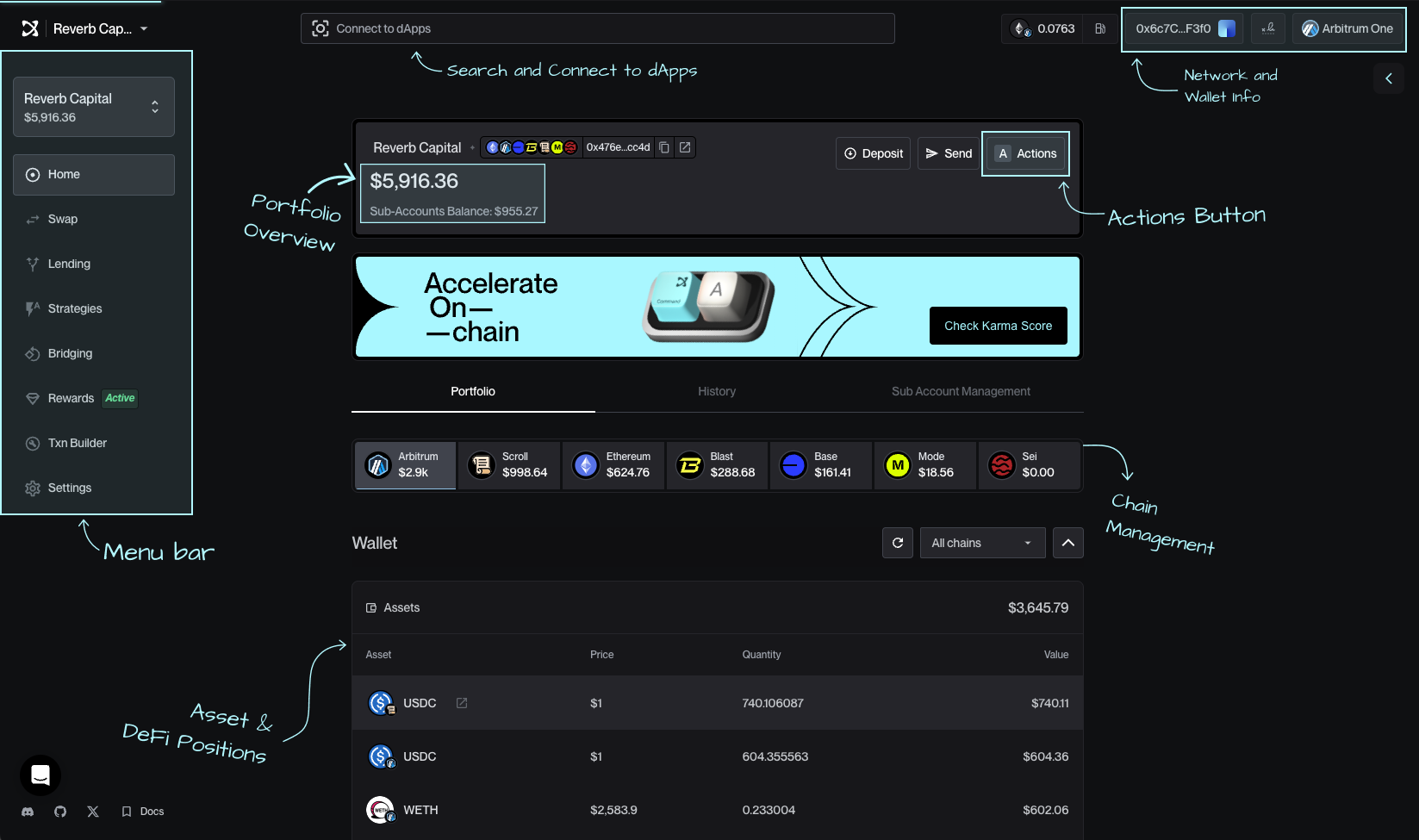
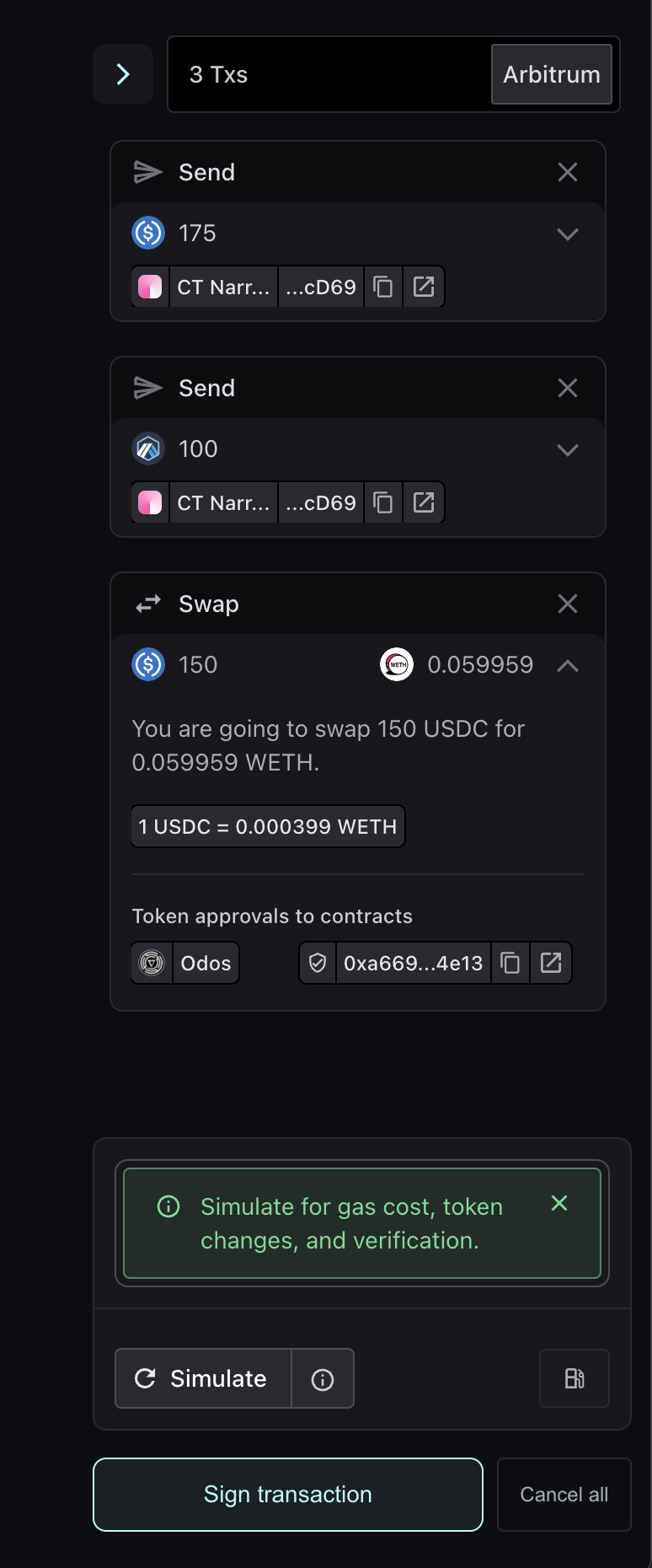
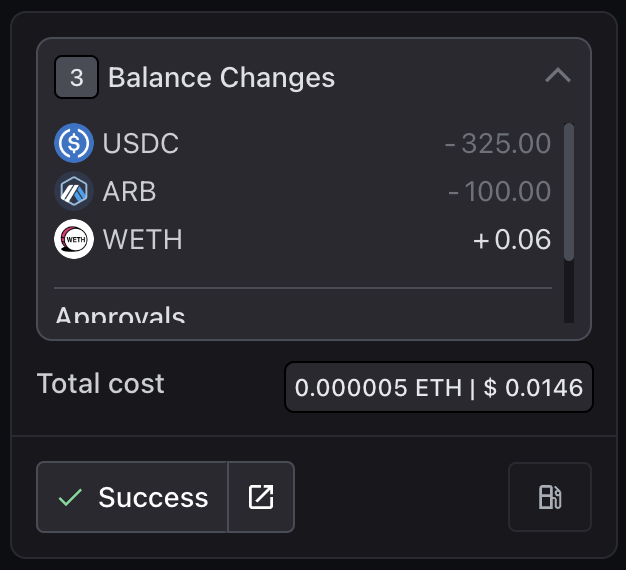


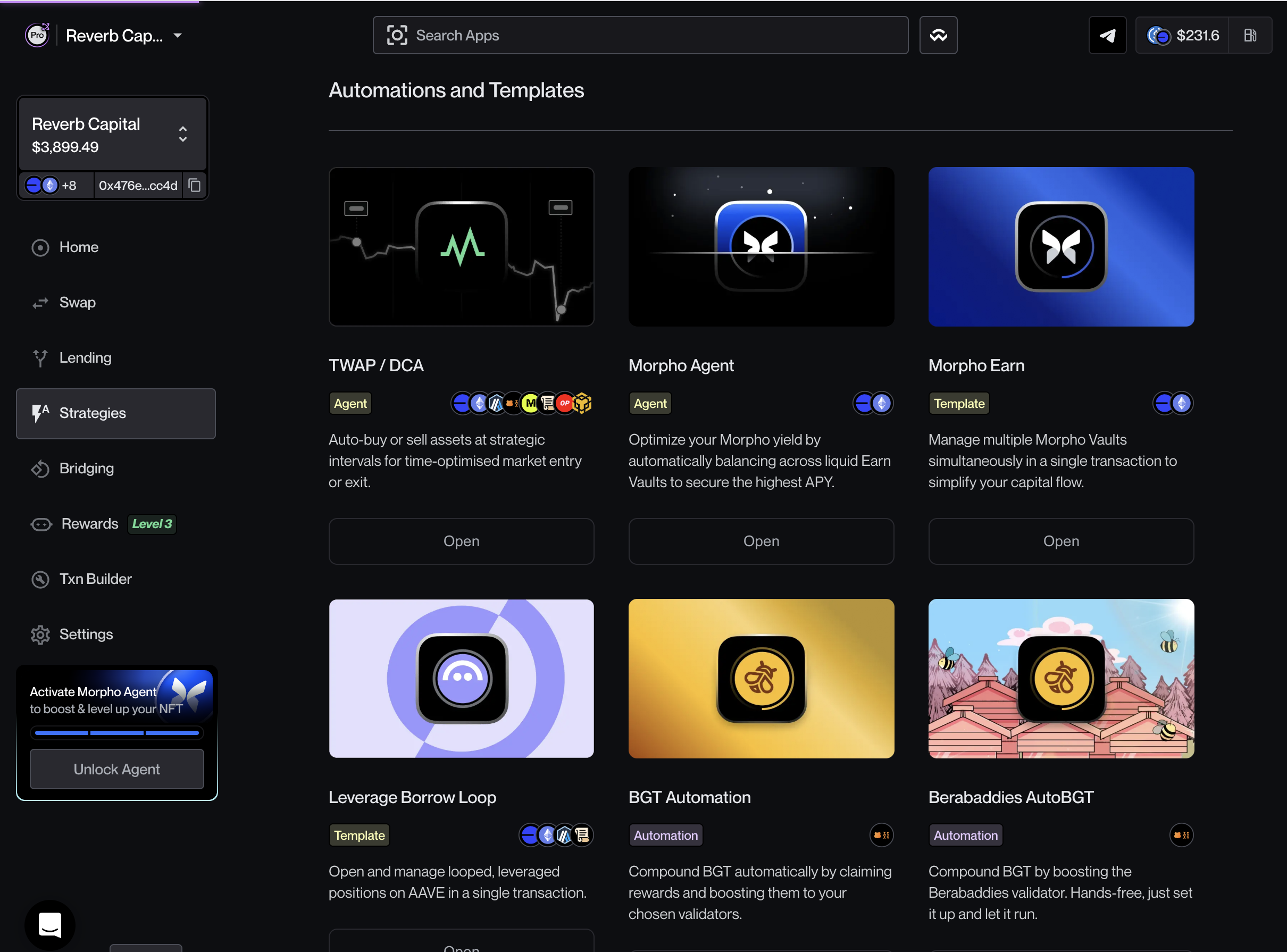


.jpeg?alt=media&token=b949ad0d-7f3d-4d77-a366-8716af3bc111)
